

3 Of The Best Personal Media Server Platforms You Can Try
With many of the popular streaming services growing more expensive, you may eventually reach a point where belt-tightening is needed. When money is at a minimum, it's time to reprioritize, and luxuries like media consumption are often the first to get cut. But even as streaming prices get out of control, we can still take the reins with our own media, just like the good old days of physical disks and tapes. Rather than wasting money on a service you rarely watch or one that simply costs too much for the quality of content, there is a solution out there, and it's rather simple to jump into. Just roll out your own media server, which is as easy as turning an old computer into a powerful media center.
Of course, with so many media server platforms on the market these days, it can be challenging to choose the right one for your particular media center setup. But worry not, as we've put our tech expertise to use and dug deep to uncover the best platforms in this category. Between our top three choices, just about everyone's needs should be covered, whether you're looking for services with commercial backing or prefer an open-source option that's free. Either way, after launching your very own media server that can stream your hand-picked content, even when you're away from home, it'll be hard to ever return to costlier methods like Prime Video or Netflix.
So if you've always wanted to build out your own media server, but weren't sure which platform to start with, we've got you covered. Below are three of the best personal media server platforms you can try today.
Best all-rounder: Emby

If you love endless customization, or simply having the ability to tune a media server through features like personalized layouts, custom CSS support, and server-side plugins to manage your media's art locally, Emby should greatly appeal. And for all you cinephiles out there, local network playback is included, allowing you to stream 4K and HDR content over your home network. Overall, Emby is a direct competitor to Plex (more on that below), perhaps not as highly polished but way more customizable, and it brings plenty of optional plugins to boot.
Emby is pretty cheap, too, at only $5 a month, and even the lifetime license is affordable at $120 — especially compared to Plex, which has raised its lifetime pass all the way up to an eye-watering $750. This affordability makes Emby a great platform for beginners, with the app itself striking a fine balance between its feature set and ease of use — not to mention that it can be used over your local network as well as the World Wide Web. Even seasoned veterans can benefit from Emby's robust transcoding and high level of local control, which can keep your setup independent without worrying about your media server going down when your internet provider suffers a blackout.
You don't have to look around much to find professional tech reviewers singing Emby's praises, going so far as to call it a fine replacement for Plex. User reviews across Android and iOS agree, noting the mobile app's consistent improvements and high level of customizability.
Best for precise control: Jellyfin
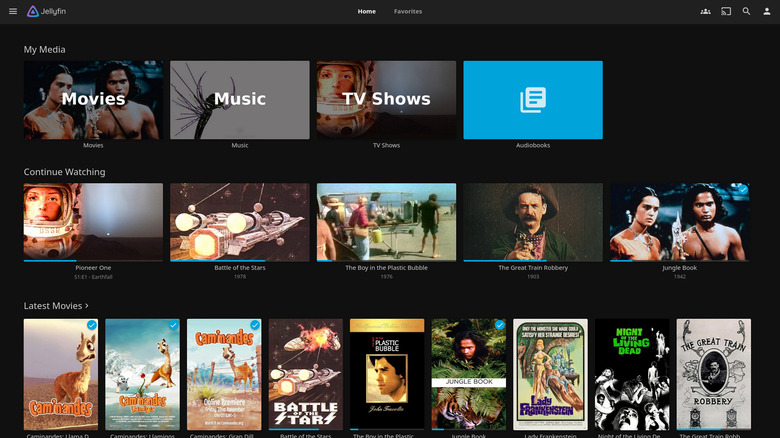
While Emby may be a great middle ground as a personal media server thanks to its ease of use and local customization, Jellyfin takes a different approach, offering something closer to Kodi's functionality and a way to replace your TV's streaming devices with a PC. It's also an open-source media player and server that's 100% free and self-hosted, which means there are zero recurring costs. Of course, all of this freedom comes at a price; you're going to have to get your hands dirty setting up your local server. Then again, if you're the sort who prefers to build their own local systems to retain full control, Jellyfin is the obvious choice.
Thankfully, Jellyfin offers a robust community with users all over the world, which means it's easy to dig up info on how to set up your system — no matter if you're only interested in a local server or wish to stream when away from home. It's all possible with Jellyfin, at no cost other than your time, which is why it's a top choice for enthusiasts who demand full control rather than relying on a company. So if you're a lover of everything free and open-source, Jellyfin will meet your needs with a much easier setup process than Kodi, getting streaming working within a few minutes.
Sure, Jellyfin can be used similarly to Plex or Emby, with the ability to stream content locally or over the web, and professional tech reviews are quick to point out that functionality is on par with the competition, just with the familiar clunkiness of open-source software. User reviews across mobile app storefronts mention that its media file compatibility is off the charts, outpacing the competition.
Best for ease of use: Plex
Last but not least, we have Plex, which is easily the best-known media server in today's roundup, holding 70% of the market for good reason: It just works. Plex is the media server you pay for if you'd rather spend your time watching and listening to media than setting up, configuring, and theming. This polish comes with a cost attached, starting at $7 a month. Sadly, Plex has tripled its lifetime pass price, leaving customers seriously frustrated. Keep in mind the sub is still cheaper than Netflix and Prime Video, both of which start at $9 a month, so pricing is relative when it comes to streaming — and with Plex, you have full control over your library where titles won't disappear.
Plex also offers support for too many devices to name, which means no matter your OS or hardware of choice, there's likely a Plex app available so you can start streaming your content. While Emby's support is respectable and Jellyfin can sometimes require third-party clients, Plex — well, it's been around so long (since 2008, as a matter of fact) that support is rarely ever a question. Once again, it just works; this is where Plex shines brightest, and its streaming doesn't stray from this trend, with transcoding support out of the box that makes it easy to watch your media no matter its format.
Of course, you don't have to look far for years and years of positive reviews, from both professionals and users on app stores and social media. Plex's simplicity has ensured it's a top choice for anyone looking to roll out their own media server that's as easy to access as simply signing into an app — just like traditional streaming services, but without the high prices and constantly shifting media.
How we chose the three best personal media server platforms

When researching products, we like to pore through user reviews for insight into how actual users feel about the product — and in this case, we read hundreds of Play Store and App Store testimonials. On top of this, we've leaned on our own expertise to hone this list, having covered media servers and tech for well over a decade. We also consulted professional tech reviews to gain a clearer sense of which features stand out and which fall short. This way, we have a much more complete picture by combining all of this information into one digestible package, which is precisely how we landed on the three choices above — they are indeed the best personal media server platforms you can try right now.