

Meta's Ray-Ban Display Developers Have Already Created Some Killer Apps
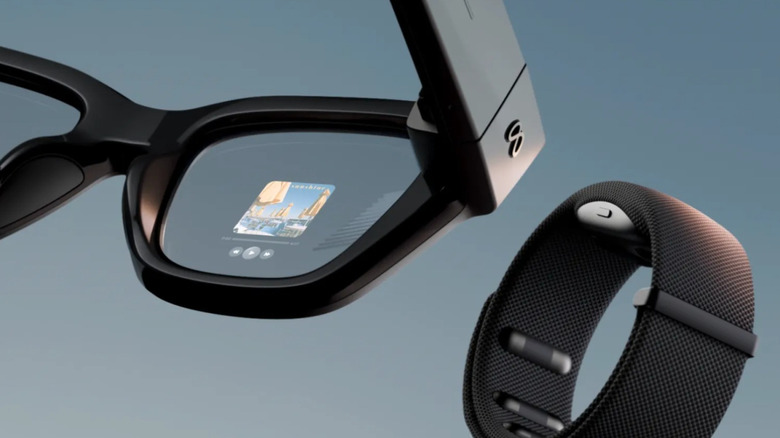
In September 2025, Meta released the Ray-Ban Display in the US. These AR glasses function much like the standard Meta Ray-Ban smart glasses but with a notable upgrade: an in-lens full-color and high-quality display. This allows users to control and view content from Meta apps — like WhatsApp, Instagram, and Meta Assistant — and a few other mobile apps — like Spotify and Apple Music.
But that's the thing — the Meta Ray-Ban Display was pretty much limited to only a small set of apps out of the box. For an $800 device, this felt underwhelming. Well, that actually changed a few weeks ago. In mid-May, Meta launched its developer platform for the AR glasses, giving developers the chance to create entirely new apps for the glasses or make their existing apps compatible with it. There are already plenty of killer apps for the Meta Ray-Ban Display now available for everything from productivity to gaming.
Apps for getting things done
Productivity apps for iPhone and Android have existed for years, and now, the Meta Ray-Ban Display gets its own set too. Here are some of them:
DisplayList: To avoid frequently pulling your phone out during an errand or grocery run, you can try DisplayList. It puts your to-do list or grocery list right on your Meta Ray-Ban Display for easier access. This list stays on as you go about your task, and you can check items off with hands-free gestures.
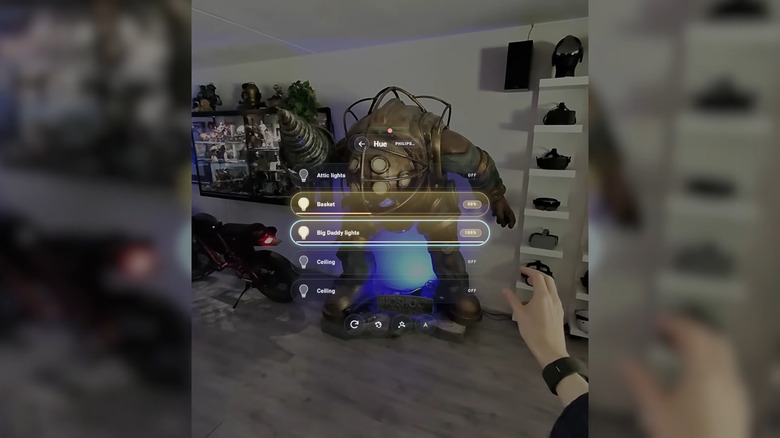
Philips Hue: If you're after hands-free control of your Philips Hue devices without having to call out to your voice assistant, check out Philips Hue. It lets you use the Meta Neural Band to switch your lights on or off, adjust the brightness, and even set the lights to one of the twelve available colors. Your scenes are also accessible from the glasses.
Sous: You no longer have to wash your hands mid-cooking to turn the pages on a recipe book or scroll through your phone. Instead, you can just follow the step-by-step instructions on your glasses. After choosing from one of the recipes on the list, you'll first see the ingredients list. Enter to go to the first step, which is displayed in easy-to-read text. From here, keep hitting next until the meal is ready. If the recipe requires a timer, you can start one right in that specific step too.
Phrasebook: Travel phrasebook apps are great, but repeatedly glancing down at your screen while talking to someone can disrupt the flow of the conversation. This is where Phrasebook can help. It supports Japanese, Spanish, German, and French and has five categories: Basics, Directions, Food & Drink, Shopping, and Emergency. The phrases include phonetic lines to help you pronounce them.
Apps for fun and games

Sure, the Meta Ray-Ban Display is a handy tool for getting things done. But it also doubles as a convenient space for playing games and other fun activities on the go.
Dino Run: If you love playing the Chrome Dino game to pass the time, the Dino Run app for the Meta Ray-Ban Display is just what you need. It shows you a Chrome Dino-inspired landscape with the same obstacles. To control the dino, just pinch your fingers (for jump) or swipe down (for duck). The best part about this game is its minimalist style that doesn't take up much of the glasses, perfect for when you're out and need to be more aware of your surroundings.
Doom: Other than Dino Run, the Meta Ray-Ban Display supports more advanced games. In fact, you can play Doom on it. You control the shooter with hands-free gestures like pinching to shoot and swiping to move. The graphics are pretty decent for an in-lens display.
Glimmer: The Tamagotchi is one of the legendary gadgets from the '90s, and now it gets to live in your Meta Ray-Ban Display in the form of the Glimmer app. This is an open-source game built specifically for the AR glasses. Like the Tamagotchi, you need to care for your pet to help them grow. If you do a good job, it will evolve from Egg to Archon, but if you forget it, it will soon die.
Sports: With the Sports app, you get access to live scores, game states, and league standings from NFL, NBA, MLB, NHL, NCAA Football, NCAA Basketball, Premier League, Champions League, and more. There's an option to mark teams as favorites for quicker access and refresh the screen anytime. The app doesn't require any login either.