

With iOS 27, Apple Wants To Prove That An iPhone Is The Best Phone For Your Kids
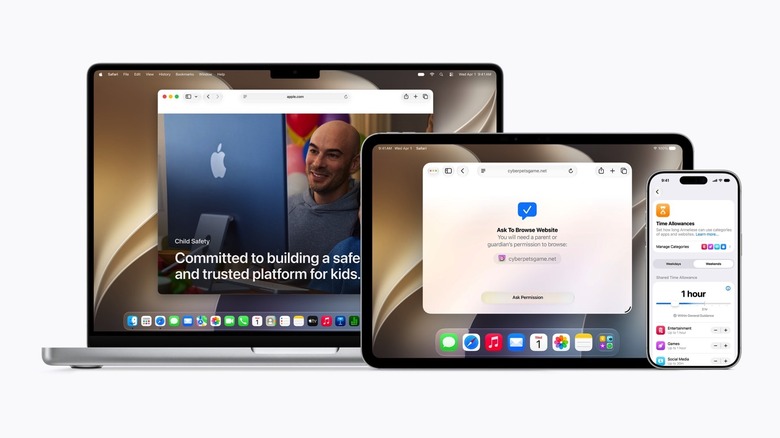
Unlike previous versions of Apple's Worldwide Developers Conference (WWDC), where Apple announced new features separately by operating system, WWDC 2026 combined information to focus on three overall categories instead. Each category applied to all Apple products — iPhone, iPad, Mac, Apple Watch, and Vision Pro — and they were broken down by performance improvements, trust and safety, and Apple Intelligence and the new Siri. The second group, trust and safety, focused on child safety, with Apple introducing new parental controls that give parents more granular control over the technology experiences their children can have. The new child safety features will be available in iOS 27, iPadOS 27, and macOS 27, and they may be particularly important for mobile devices, like the iPhone and iPad, which a child or teen is more likely to interact with first.
These parental controls include better support for managing access to content as well as blocking content deemed inappropriate for kids. Apple has also tweaked the Screen Time experience to give parents the ability to monitor what apps their children use, set schedules that take into account the need to use a device for education, and customize access to apps. Apple has set up a Child Safety website that explains the child-safety features announced for iOS 27 and its other platforms, and as another helpful resource, Apple is working with the American Academy of Pediatrics, which created a Family Media Plan for helping parents develop safe technology habits for their children.
The Child Account
The Child Account is automatically applied to users who are under the age of 13, and it can remain active for users up to 18 years old. Parents can also convert existing accounts that were created for young iPhone users before the iOS 27 update into Child Accounts. This feature restricts content based on the child's age, including App Store apps, media, and websites.
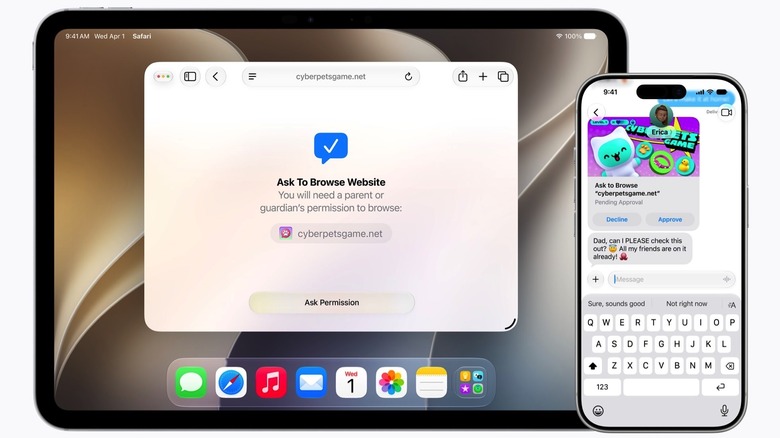
Once the Child Account is added to Family Sharing, parents will be able to monitor what their children are allowed to do on iPhones. Using the Setup Assistant feature, parents can set what apps children can access. They may want to have key communication apps, like the Phone, Messages, and Find My apps, active at all times, and after that, parents can add essential apps or approve a specific set. In time, children will discover new apps and games to install, and they can request permission to these via the Messages app.
In addition to asking for permission to install apps, children will also have to ask for permission to browse new websites and contact new people with the Ask to Browse and Ask to Approve features. Communication Safety protections will continue to block nudity in Messages and FaceTime, but iOS 27 adds blockers for gore and violence now, too.
The new Screen Time features
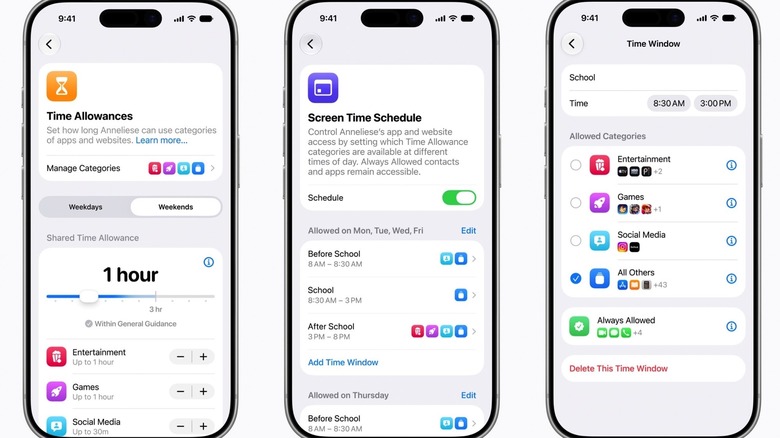
A new Screen Time feature is also being added to the redesigned iOS 27 experience, allowing parents to fine-tune their children's access to the device based on both time and the type of content. The Screen Time feature lets parents set a specific schedule on the iPhone and iPad for when a child may use a device, and it even accounts for the use of school-related devices. Children will be able to use only school-related apps during school hours if parents set their devices that way. Other categories, like games and social media, can be reserved for afternoons and weekends. Parents will be able to see exactly what apps their children have used on their iPhones as well as give them the ability to pause device access completely.
In addition, the Time Allowances feature lets parents customize how much time a child can use the iPhone every day. The Time Allowances screen includes a recommended upper limit of three hours of access per day, which Apple marks as general guidance for device use for children. Parents can set a total device use time for the child, but they can also choose more granular controls. For example, they may want to limit social media access to only a few minutes per day, while allowing more time for gaming or entertainment, categories that are also available in the Time Allowances screen.