

Why There's A Tiny Hole On Your Fire TV Remote
We may receive a commission on purchases made from links.
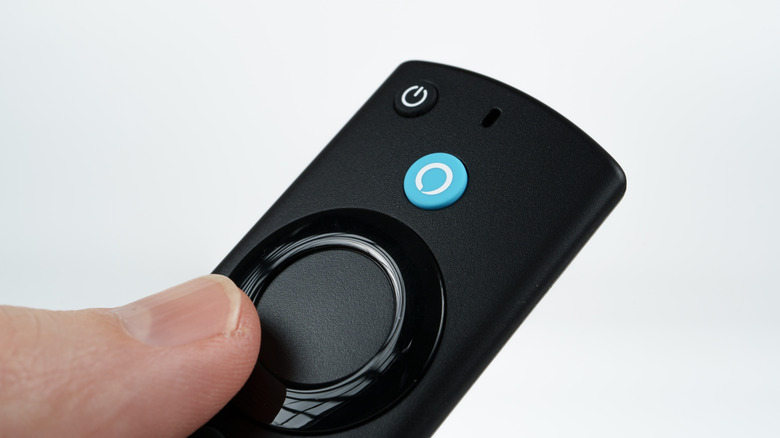
An Amazon Fire TV device is great for accessing streaming services after a long day, but it's the Fire TV remote that ensures you're in control of media. These remotes have many of the buttons you would likely expect from a streaming controller, including navigation, rewind, fast forward, and play controls. However, those with this accessory may have noticed a tiny hole on the front side of their remote. It may seem arbitrary, but it actually serves an important purpose.
The pin-sized hole on certain Amazon Fire TV remotes is where the microphone is located, and it's what helps users issue voice commands or communicate with Alexa. With the assistant being an easy way to search or play content, among other capabilities, being mindful of where the microphone is located can be a good way to ensure the longevity of your device. Fortunately, we can provide you with some tips for keeping your mic working properly.
Though your Fire TV remote's Home button may be hiding a useful feature, the mic on the controller isn't necessarily meant to be hidden. Rather, it is likely on the front of your controller so that it can properly pick up your voice. With that being said, there are several Amazon Fire TV remote shortcuts that can be easy to miss if you're looking to get more functionality out of the device.
What to know about Fire TV remote microphone
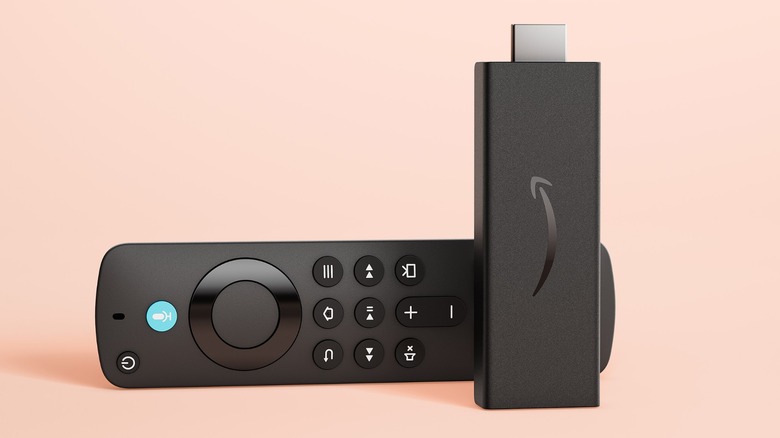
Like knowing what the blue light on your Amazon Fire TV stick remote means, being aware that the microphone is located just above the Voice Search button on certain controllers can help maintain the functionality of your voice controls. Remember that you need to press and hold the Voice Search button if you want to interact with the microphone, and speaking into it directly produces the best results.
If you want to ensure that your remote is actually picking up your voice, you should take proper care of the microphone. Considering the size of the hole, you're especially going to want to ensure that nothing is blocking it — if you're considering a protective case for your accessory, make sure that's something that isn't going to obstruct the microphone hole. If you think dust or debris is in the hole, try using a bit of canned air rather than sticking something into it.
It's also worth remembering that this small hole is not a reset button, which can be easy to confuse for those accustomed to some electronics having recessed pinhole reset buttons. You're most certainly not going to want to push a pin or paperclip into the microphone hole on a Fire TV remote. Though, if you are looking to reset the accessory, it's done through the physical controls on the controller, and the relevant Amazon support page provides guides for a variety of models.