

This Cool New Google Earth Feature Will Change How You See The World

For those with a fear of flying, Google has introduced something that's either going to help alleviate your worries or further exacerbate them. Along with the company adding a variety of new features to Google Maps throughout 2026, Google has taken something from the Google Earth app and added it to the desktop browsing experience for everyone to enjoy. Even better, it's completely free to play so long as you know where to look.
Announced in a June 12 tweet on X, Google is now making its Flight simulator feature available to more users. The decision stems from the company's aim to add more content from its Google Earth app to the web experience, including elevation profiles, additional data layers, and new import types. Originally, Google's Flight simulator was just an Easter egg users could find to have a little fun, but now you can access this feature in just a few clicks in a web browser.
Though the new desktop experience likely won't replace flight simulator games users may already enjoy, the game can still be a fun way to explore all the map information available in Google Earth, including 3D renderings of buildings and our planet. While it offers little more than the ability to move around Google Earth in a new way, at least you don't have to memorize every TSA rule that changed this year to enjoy it.
How to use Google Flight simulator
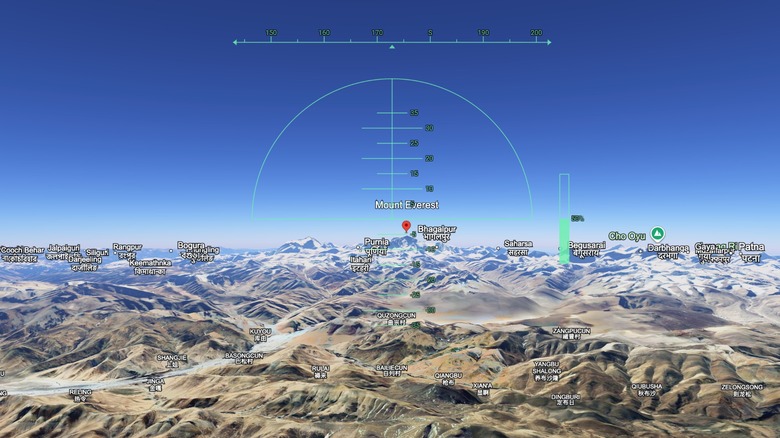
Google Flight Simulator has been available within the Google Earth app since 2007, and almost 20 years later, the little flying feature is now available in web browsers. Getting started with the sim is easy enough, though there are some things you need to keep in mind. First, it's only available on desktop, so sorry, Android and iPhone users. It also relies on simplified flight physics, meaning you're only going to get a casual experience, and those with low bandwidth may have issues loading certain elements.
Here are the steps:
-
Navigate to Google Earth on your computer.
-
Tap Explore Earth next to the search bar.
-
Select Tools from the top in the menu bar.
-
Choose Flight simulator.
Use the arrow keys on your keyboard to move the plane up or down, or bank it left or right. Use the page up and page down buttons to adjust thrust, or use the on-screen controls. You can also click anywhere in the simulation with your mouse to switch from keyboard control to mouse-guided controls. If you crash, click "You crashed! Restart" to try again.
Looking at comments on the post on X, users are excited that the feature is now available, though many have issues with its precarious controls. Though it can be easy to find yourself spinning endlessly into the ground, it's nonetheless a fun way to kill some time. At the very least, it's certainly less obnoxious than Google's 6-7 Easter egg that messes with your web searches.