

New Spotify Feature Makes It Easier To Shame Friends With Embarrassing Taste

It's been a busy year for the Spotify streaming service, and it doesn't seem like the company has plans to stop anytime soon. Along with the platform adding a slew of features throughout 2026, Spotify appears to be keeping a strong pace by bringing in a new way for users to interact with collaborative playlists. However, much like playing a casual game of Uno, this new feature may accidentally cause a rift among pals.
If you're not familiar, Spotify has a collaborative feature that allows you to build a playlist with others. Along with adding and removing tracks, users will now be able to react to songs within a collaborative playlist thanks to Track Reactions. Users are only able to react with a handful of different emojis, though using the feature is somewhat similar to reacting to a post on social media.
Both free and premium users 16 and older will soon be able to access these Track Reactions, which Spotify says will be rolling out "over the coming weeks in select markets." Though this feature may not be able to win back users who decided to ditch Spotify, it's sure to be a source of entertainment (or ire) for those sticking around. Don't worry, if you get tired of your friends laugh-reacting to songs you add, playlist owners will be able to disable the feature much like they can disable Spotify video content.
Make fun of your friends' music tastes with Spotify Track Reactions
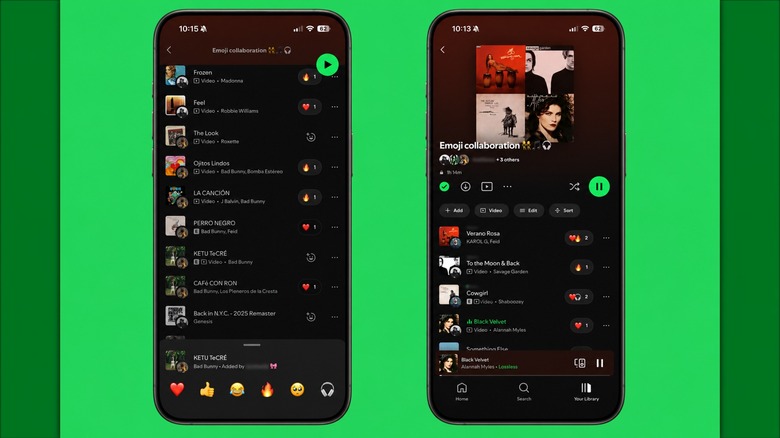
Announced in a post on the Spotify Community page, users who receive the Track Reactions feature will be able to react to songs added to a collaborative playlist with six different emojis. Options include a heart, fire, headphones, thumbs up, laughing, and an emotional expression emoji. According to the post, these reactions will only be available within collaborative playlists, and only the owner of the playlist and fellow collaborators will be able to see or add reactions.
Using the feature is rather simple. For those who have it, all they will need to do is tap the reaction button available next to a track title in a playlist. Users can then choose from the six available options and the reaction will appear next to the track, and contributors can see how others react. Additionally, users may also be able to get notifications about reactions if they're eligible for the feature and have a connection with the user reacting.
Track Reactions will be enabled by default if the playlist has fewer than 10 editors, but owners of a collaborative playlist will be able to disable it. Just tap Name and Details when in the playlist to disable the feature. Though all of the available options aside from the laughing emoji do seem innocent enough on their own, some users may wish for a thumbs-down emoji or something equally dismissive. However, it's really all about how you choose to use them.