

5 Phone Screen Problems You Should Never Ignore
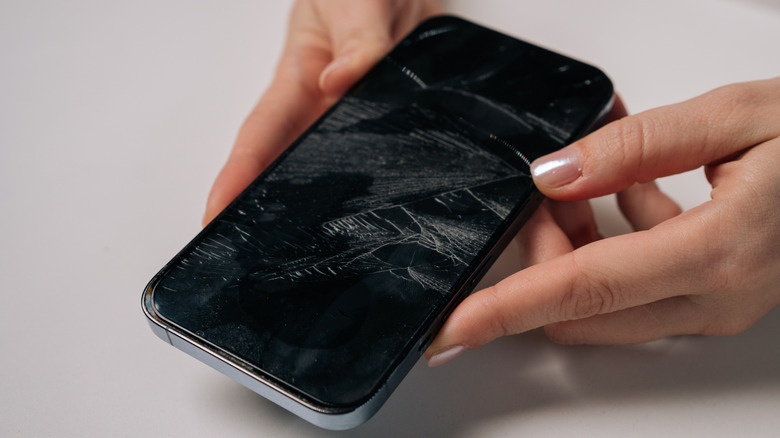
Your phone isn't meant to last as long as a TV or a fridge. It's not unusual for most people to switch to a newer phone after just two years of having it, and even the most stubborn phone enthusiasts rarely ever keep theirs beyond four. Knowing when to replace an old phone is integral, and so is knowing what issues can worsen if left untreated.
Phones are complicated devices, and you might not always know what issues are plaguing your device internally. One area where you'll notice issues easily is the screen, and it's important that you don't ignore certain issues, as they can worsen with time. Some of these issues, including ghost touches, delayed touch response times, and unregistered touches, might seem like software bugs or traits of a laggy phone. Other times the issues can be physically noticeable, such as a swollen phone where the screen is lifted or dead pixels.
How easy it is to fix these issues depends on various factors, and so does how quickly you need to repair or replace your device. It's best to troubleshoot these issues as soon as possible, as they can be signs that you need to replace your smartphone.
1. Ghost touch

Ghost touches are some of the most random yet fairly common screen issues that users experience. They're also one of the more annoying ones, as you may not be able to access your phone to troubleshoot it. Moreover, there's the risk of these touches accidentally changing important system settings, deleting apps, or even sending out incomprehensible messages. If the problem disappears by itself, you might think it's okay to ignore it. However, if the problem has a history of reappearing on your phone, you shouldn't ignore it just because it's not an immediate issue.
Ghost touches can often be caused by easily fixable issues, and we recommend figuring out if one of these is the cause before you consider changing your phone. Your phone can register buildup of grime, sweat, and dust particles as touch, so cleaning your phone is often all you need to get rid of ghost touches on your phone screen. Using a faulty screen protector or low-quality charger can also cause ghost touches, so make sure to try a different one and see if it helps. Other common methods like restarting the phone and updating the system software can also deal with temporary software glitches.
If these methods don't solve the ghost touches or if the issue constantly comes back, that's when you should consider consulting a phone repair specialist or even replacing your phone altogether.
2. Screen lift
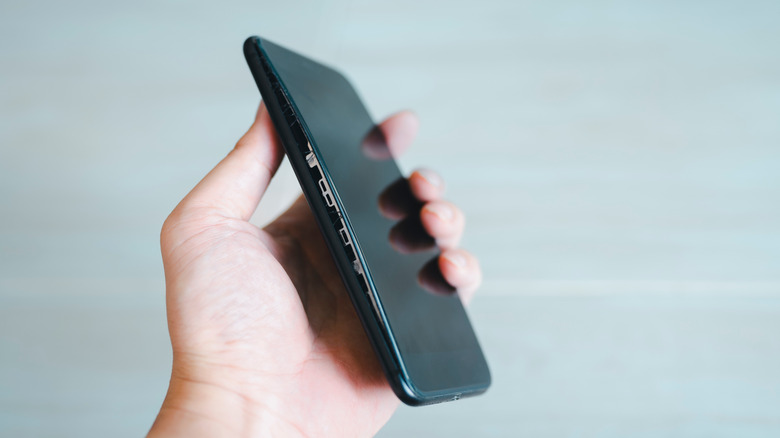
A screen that bulges out of the phone's chassis should be one of the most obvious signs you should get a new one, or at least get it looked at by a professional. While most people won't continue using a phone if there's visible stretching, a screen that's only slightly lifted off and still works fine might not raise any immediate alarms.
Even if you think it's okay to use your phone in this condition, it can be incredibly dangerous, and it almost always worsens with time. Dust particles and liquid can seep into the gap, damaging internal components, or internal connections inside the phone might come loose due to the increased stress. Your phone is also much more fragile in this case, and any force acting on it will have more drastic results than normal.
We also need to factor in underlying causes behind this condition. It might not be as risky if your screen is doing this due to physical damage, but if this happens out of nowhere, it likely means the battery inside your phone is swelling up. Since batteries are highly combustible, you need to replace a swollen battery as soon as possible.
3. Green lines on the screen
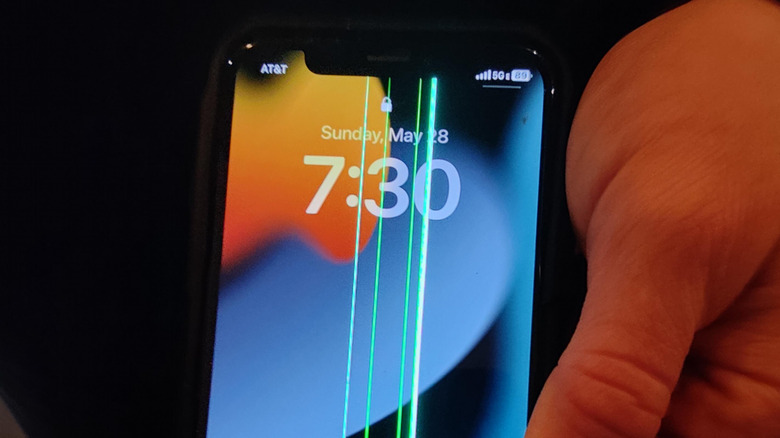
Having a green line pop up on your phone screen out of nowhere is one of the more common display problems out there. It can manifest in different ways — there might be multiple green lines, the line itself might be thicker and span larger areas, or the color might be white or pink instead. The one thing that is common in all cases is that this is a phone screen problem that you shouldn't ignore.
This issue was first commonly associated with OnePlus phones — causing the company to offer lifetime screen service and repairs for the issue — but it's now found on phones from all brands. It started popping up on phones that downloaded new updates, which led to many thinking it was a software-related issue. The issue is almost certainly hardware-related, though, often being caused by a build malfunction or another factor that's out of your control. It's usually caused by a misaligned ribbon cable or a trace circuit that's damaged physically or subjected to high levels of heat. The reason it often pops up immediately following software updates is because phones generally heat up while performing an update, and if you're updating while the phone's plugged into a charger, this heat can damage internal components.
Even if your phone functions fine with a green line on it, the display often worsens with time if left untreated, which is why we recommend getting it looked at as soon as possible. Fortunately, many companies offer free repairs or exchange programs if your phone faces this issue, as it's almost always out of your control. Physical damage can also cause green lines to appear on your phone, in which case the free servicing won't apply.
4. Pixel bleeding, OLED rot, black spots on the screen
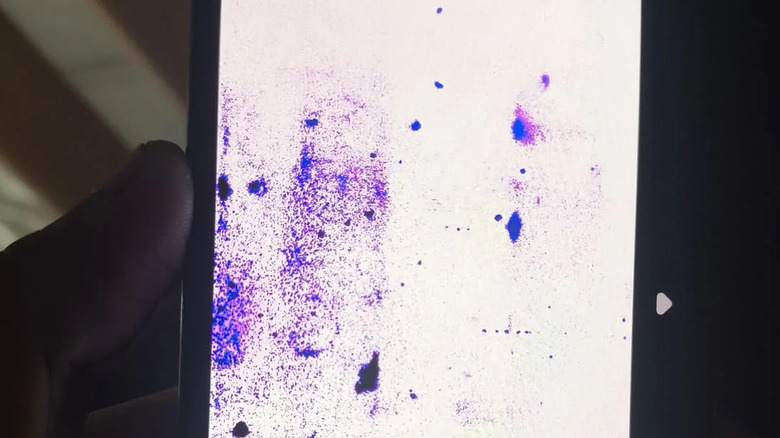
Screen bleeding can refer to various different things with regard to your phone screen. There's the backlight bleeding that happens in LCDs where your screen has uneven brightness and there are lighter spots near the edges, and then, there's the "OLED rot" that occurs in OLED phones, manifesting as colored droplets of ink.
Both issues need to be fixed, but one is a lot worse than the other. A phone with backlight bleeding is still perfectly usable if you can ignore the display artifacts, and it's not likely to get worse. Pixel bleeding on an OLED, however, is certain to get worse with time, requiring a swift fix.
Spots on an OLED display are caused by dead or damaged pixels, often due to physical damage to the phone or by moisture leaking in. The issue can become more pronounced with time, often making the entire screen unusable. The moment you see this issue, back up all your data and get a screen replacement without delay.
5. Touches not registering properly

A smartphone that doesn't register touches is completely unusable. However, there are times when an old phone still registers them most of the time, but you occasionally have to tap more than once to have it work. This can be incredibly annoying, but you don't need to immediately change your phone if the issue isn't as frequent. However, depending on what's causing this issue, this can be a sign of many more problems.
Like with ghost touches, a phone screen that isn't registering your touch properly can often be caused by easily fixable temporary issues. Follow the same troubleshooting steps as with ghost touches; clean your phone and restart it. If the issue persists after these steps, then there's likely something wrong with either the software or the physical hardware of your phone.
The likeliest suspect here is an issue with the touch-sensitive layer of your smartphone's capacitive touchscreen — the digitizer — but other causes also exist. A damaged screen, liquid spilling over the display, and even something as simple as a phone protector can cause this issue. Similar to ghost touches, this can sometimes happen while you're charging your phone with a cheap, third-party charger as well — which is why you shouldn't buy certain cheap accessories.