

Google Is Rolling Out A New App That Stores Your Digital Signature On Your Phone

While Google Search may be seeing a decline in popularity, the tech giant continues to roll out helpful new features across the Android ecosystem. The latest is an aptly named "Signatures" app that looks as though it will be universally accessible across your Android phone, potentially allowing you to drop in a digital signature or initials in both native and third-party apps.
Among some of the company's other questionable decisions, like saving every audio file or image you use to search or using your search data to train AI, Google has allowed the app's rollout to go seemingly unheralded. Though it has already arrived on some phones as part of the June 2026 Google Play update, Google declined to mention it in its changelog — however, that's likely because the app does not appear to be fully functional just yet.
According to reporting at 9to5Google, a shortcut for the app's main activity window has appeared for some people using Google's Pixel series of phones, as well as some Samsung and OnePlus devices. We were also able to surface the Signatures app's main functionality using a Google Pixel with the June 2026 Google Play system update installed. The shortcut allows some of the app's functionality to be accessed right now, but you're unable to paste signatures into fields in the app's current state.
How the Signatures app works
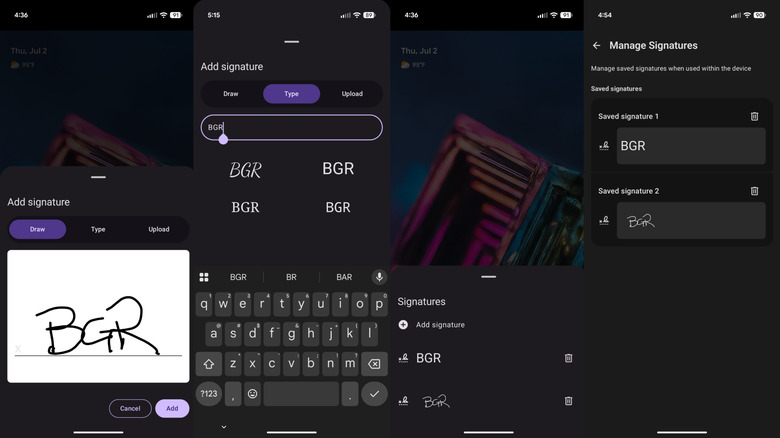
The core functionality of the app is to store versions of your signature, but beyond that, little has been confirmed. You can draw or upload a signature, or you can type one out and apply a font style to it. The app lets you save multiple versions of your John Hancock, and you can either delete them directly from the main list or manage them from a dedicated "Manage Signatures" page — but that's about it in terms of functionality for the app's current state.
However, there's reason to hope the Signatures app will indeed become a universal utility for signing forms in the near future. According to an analysis done by Android Authority, the app is targeting API level 31, which means it should work with devices running Android 12 and newer. And since it is being activated by a Google Play system update rather than an Android OS update, its availability isn't inherently limited to any specific models. In other words, this doesn't appear to be a Pixel-exclusive feature, and considering its widespread potential availability, Signatures being a system-level solution for Android users to sign forms with isn't a far-fetched idea.
How to try Google's new Signatures app yourself
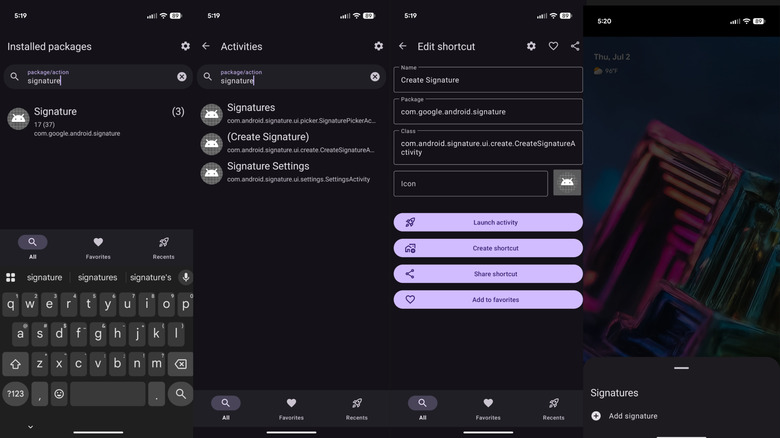
If you're interested, there's a good chance you can test Google's new Signatures app on your Android phone right now. First, you'll need to be running the June 2026 Google Play system update — go to Settings > Security & privacy > System and updates > Google Play system update, then tap Check for update to install the latest version. Alternatively, search your Settings app for the term "Google Play system update" to find the update menu.
Once you're on the latest Google Play system update, you still won't see the Signatures app in your app drawer. Instead, you'll have to install an app like Activity Launcher, then use it to search for the term "Signature." This should yield three activities for an app with the package name "com.google.android.signature": one that opens the list of signatures, one that lets you create a signature, and one that opens the "Manage Signatures" page. Just open one of these from the activity-launching app or create a shortcut for it on your home screen to get started. As explained above, you can create and manage signatures now, but it doesn't appear that you can use them in apps quite yet.
The Signatures app could close one of Android's long-standing convenience gaps versus Apple's ecosystem, where markup and signing workflows tend to be more tightly integrated. Like much of the ecosystem-wide functionality Google has added to Android in recent years, this one is tied to Google Play system updates rather than a firmware upgrade from any single OEM. There's not even a Google Play listing for the Signatures app at the moment, indicating it could launch broadly on Android devices without requiring an additional installation.