

What Is Disc Rot? How To Check If Your Old DVDs And Games Have It

Although the convenience of streaming services has led to a widespread replacement of DVDs, and console games are moving away from physical discs, many people still have significant collections of DVDs for movies or games. If this describes you, you might worry about finding gadgets that let you watch your DVDs. However, you should also think about how you're going to protect your media from an issue called disc rot. Disc rot occurs when the physical layers that make up the optical disc begin to deteriorate, leaving the data stored on it unusable.
How can you tell if one of your old DVDs has disc rot? If you look at the surface of the DVD, you may see odd markings or damage. The optical disc might seem to have tiny holes, or you might see a cloudy, light-colored discoloration. Sometimes, the discoloration related to the deterioration resembles a darker stain, similar to coffee. Some discs see their layers separate (called delamination).
In addition to showing physical deterioration, DVDs suffering from rot often won't play properly. The movie or game may skip or freeze, if it plays at all. Of course, DVDs that show significant scratches, grime, and fingerprints in the surface layer may also skip intermittently. If you suspect the DVD is grimy instead of suffering from disc rot, clean it with a microfiber cloth and an even mixture of rubbing alcohol and water. If cleaning doesn't fix the issue, rot may be a possibility.
How to anticipate if your DVDs may eventually experience rot
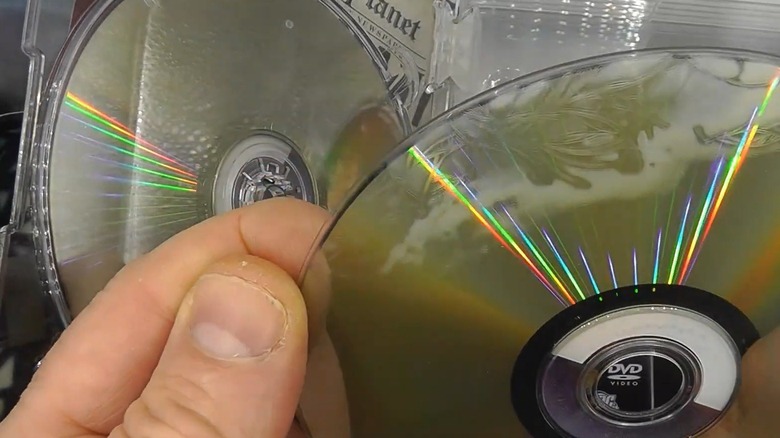
With proper storage and handling, how long can you expect your DVD collection to last? Under ideal conditions, your DVDs should last 30 to 100 years. If you leave your DVDs exposed to contaminants, including excessively humid air or chemicals, though, you'll increase the chance of noticing disc rot before reaching the 30-year mark. If DVDs are stored in areas with excessive heat, disc rot is also more likely to appear. Exposure to these kinds of harsh environmental conditions can cause the layers of the disc to pull apart, enhancing the effects of rot. Storing the disc in a proper case and in an upright position can reduce the effects of these harsh conditions.
Certain formats of DVDs are more susceptible to suffering premature degradation and disc rot. If you have mini-DVDs that you used with a camcorder to record home movies, or if you used writable DVD-Rs for data backups, the dyes used when manufacturing these discs could cause rot to appear faster than expected.
Another way to determine whether you own DVDs that are likely to suffer from rot is to look for announcements about manufacturing issues. For example, Warner Bros. Home Entertainment admitted last year that most of the discs it manufactured from 2006 to 2008 are likely to succumb to rot (if they haven't already). Warner Bros. has offered to replace the affected discs, but some titles are no longer available.
Steps you can deploy to reduce the impact of disc rot

Unfortunately, there's no fix for disc rot on your DVDs once you notice that it's occurring. Using cleaning techniques or polishing the surface of the DVD won't fix disc rot. DVDs consist of several plastic layers, along with a reflective layer of aluminum or gold. Because the rot is occurring in the individual layers, cleaning the surface doesn't fix the issue.
If you're worried about disc rot, the best step is to make a digital copy of the data on the DVD as soon as possible. Many companies will convert DVDs for a fee. Some conversion companies even specialize in working with DVDs that are showing signs of disc rot. They might not be able to recover all the data from the disc, but they can digitize and preserve at least part of it. You can also turn your DVDs into a makeshift streaming service before they suffer disc rot by using software to digitally rip the media and store the copy on a hard drive. Some DVDs you purchase may automatically include a digital copy that you can continue to access if you experience disc rot.
The good news is that rot doesn't migrate from disc to disc. However, if one of your DVDs has rot, others may have exposure to the same harsh conditions in their current location, meaning you need to take steps to protect them.