

Air Vs. Liquid Cooled PC – Is The Price Really Worth It?
We may receive a commission on purchases made from links.
When planning a new PC build, you'll probably want to find the perfect balance between keeping components as cool as possible while trying to save some hard-earned cash. That said, it's incredibly easy to be taken in by many PC building myths, particularly with the flashy marketing of premium all-in-one (AIO) liquid coolers. You might think it's absolutely necessary to pump liquid through a gaming rig via a custom cooling loop to prevent it from melting. However, going the liquid-cooled route can add hundreds of dollars to your PC build cost, especially if you're running a custom loop. For those who have fallen into that trap, you're not alone in being made to feel that traditional fan and heat sink setups are relics of the past.
But unless you're into overclocking your CPU and graphics card to their absolute limits, a basic CPU air cooler and the standard fans on a GPU are more than enough to handle most users' needs. Custom pipework, water blocks, and reservoirs do hold the technical edge on paper, but simpler and cheaper air-cooling hardware typically delivers similar real-world performance for the average consumer for cheaper. Let's break down the exact trade-offs of air-cooled vs. liquid-cooled PCs to see how they compare.
Air coolers offer unmatched long-term reliability and value
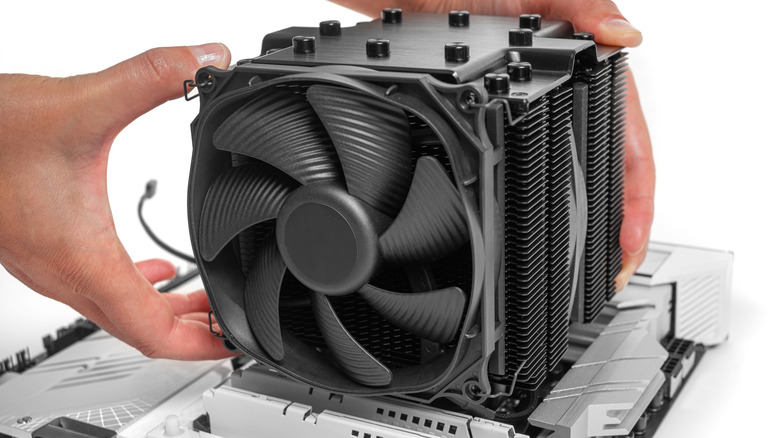
For those looking to cool their PCs efficiently and with zero maintenance (other than cleaning), traditional air coolers are incredibly superior in terms of long-term convenience and cost. The beauty of an air-cooling system lies entirely in its mechanical simplicity. A basic CPU cooler consists of a fan attached to a metal heat sink that pulls heat away from the CPU. Premium options feature a larger heat sink with fans for both intake and exhaust, as well as multiple pipes for more efficient cooling.
Air coolers have no pumps that could fail, no internal tubes to worry about, and absolutely zero risk of fluid spraying all over expensive components. The biggest point of failure on an air unit is merely a fan motor dying. And if a fan gives out after years of service, replacing it is a quick and easy fix that will set you back as little as $15 to $20. On the other hand, when a custom loop's pump dies, or liquid starts to evaporate and leak, the entire setup could be made useless, forcing users to top off the liquid every 12 months, replace the pump, or get a new cooling system.
A budget-friendly air-cooled solution like the Thermalright Peerless Assassin (priced at about $30) is capable of cooling CPUs rated for a power draw of up to 200 watts — most modern CPUs draw between 65 and 160 watts. The AMD Ryzen 7 9800X3D, arguably one of the best gaming CPUs to buy right now, draws 147 watts under load, for example. Comparable budget liquid CPU coolers like the Thermalright Frozen Prism start at over $50, while the most capable ones can easily reach $150 or even $200.
Liquid setups excel at sustained heat management
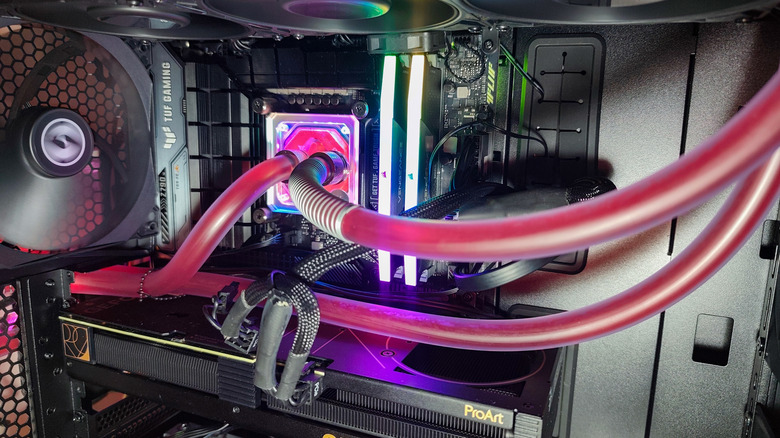
Air cooling wins when it comes to keeping money in your pocket, but liquid cooling looks gorgeous and performs exceptionally well. It works by utilizing a dedicated water block, a pump, a radiator, and tubes to cycle liquid across a processor, GPU, and even RAM. Because water has incredibly high thermal conductivity, it can absorb heat and transport it away from the components and directly to a radiator. This process keeps the interior ambient temperature of a case much lower, which in turn allows more performance to be pushed from your components. Liquid coolers also leave the space directly above a motherboard clear, meaning you won't have to look at or deal with a massive, bulky metal heat sink when trying to install RAM modules or reach the top PCIe slot.
Some graphics cards come with a water block pre-installed to suit custom water loops, such as the Gigabyte Aorus GeForce RTX 5080 Xtreme Waterforce WB. However, most builders choose AIO coolers instead: a liquid cooler and a radiator prebuilt by the manufacturer and sold as a sealed unit. AIOs don't require maintenance like custom cooling loops, with some companies offering this option for graphics cards, such as the Gigabyte with its Aorus GeForce RTX 5080 Xtreme Waterforce. But keep in mind, they are often $100 to $200 more expensive than their standard air-cooled counterparts.
If your PC is prone to overheating with an air cooler, or if you run demanding titles or workloads, it may be time for a liquid solution. Some enthusiasts even take water cooling to the next level by using mineral oil in their custom loops instead. But unless you want to chase benchmarking records or make a compact setup run as efficiently as possible, a solid air cooler will provide competitive temperatures at much lower prices.