

What Does The Clock Symbol Next To A WhatsApp Message Mean?

While there's no need for a WhatsApp Plus subscription, the messaging app is the most widely used option across the world for its availability and ease of use. It makes international communication simple thanks to its widespread adoption, giving it a leg up over regional services. If you frequently use WhatsApp, you may have noticed a little clock symbol next to certain messages. This indicates that it's a disappearing message, meaning it will go away after a certain amount of time.
Disappearing messages were added to WhatsApp in 2020 as a way to give users more privacy options. You can set messages (including media) to expire after 24 hours, 7 days, or 90 days, at which point they'll be deleted unless you or someone in the chat chooses to save them. That makes them disappear for everyone, including the sender, and applies to messages you send to yourself. Keeping a message notifies the sender, giving them final authority on who can save what they sent.
How to send disappearing messages in WhatsApp
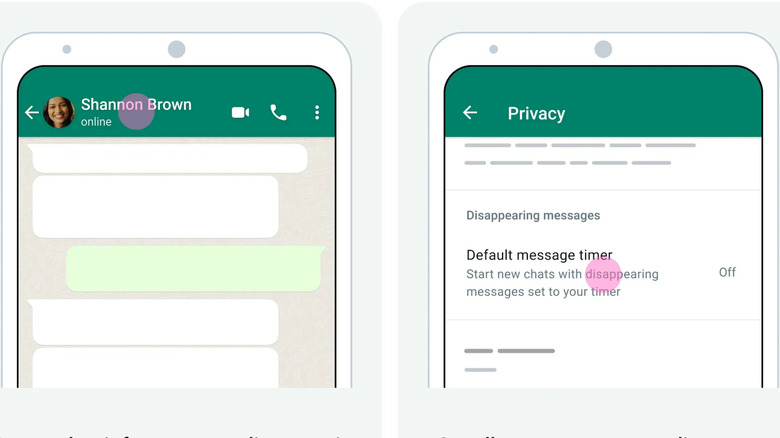
Disappearing messages are one of those hidden WhatsApp features everyone should use, so here's how to set them up. For an existing conversation (individual or group), open the chat info, then go to Settings > Privacy > Default message timer and select the duration you prefer. You can also change your personal settings to enable disappearing messages for all new chats by opening the You tab and going to Privacy > Default message timer. Once disappearing messages are set up, you can save individual ones by clicking or long-pressing and selecting Keep.
Saved messages will stay in the chat, and you can view all of them by going to the chat info and clicking on Kept messages. You can also Unkeep a message, but only for the first 25 days after the disappearing message would have expired. By default, everyone in a group chat can change the disappearing message settings. However, group admins have the option of restricting access to admins only. Note that turning on disappearing messages has no impact on anything that's already been sent.
WhatsApp's disappearing messages are a good privacy option, but there are things to keep in mind. Even under the strictest settings, nothing can stop someone from simply taking a screenshot or picture of what you send, and users still have the ability to forward messages that are set to disappear. That's why you shouldn't send any sensitive or personal information, especially in conversations with people you don't know well. WhatsApp has rolled out features to protect users from online scams, but there's no substitute for vigilance.