

What Does The VoWiFi Symbol On Your Phone Mean?

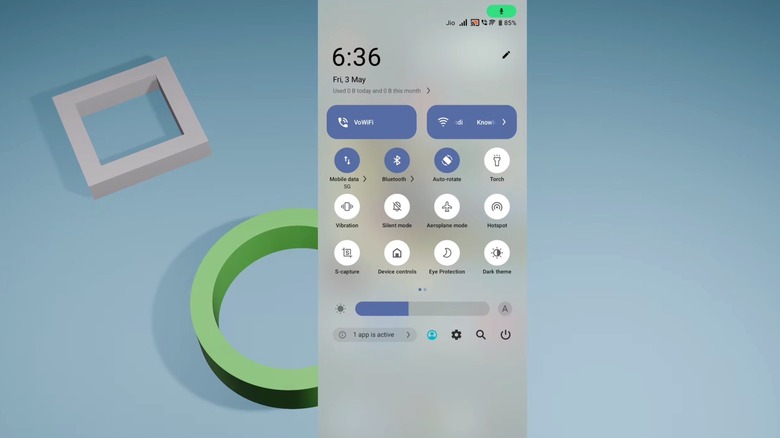
One of the smartphone features that users may take for granted is the ability to make calls even in places with poor cellular coverage, like an apartment building or a large office, thanks to a reliable Wi-Fi network. This is possible because of a feature called "voice over Wi-Fi" or "Wi-Fi calling" that is available on iPhone and Android devices, with a few important caveats: The carrier has to support VoWiFi (an acronym you may see on your handset in the status bar) and the user has to enable the feature on a supported smartphone. If you see the VoWiFi symbol on your device or the word "Wi-Fi" next to the name of your carrier, it means those two conditions are met and you can place and receive calls over Wi-Fi networks when cellular coverage is spotty and a Wi-Fi network is in reach. Depending on your carrier, SMS support may also be available.
Even without VoWiFi enabled, it's likely that most people have used an internet connection for voice calls. In that scenario, they may have used the Voice over IP (VoIP) functionality that some chat apps offer. For example, FaceTime, WhatsApp, Signal, Telegram, and other mobile apps offer support for voice calls over an internet connection. That internet connection can be a Wi-Fi network or the carrier's cellular network. However, when someone uses a third-party app to call their friends and family instead of the default Phone app, there's no symbol at the top of the handset.
The VoWiFi indicator is helpful when users need to be able to make calls reliably, regardless of the strength of their cellular signal. The symbol shows that the feature is available, and that calls (and potentially texts) are going through the Wi-Fi internet connection.
Should you have VoWiFi enabled on your phone?
VoWiFi, or Wi-Fi calling, has been available on iPhone and Android phones for over a decade, though not all carriers may have launched the functionality at the same time. For example, T-Mobile launched a HotSpot@Home feature in June 2007, which included an early form of Wi-Fi calling. More carriers started supporting the feature, with Wi-Fi calling becoming more widely available since then. In other words, the service should be available in many markets worldwide. In the U.S., AT&T, T-Mobile, Verizon, and Google Fi offer support for Wi-Fi calling.
VoWiFi is available for free, and it's up to the user to enable or disable the feature. Smartphone owners who live in regions with unreliable cellular service or buildings that interfere with cellular signals should consider enabling Wi-Fi calling on their devices, especially if they need to make many carrier-based calls during the day. Enabling the feature can improve the phone call experience and reduce connectivity issues and dropped calls. However, users would need access to a stable Wi-Fi network with uninterrupted internet service.
The user doesn't have to do anything to ensure that Wi-Fi calling works, other than turning on the feature. Users generally do not need a separate app account or sign-in, as may be the case with third-party apps like WhatsApp that offer VoIP calling features. If the carrier and phone support the feature, it'll be automatically available to users. Another potential upside to enabling Wi-Fi calling is that it may help users during natural disasters that may disrupt cellular connectivity in certain areas, when a working Wi-Fi internet connection remains available. However, using VoWiFi will not prevent charges from your carrier, such as international-call charges and roaming fees. The call is still placed through the carrier.
How to enable VoWiFi
Users may avoid international and roaming charges for calls by switching to a VoIP service and placing calls through a third-party app. Such distinctions are important when deciding which type of internet-based calling service to use.
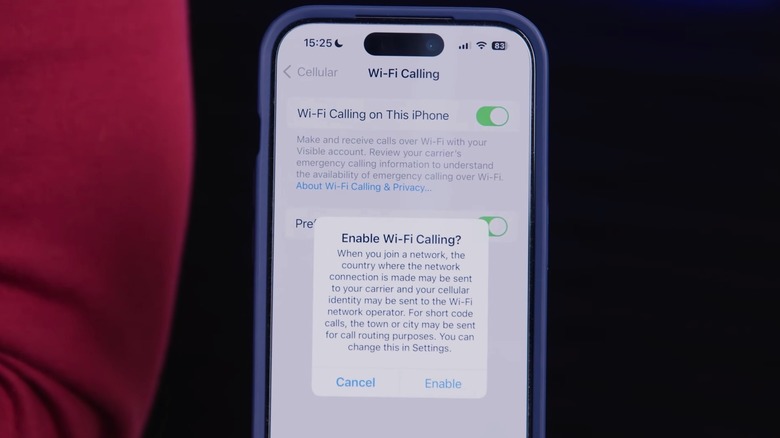
To enable (and disable) VoWiFi, you'll generally need to go to the phone's Settings app. On an iPhone, you'll have to go to the Cellular menu in the Settings app, select the SIM on which you want to enable the service, then tap Wi-Fi Calling. Enable the Wi-Fi Calling on This iPhone feature and confirm the carrier prompt that may appear. Return to this menu to disable the feature. To confirm the feature is enabled, you'll want to open Control Center and see if the word "Wi-Fi" appears next to your carrier name. This will indicate the service is active on your handset.
The process is similar on Android, with slight variations, depending on the vendor. Google Pixel phones let you enable Wi-Fi calling in Settings > Network & Internet > SIMs > Wi-Fi Calling. Samsung Galaxy phones let you enable VoWiFi from the Phone app: Tap the three-dot symbol, then go to Settings > Calls > Wi-Fi Calling. Some models may also let you enable and disable the feature from Settings > Connections > Wi-Fi Calling. Finally, some phones may let you enable the feature from the Quick Settings panel. You'll also want to look for the VoWiFi or Wi-Fi calling symbol in the Quick Settings panel. Its absence does not necessarily mean the feature is inactive. To test VoWiFi, enable Airplane mode but leave Wi-Fi connectivity enabled and make a call to a friend. If the call goes through, Wi-Fi calling is enabled even if a VoWiFi symbol doesn't appear on the screen during the call.