

This Handy Feature From Flip Phone Physical Keyboards Is Also On Android And iOS
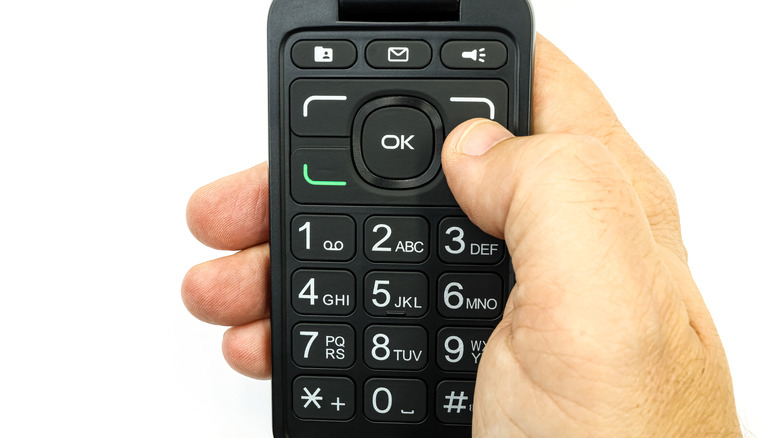
Before the original iPhone revolutionized the mobile industry, most handsets came with a keypad that was used to make calls and input text. BlackBerry smartphones had full QWERTY keyboards, making text input easier than it was on flip phones, which featured basic keypads that only showed the numbers from 0 to 9, with letters printed on eight of them in groups of three or four. A digital version of that keypad is now available in the Phone app on Android and iOS devices. Interestingly enough, it comes with T9 dialing support that can make it even easier to call someone whose phone number or contact detail you can't remember.
Multi-tap, the predecessor of the T9 dialing technology had a different purpose on mobile phones: to help users send messages by using the letters printed on the numbers 2 through 9. To write "Hello," you would press each key a number of times to get to the letter you wanted. For the letter "H," you'd press the 4 key twice. For the letter "L," you'd press the 5 key three times. To type the entire word, you would need this sequence of keys: 44, 33, 555, a short pause, 555, 666. The short pause in this instance was required so the phone could tell the difference between the two "L" letters.
The T9 technology evolved to make quicker texting possible. The phone's software would use a dictionary to guess the intended word so that the word "Hello" would only need the following sequence: 43556. If multiple words could be formed by the sequence, you could choose the right one. The same principle applies to using T9 dialing on the newest iPhone 17 Pro Max and Galaxy S26 Ultra devices.
How to use T9 dialing on Android and iOS
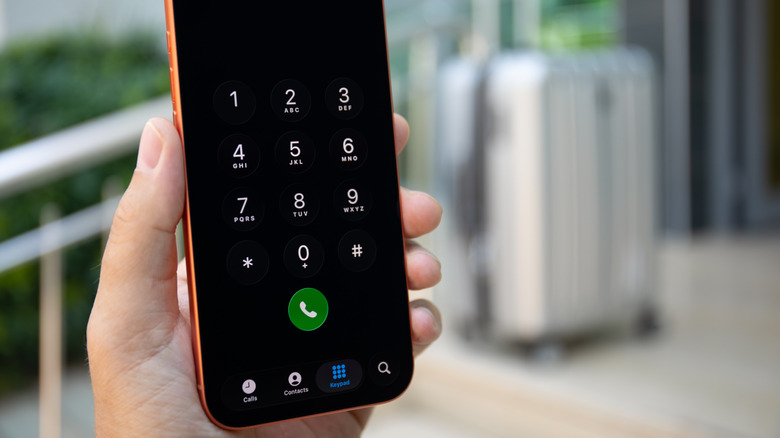
Using a keypad to call people with T9 dialing support is even easier than sending a text message. There's no need for a dictionary, as the software only has to match your key combinations to names in your Contacts app. For example, to find the phone number for a person named "Chris," you would have to type 24747. If multiple contacts whose names include Chris are saved on the phone, they'll appear at the top of the screen to help you choose the right person. To get started with T9 dialing, you don't have to install anything on your Android or iOS device, and you don't have to dig into the Phone app's settings to enable it.
To paraphrase Apple's well-known motto, the feature "just works," and you can test it immediately. You do need a supported device, especially when it comes to iOS, because Apple introduced T9 dialing support much later than Google. Apple rolled out the feature in 2024 as part of its iOS 18 update. It's called "Keypad search" rather than T9 dialing. If your iPhone hasn't been updated to iOS 18 or later, you can't use the technology.
Android users have had a version of T9 dialing available on their devices for more than a decade before iOS users got it. The HTC Hero dialer came with a Smart Dial feature in 2009. In 2013, Google added a "Dial pad autocomplete" feature to Android 4.3 Jelly Bean. Since then, many Android vendors have enabled a version of the feature on their devices. You don't need a Pixel phone to take advantage of it.
Other ways to call people on Android and iOS

The T9 dialing feature may be useful when you're looking for specific contacts. Maybe you saved someone's phone number as "John Plumber," but you don't remember their first name. Typing "plumber" on the keypad (or 7586237) will surface the phone number much faster than finding the person in your Contacts app or Phone app, and it's also a bit quicker than using the search box in your Phone app. But you don't have to be aware of this flip-phone-era technology to make calls on Android or iOS. Other methods exist.
For example, you can dial a number from memory if you know it by heart. You can go to the Contacts app on either platform and scroll through the list until you find the person you want to call. You can use the search field in the Phone or Contacts apps to find a specific person. If you're calling a person you talk to frequently, like a family member, friend, or colleague, you can add them to the Favorites list. The Recents tab in the Phone app will also list your recent calls with these contacts. You can also use Gemini on Android or Siri on iPhone to instruct the voice assistant to place a call on your behalf. You can also start calls from messaging apps by selecting a contact and tapping the phone icon that may appear near their name. Apps that support VoIP will have their own calling features, like WhatsApp, but they'll also use the Contacts app on your phone.
There's no right or wrong way to make a call on Android or iOS, so you don't have to teach yourself T9 dialing if you haven't been using it. Choose the option you're most familiar with.