

Google Messages Finally Lets You Customize Chats With Others - Here's How To Do It

It feels like it has taken years of users begging for a feature that many texting apps already offer, but Google Messages has finally been updated to include chat themes. Google announced the big update at the end of August, noting that users would now be able to change both the background in Google Messages chats as well as the color of messaging bubbles for individual RCS chats.
Google is making some big changes to Google Messages in 2026; however, users have still been missing basic customization features. While they have been able to change the colors of their chats for a while now, that customization might have felt thin compared to the options found in Samsung Messages. And while it might not be the most missed Samsung Messages feature, being able to add a flair of customization to your chats is a welcome addition, and one that Google has been falling behind on. Thankfully, that is now changing, so users who were disappointed with its lack of customization can rest easy now. There are a couple of things to keep in mind, though.
For starters, the changes are only visible to the user themselves. That means, unlike Google's chat colors — which changed the color of the chat for everyone — the new chat theme customization options will only be visible on the device of the person who sets them. Additionally, Google says chat themes require you to use RCS messaging, though if you're using Google Messages, the chances are you already have the feature turned on, since it's on by default if your carrier supports it.
How to change the chat theme in Google Messages
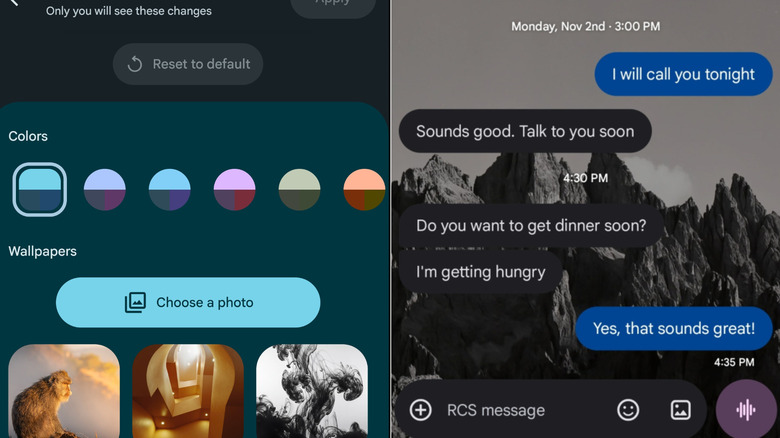
If you want to customize your chats in Google Messages, you'll first need to verify the update has hit your device, which you can do by heading into a chat and tapping the three vertical dot menu at the top right. You should see an option for Chat theme if it is available. From here, simply tap on the option, and it will bring up an assortment of Color options — which appears to be Google's older color customization feature.
However, if you scroll further down, you'll have the ability to choose from several different categories for background options such as Animals, Architecture, Landscapes, and even Sunsets or Space. If you'd rather use your own photo, then there is also an option to choose a photo from your phone's gallery, too.
Before tapping Apply, though, scroll back up to your conversation to see how the photo or background will look. That way you can make sure you are happy with it. Once you are, simply hit Apply and you're all set to go. While it has taken Google a long time to add customization options like this, it's nice to finally have them, especially since Samsung killed off Samsung Messages earlier this year, making Google Messages the default option for messaging on most Android phones.