

How To Access Your Android Phone's Secret System Update Menu
It seems as though we're always waking up to a barrage of software updates every few days. Our computers can't sit still without them, our phones are eager to push them out to us, and even our cars and refrigerators need to be kept up to date. And yet, there's been one shortcut to this process that has more or less evaded our attention, but has been available on almost every Android phone for a while, and that is Google's "System services" updates menu. Basically, if you've got an Android phone or tablet and it has the Google Play Store and other Google services pre-installed, there's a fairly hidden menu that you may want to explore.
Google's updates come in many forms, including pushes to individual apps and background services like Android System Intelligence and Google Play services. There are multiple ways to update these services, ranging from applying OS upgrades to updating individual apps on the Google Play Store. But the most reliable way is to open Android's main Settings app and navigate to your Google account-related settings (often an option at the top of Settings with your name and profile pic). From there, hit the All services tab, then select System services. Here, you'll see all the various system modules that the feature can update. If you haven't restarted your device recently, you might want to tap in and check if an update is queued up, especially after the first of the month.
What can be updated from the hidden 'System services' menu?
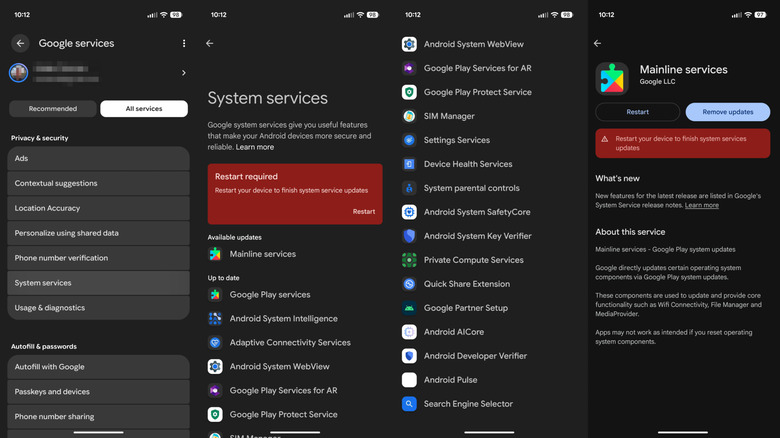
The list of modules that you can update from this relatively hidden menu is expansive. In BGR's testing on a Google Pixel device, we found the following services (in alphabetical order):
- Adaptive Connectivity Services
- Android AICore
- Android Developer Verifier
- Android Pulse
- Android System Intelligence
- Android System Key Verifier
- Android System SafetyCore
- Android System WebView
- Device Health Services
- Google Partner Setup
- Google Play Protect Service
- Google Play services
- Google Play Services for AR
- Mainline services
- Private Compute Services
- Quick Share Extension
- Search Engine Selector
- Settings Services
- SIM Manager
- System parental controls
Tapping any one of these services modules opens a secondary page where you can apply pending updates or remove recent updates — both of which could be helpful when troubleshooting an issue that recently cropped up seemingly out of nowhere. Most of these modules can be updated in one tap, but we noticed that the "Mainline services" module required a restart after updating.
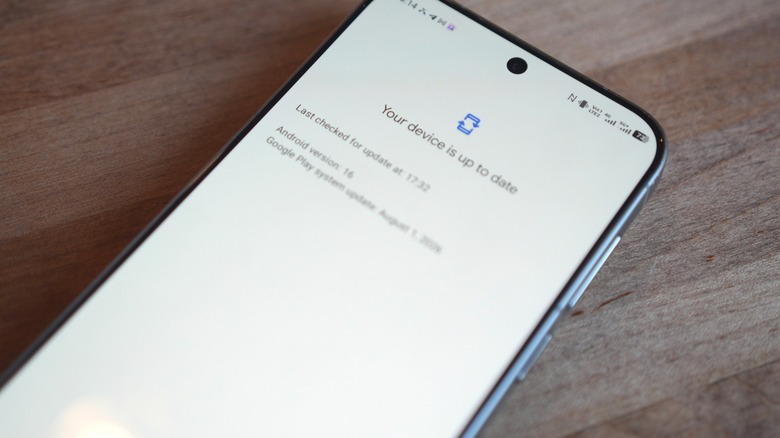
Eagle-eyed audience members may have noticed that many of these modules are updated monthly with Google Play System updates (GPSU). That's because, in essence, this menu lets you granularly update individual GPSU modules. However, note that you don't absolutely need to update any of these — updates will automatically install in the background if given enough time.
Google maintains a page where you can see the release notes for these updates. In August 2026, for example, the Google Play services module received updates that made it easier to pair and manage Bluetooth trackers like the new Google Pixel Tag using Google's Fast Pair functionality.
Where did all of these 'System services' modules come from?
This distribution model for updates in smaller, behind-the-scenes services traces back to two initiatives at Google: Project Treble from 2017 and Project Mainline in 2019. In short, the company refactored the operating system to allow it to push certain changes at its own pace rather than having to relay them down to hardware producers and be subject to their schedules. Google further broke down the OS update process into individual modules: some modules are covered in applets like Android System Intelligence and the Google Play Protect Service, while other nitty-gritty services like those for radio control, media playback, and ad personalization are packaged into what we see as "Mainline services" here.
The purview of this update tree has morphed and grown, but still, most of a given changelog reads fairly mundane. Digging into the push from August 2026 a bit further, this update gave app developers more tools to support Google Maps implementations within their own apps. Another change from late July added a new user-grantable permission for audio playback in WebView browsers launched from a third-party app.
It's a ton of interface tweaks, bug patches, and maintenance-related changes with the occasional crucial hotfix, but there are so many of them that tide into shore every few days or so that at least some of them should contribute to an overall quality-of-life boost on your Android gadgets, even if you never quite notice them. That said, they're not so impactful to the average user as to require an immediate install, unlike a whole Android OS version upgrade.