

This Free App Is Essential If You Use Logitech Accessories

If you own a Logitech peripheral, then you likely know about its Logi Options+ app. It's a tool for configuring settings related to your Logitech keyboard, mouse, and other peripherals. There's just one frustrating problem to contend with: it is a notoriously unreliable mess, causing buggy experiences, reduced performance, and a host of other issues. In one particular situation, Logitech mice, like the MX Master 4, stopped working on macOS because an app certificate expired.
It's not the first time the software has had broken performance issues either, but there is an alternative that's open source and totally free: OpenLogi. It doesn't require an account, doesn't incorporate telemetry, and gives you full, granular control over your gear. For example, you can completely remap the buttons and extra functions on your MX Master mouse all from an easy-to-use visual interface. Everything you can do in Logi Options+ you can do in OpenLogi and then some.
Another interesting feature coming soon is the option to set per-app profiles, so you can customize button and device actions based on the app you're using. OpenLogi is available for macOS, Linux, and Windows, and you can have it up and running in a few moments. Although you'll want to shut down Logi Options+ before launching OpenLogi, they tend to clash; let's be real, you should probably uninstall Logitech's software altogether. You have to do the same with Solaar if you're on Linux.
Why is OpenLogi so essential for Logitech peripherals?
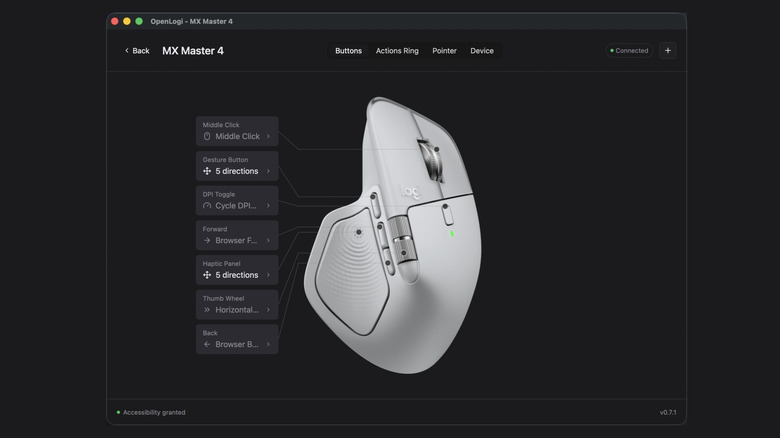
Logitech makes some great peripherals, with the MX Master 4 being the best mouse on the market. Some users even say that their Logitech mice have lasted for quite a while, but if you factor in the troublesome software experience of Logi Options+, there are some issues with the brand's software. OpenLogi is a completely different tool to continue using those peripherals as intended without some of the headaches and frustrations they'd bring otherwise.
Logi Options+ is a relatively large package, over 200 megabytes in size, with root-level access, data telemetry built-in, and other unnecessary features, when it should be a simple device driver. It isn't just your average bloated software, as it also contains functions that are potentially compromising. Some important functions or tools are also disabled when you go offline. OpenLogi does away with pretty much all of that.
It requires no account, works across multiple platforms, including Linux and macOS, and it's both free and community-developed. OpenLogi also runs locally, with no cloud access, so your privacy is better preserved. You can access Logitech exclusive features like SmartShift, button remapping, DPI presets, and more. The biggest downside is that the bugs and issues tracker on the OpenLogi GitHub repo is quite extensive, so there's a lot to fix, but that's fairly common for new software applications like this.
What about Logitech Flow?

Through Logi Options+, Logitech supports a unique feature called Logitech Flow. It's a system that allows you to connect your laptop and computer seamlessly, swapping between them while using a single mouse and keyboard setup. You can't get this up and running without Logitech's software, so the next pertinent question is whether or not OpenLogi will support it. OpenLogi technically does support it already, but not all of what Flow provides. You can take advantage of easy switch hosting via HID+++, which means your mouse and keyboard will follow the host when switching, just like in Flow.
However, Flow also allows you to use a cross-computer clipboard and pointer system, so you can transfer files between connected devices and copy-paste content viewed on one to an entirely separate machine. The OpenLogi team says this functionality is on the future roadmap, but it may be a while before it's supported. That is a significant trade-off if you use Flow regularly for work or personal projects. Only you can decide if the switch to OpenLogi is the best option for you, but it is good to know the feature will [hopefully] be coming at a future date.