

Sick Of Windows Bloat? Try These 3 Lightweight Linux Distros Instead
If you're familiar with Linux, then you've probably heard of the distributions from which most others are forked, like Fedora, Debian, and Arch. While these are perfectly suitable to start your Linux adventure, there are others that are more fitting for keeping your system bloat-free while providing the tools to build out your OS how you prefer. So rather than simply signing up for any of the popular Linux distros, let's explore three lesser-known options that will provide you with more control than the releases they are based on.
This is what Linux is all about: finding and tweaking a system that best suits your specific use-case. So if you're sick of Microsoft's endless bloat and would like to jump over to Linux to regain control of your OS, we've uncovered three options that give back control to the user without compromising much on the apps available in the bigger repositories of Linux's main pillars.
So if you've always wanted to try Arch and its delightful pacman package manager, but were scared of its manual install, EndeavourOS has the solution you are looking for. Then again, if you're more interested in the RPM packaging of Fedora and its corporate backing, Aurora has entered the fray with an atomic system that's rock solid. Of course, we can't forget Debian, but with its polarizing adoption of systemd, it's not quite the old-school option for lightweight users it used to be, and so Devuan is a fork that removes the bloat with a handful of traditional initialization systems, giving choice back to Debian users under the Devuan flag.
Moving away from Windows is easier than ever, especially when there are plenty of things Linux can do that Windows 11 can't, thanks to modern and polished distros that provide control without the bloat.
EndeavourOS
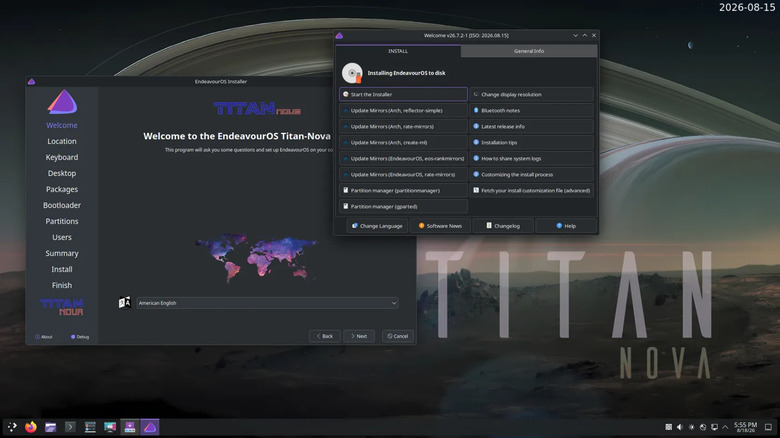
Imagine a version of Arch Linux that's easy to install, without making too many changes that'll interfere with package management, ensuring your experience is as close to Arch as possible without any of the headaches of its forks. That's EndeavourOS – a distro that keeps things lean and lets users choose their software rather than relying on suites many users consider bloat. Moreover, EndeavourOS uses the Calamares installer, which has grown so popular, it's becoming a standard. Not only does it simplify installing an Arch-based distro, but it also works online and offline, so you can get a fresh OS up and running without an internet connection.
When installing offline, it's limited to a single desktop environment, KDE Plasma, known for its low resource usage these days. Of course, should you prefer to install Gnome, Mate, Cinnamon, Budgie, XFCE, LXQt, LXDE, or the i3 window manager, just use the online mode. That's a total of nine options in one installer, and rest assured, what is installed will be minimal: a basic set of apps to get you going, allowing you to choose further software for your needs; say, if you'd like to use a package manager, options like Octopi exist in the AUR.
And that's the beauty of using an Arch-based distro: access to the AUR that houses thousands of community apps, removing the need to use Flatpaks when the AUR and Arch house just about every application you would ever need. Like any community store, you should be careful what you install from the AUR. EndeavourOS has basically simplified using Arch so that anyone can get a system up and running, online or off, while skipping the bloat of Windows – one of the many reasons why people are ditching Windows 11.
Aurora
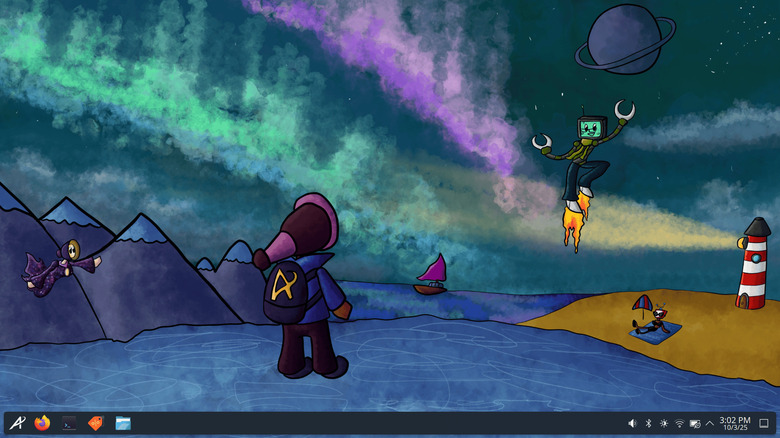
If you are unfamiliar with what an immutable OS actually is, think of ChromeOS or even Android, where the core is read-only, meaning neither you nor anyone else can change those files. This keeps the OS rock solid, and Aurora is an immutable distro built on Fedora's KDE atomic framework (specifically Fedora Kinoite), and each build is tested and deployed to users as a single image. Should anything break, you can roll back to a previous image, negating the instability that typical Linux distros can exhibit with updates. With Aurora, you simply roll back and continue computing, no muss, no fuss.
While an immutable OS can be trickier to tweak, there are tools available to pin packages after the fact, but it's certainly not as easy as replacing defaults in a non-immutable spin. So there are extra challenges that come along with Aurora's core design, but the stability and ease of use of image snapshots, for many, are worth that extra effort. Or you can install containerized Flatpaks from Flathub, simplifying and hardening the OS further. The security and peace of mind are hard to ignore, all built off a distro that won't be going anywhere anytime soon: Fedora.
This means you get Fedora's familiarity in an even more secure package with Aurora, wrapped in a KDE Plasma package (there are no other desktop choices; this is a KDE spin specifically) installed through the tried-and-true Anaconda installer with its live ISO. Plus you get the added simplicity of not having to manage the core immutable OS. This leaves users with a non-bloated, uncomplicated KDE base to install the apps they choose so they can keep their OS as lean as they like while avoiding Windows' bloat.
Devuan
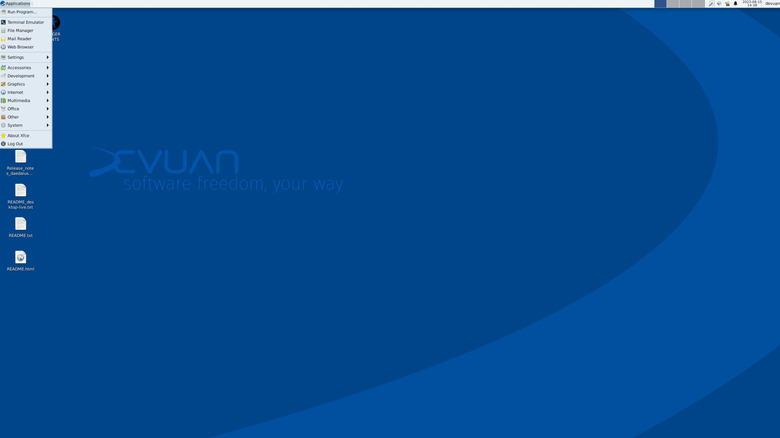
If you're sick of Microsoft's telemetry permeating Windows, then a distro where you are in control of everything, even the system that handles all of an OS's initialization, might be the change you are looking for. This is where Devuan excels: it's forked from Debian, but without systemd, which many consider bloated because of its many forced dependencies that have grown well beyond what an init system typically controls. By skipping this bloat, Devuan's developers give control back to users through a choice of three inits, SysVinit, OpenRC, or runit.
Devuan uses the Refracta Installer, which avoids any dependencies on systemd for the live ISO. Sadly, Refracta isn't the easiest to parse, thanks to its graphical UI, and the live ISO only offers XFCE because this installer works by cloning itself to your drives. The good news is that you can create your own XFCE-based Devuan spin out of the live ISO, thanks to refractasnapshot. This way, you can tweak the base installer to offer your most-needed apps, then use that installer across a fleet of hardware at home or at the office. If you wish to test other desktop environments, you'll have to use the Netinstall or Desktop DVD ISO.
Skipping systemd and opting for a smaller, less bloated init system means you'll have to consider your app choices more carefully, since some depend on systemd to work correctly. Certain apps from Flathub or outside sources may not boot at all. Devuan's system daemons don't auto-activate upon installation of their necessary scripts, so your specific hardware may require manual intervention for software like PipeWire and WirePlumber. Ultimately, if you wish for full control over an unbloated system, it's very possible with a distro like Devuan.