

What Is An eGPU, And Is It Worth It For Your Laptop?
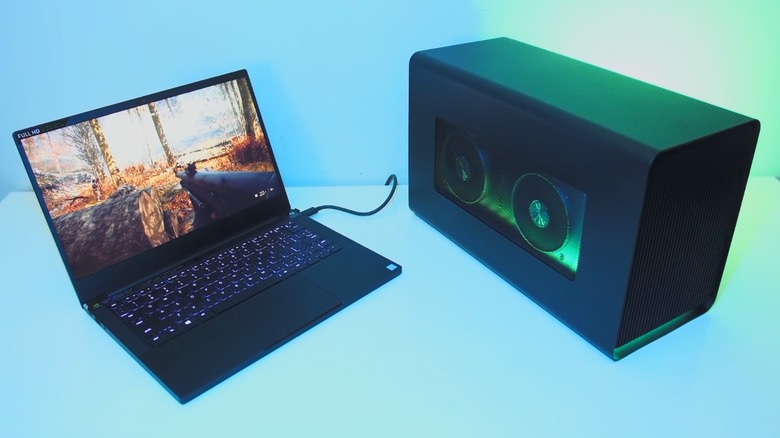
While the power gap between desktops and laptops is slowly shrinking, desktops are easy to upgrade. Upgrading laptops, meanwhile, is a roll of the dice. You can upgrade certain components (though not all laptop upgrades are worth the money), while others, such as the graphics card, are unupgradable unless you sidestep the problem with an eGPU.
An external graphics card, or eGPU for short, is an add-on that lets you use desktop graphics cards with laptops. Even though a laptop might list an RTX 5090 among its components, it actually uses a laptop-grade GPU, which is weaker than an actual RTX 5090 designed for desktops. However, you can plug a genuine RTX 5090 into a laptop using an eGPU setup and use it to power games or other programs that require a ton of rendering computations.
Despite what its name might imply, you can't just plug any desktop GPU into your laptop and call it an eGPU. Instead, you need a specialized eGPU enclosure, the graphics card you plan to use, a connector cable (usually a Thunderbolt), and an external monitor. After you secure the GPU in the enclosure, connect it to your laptop, power on the enclosure, and boot up your computer. Assuming your laptop detects the GPU, connect an external monitor to the eGPU's video output slot, set it as your primary display, and you're good to go.
Anyone can use an eGPU, but it isn't for everyone

If you like to play games on your laptop, an eGPU will improve performance because whatever graphics card you put in the eGPU enclosure will surpass the GPU that came with your laptop. According to MakeUseOf.com, this is especially true for thin laptops, which often have the weakest graphics cards (or overheat fastest while gaming). However, much of an eGPU's functionality is just hypothetical.
The biggest problem holding back an eGPU's potential is price. Of course you need to buy a solid GPU, but the Thunderbolt cable, eGPU dock, and monitor increase the price exponentially, especially if you spring for the quality models. While many of these components are standard for most desktop and laptop use, an eGPU station can run several hundred dollars at outlets like Micro Center.
Let's say that you have plenty of money to spend and want to buy an eGPU dock and all the other components. When MakeUseOf.com tested their eGPU setup, it found a prominent issue baked into the design. Specifically, you will always experience some performance loss by transferring data over a Thunderbolt connection, and that's assuming you buy an eGPU dock that even accepts these inputs. MakeUseOf.com found Oculink connectors more dependable, but unless you power everything on when connected, these cables won't send any signals. Between these performance issues and prices, you are probably better off just building your own gaming PC, budget or otherwise.