

5 Cool New Features Added To YouTube In 2026
YouTube is a steadily evolving platform, and while it has changed quite a bit over the years, 2026 has brought some particularly interesting additions to the masses. Some of these changes are more aimed at creators, but others were designed to improve the user experience on YouTube. From features that make it much easier to find new videos to watch, to the ability to lock your account on smart TV, these five new YouTube features make the platform simpler to use.
It is worth noting before we get started that some of the features we are highlighting today are available for all YouTube users, while a few others require a YouTube Premium subscription. There's also another factor to consider, and that's the fact that Google is still rolling out some of these features. That means they may arrive for users at different times. Some of them may not yet be available for you, but if you keep an eye on your YouTube app, these updates should hit your account at some point in the near future.
Conversational search
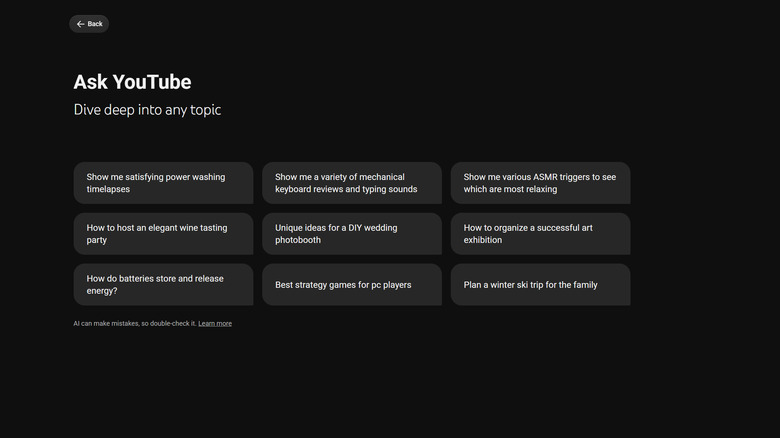
It often seems as though AI is infesting everything that we do these days, and YouTube is no different. While most Google products have seen their fair share of new AI features across the board — some you may or may not want — YouTube has received one that should actually be helpful to most users. That feature is called Ask YouTube.
Unlike traditional YouTube search, which required you to input keywords or even exact video titles to find the video that you were looking for, Ask YouTube takes natural conversational language and builds a response based off of that using the power of AI. On top of being able to find videos on YouTube itself, Google also says that the feature can pull in real-time information from the web so that it can find exactly what you're looking for. Ask YouTube originally started as a YouTube Premium only feature, but has since expanded to more users. Unfortunately, the feature is still rolling out and it only supports searching in English at the moment.
In-app direct messages
Another new feature that has arrived this year — or maybe we should just say it made a comeback — is direct messaging. YouTube used to allow users to message each other directly; however, it removed the feature a few years ago. Now, though, YouTube has brought direct messaging back from the dead, along with some important restrictions. Being able to send messages directly in YouTube itself makes it easy to send video links to other users that you talk to all the time without forcing you to leave the YouTube app.
You will need to be at least 18 years old to use direct messages on YouTube. You'll also need to be signed into a YouTube account within a supported region. If you already have the feature, then you can find your messages within the YouTube app by tapping the message box icon at the top. Once you have the feature, you'll be able to message others, delete conversations, and even block users — in case you end up with anyone trying to spam you on YouTube.
Auto Speed
If you trend toward watching longer-form content or listening to podcasts, then this next feature could be a hit for you. Auto Speed allows YouTube to automatically detect when slower sections of a video are playing so that it can speed them up, and then it can slow back down when important information comes back up again. You can also pick a minimum speed that you want to utilize — anywhere from 1x speed to 4x speed. This is a great feature for users that often find themselves skipping ahead or even listening to videos at faster playback speeds just because they don't need to listen to them in real time.
The downside is the feature is currently only available to YouTube Premium users. It also isn't one of the many features included in YouTube Premium Lite, making it one of the disadvantages of going with Premium Lite over standard YouTube Premium. Additionally, the feature is currently only available in the Android app, so users on their web browser or iPhone won't be able to take advantage of it just yet. Sadly, Google hasn't shared a release date for when it will arrive on other platforms, so we'll just have to wait for more information to see when it rolls out.
Account Lock on YouTube for TVs
At least 36% of YouTube users now watch YouTube on their smart TVs. Earlier this year, YouTube even added longer advertisements to the YouTube app on smart TVs. The downside to this, of course, is that if you share a home with someone and you have your YouTube account signed in to the smart TV, then just about anyone who has access to your smart TV can go in and use your YouTube account, unsubscribe from channels, or see what you've been watching.
YouTube has found a way around this, though, by adding an account lock to YouTube for TVs. Once turned on, the feature adds a four-digit code to your device, which will then be required to access any YouTube data on that smart TV for that account. You don't need YouTube Premium to take advantage of this feature, either. It is still rolling out globally to most supported smart TVs, so exactly when you see it on your device may vary.
On-the-go mode
The final feature we want to highlight is one that podcast viewers will probably find exceptionally useful. While YouTube is still a video platform first and foremost, there are a ton of different content types on the website, including music videos, podcasts, and just audio that you don't necessarily need to pay attention to the video to enjoy. For videos like this, YouTube has added in a new feature called On-the-go mode. This basically allows you to turn any video into audio-focused content, putting audio controls front and center — like skip forward and back buttons.
These new controls will remain available whether your phone is locked or unlocked. YouTube says it can even detect when you've been walking or running so that it can automatically suggest switching to the mode. Much like auto speed and some of YouTube's other fine-tuned user controls, On-the-go mode is only available for YouTube Premium subscribers. It's also currently limited to the Android application, and it completely replaces Premium Controls. Google has yet to bring it to iOS, but has said the feature will be available to iPhone users in the coming months.