

Insta360 Mic Pro Review: Say Cheese!
One of the most often overlooked challenges of being a creator isn't the videography. Creators can go out and spend thousands of dollars on the best cameras, the best computers to edit their videos, and even spend hours poring over thumbnails, A/B testing, and analytics, but one major Achilles heel is often the last one upgraded -– sound. You can film an outstanding video, but if it sounds bad, or if your audience simply can't understand you, that's wasted effort.
Still, let's say you go ahead and upgrade your sound. Let's say you get a couple of wireless mics, plug them into your camera, and head out to shoot. The problem now is that you have this little black box stuck to your shirt or jacket that looks out of place. Up until now, that was just the cost of doing business.
I'm not saying Insta360 solved the biggest challenge a creator can face –- far from it — but it found a neat solution to the problem that I genuinely love. This will not instantly elevate your status as a creator to the stratosphere, but it may be a little detail that your viewers notice and enjoy, and at the end of the day, isn't every creator looking to improve as often as they can? I've been using the Insta360 Mic for a few days, and these are my thoughts.
All about that face
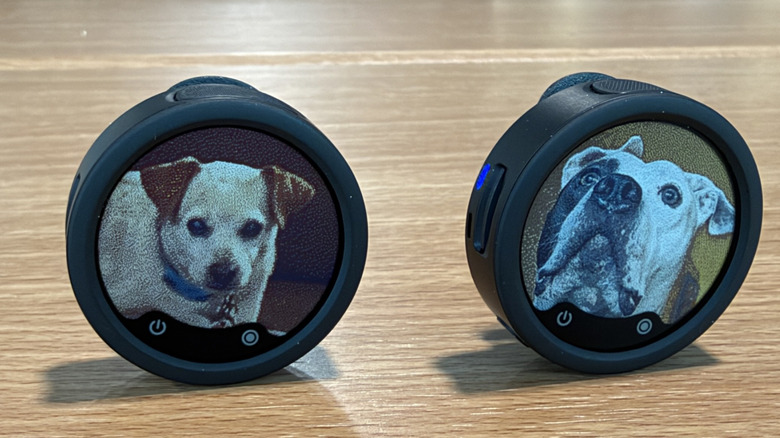
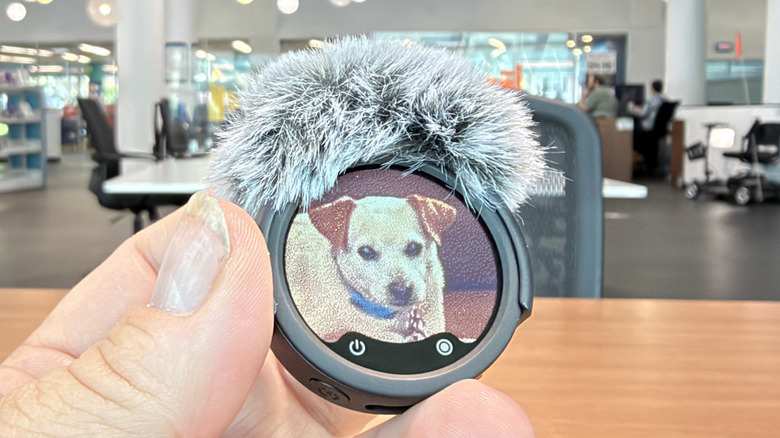
We'll get to how the mics sound, but if you're looking for the defining feature of the Insta360 Mic Pro, it's arguably the color E Ink display on the outside of the mic. Put simply, this is a color display that can store a color image indefinitely, with no power drain over time. The microphones use a bit of power to load up the image, which takes around 30 seconds or so, but once it's in place, it just stays there. It's the same principle behind the Kindle Colorsoft, but since this is microphone — and you presumably won't be changing images as frequently as, say, turning pages in a book — the image should last almost indefinitely.
Loading up the image is not necessarily the easiest process. The microphones can attach to your phone via Bluetooth or via the receiver unit. You'll also need to connect the mics to your phone in order to customize them in the Insta360 app. It's not hard to do, and once the mics are paired, the app remembers without you having to take further action. Once you pair the mic with the app, you can choose from a number of different pre-loaded wallpapers, or you can upload your own from your camera roll. You can have multiple images saved, so if your brand uses different logos, that's doable.
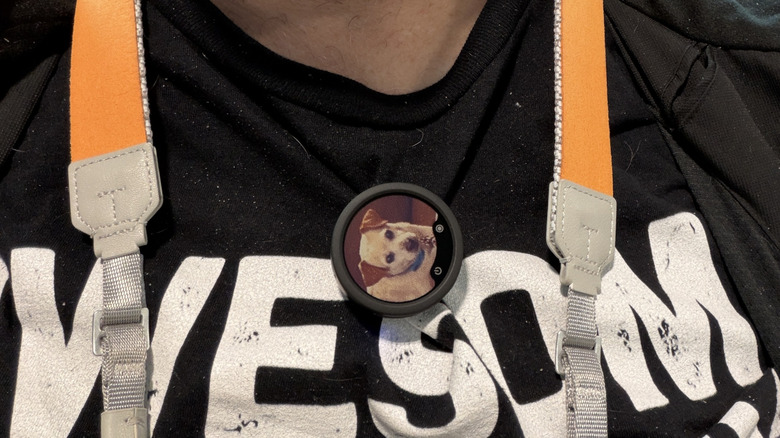
The key to this feature is that your microphone is no longer an intrusive eyesore. You can brand it however you want. Speaking of which, if you have a brand deal with a company, you can toss their logo on the mics, too. The possibilities are intriguing once you really dive into it.
Range for days
The range of the Insta360 Mic seriously impressed me. Insta360 suggests the range is close to 400 meters, and I ran a couple of tests to try and confirm that. Of course, like most range claims, it has the usual caveats –- no obstructions, etc. For my part, I tested the mic in an open field near my house, and I scratched at the 400-meter range.
There were a couple of signal drops as I moved to that range, but considering I tested it on my electric scooter, and I had to go through and out past a copse of trees along the way, I was not surprised at all when the signal dropped. But once I got to the 400 meter range and turned around, the audio sounded like I was standing next to the cameras. It was pretty cool, to say the least.
Of course, your mileage may literally vary. There are a host of issues that could affect that range, including obstructions, not facing toward the camera, weather, other wireless signals in the area, and more. 400 meters is the maximum, so bear that in mind. That being said, I found the range to be very impressive, and though I personally wouldn't test that range beyond a few meters, let alone 400, I can think of several reasons why you might need to.
Local recording is king
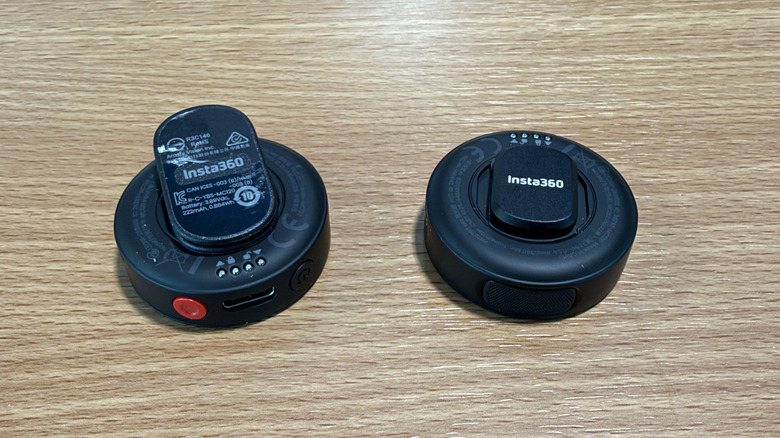
Of course, if you're worried about the range, you can just pop in a memory card and record your audio locally. Each Mic has a microSD slot and a separate red recording button that you can use if you want the assurance that a local recording can give you. Basically, if you're recording locally, you won't have to worry about dropouts at all.
Once you're done recording, it's simply a matter of pulling out the SD card and popping it into a reader to retrieve your recordings. You will have to sync the audio later, which can be troublesome in its own right, but it's a nice safety net.
Local recording is very much a nice-to-have when you're recording in a situation where you simply cannot afford to miss out on any audio. Weddings come to mind as one obvious use case. Those moments only happen once. A local recording transmits to your recording device, so you'll still get audio on the recording, but if there's any kind of interruption, the local audio is there as a backup.
Sound quality is excellent
When used properly, the Insta360 Mic records excellent audio. I compared it against the audio my iPhone recorded without a microphone, and the difference is clear. It becomes even more night and day the further you get from the iPhone. If you're standing at arm's length from the iPhone, then the mics of the phone are enough to pick up good audio. If you want to back up and interview someone, that's when the Mic Pro's advantages really become clear.
The Mic has two levels of noise cancellation which can do a lot to clean up the noise around you. I tested this by riding my scooter at 25 mph and recording audio samples. The noise cancellation is quite good, but even when it's off, the mics do a good job of eliminating wind noise.
When that's not enough, you get two wind muffs that further reduce the outside noise. Personally, I didn't like how the wind muffs attached — it's a thin band of plastic that attaches to the top of the mic. It never really felt secure to me, though in fairness, it never fell off either.
What's in the box?
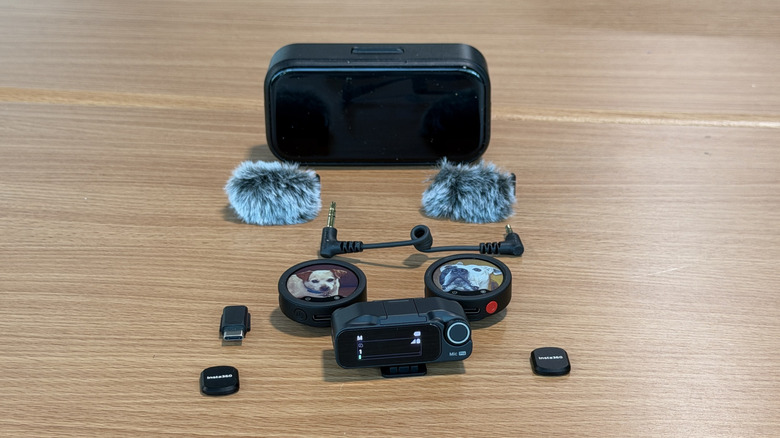
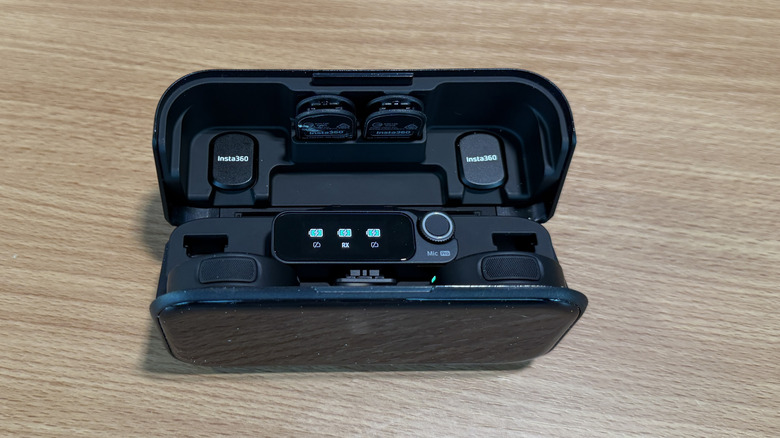
As reviewed, the Insta360 Mic ships with two mics, one receiver, the charging case, two clips, two magnets, two wind muffs, a short audio cable for connecting to a camera, and a soft case to carry it all with you. This set will run you $329.99, though individual Mic transmitters are available for $99.99 each. There's also a cheaper set with one mic for $199.99 and an even pricier set with four mics for $528.99.
Everything stores inside the charging case except the audio cable and the two wind muffs. It's sort of a dream to be able to store mics with wind muffs attached, but alas, that remains elusive. The mics can fit in the charger with either the magnets, clips, or nothing attached, and the case has clever slots to hold the clips and magnets if you want. I really like the setup here — it feels very complete and "grab and go."
As for battery life, when you're using the receiver, a transmitter can operate for up to 34 hours on a charge — I never drained a microphone's battery completely, but that seems consistent with what I observed. Without the receiver, the mic can last up to 17 hours. The receiver can also receive from up to four Mic transmitters at the same time.
Conclusions
Overall, the Insta360 Mic is a pretty good buy for what it offers. The range, local recording, and battery life all combine to provide premium features for a premium price. They're not cheap, but they're very competitive with what else is out there.
But the X factor is the E Ink screen, and whether you feel it's a worthwhile addition. Yes, it can hold your brand/logo/image, but the mics themselves are pretty small, so if your camera is any more than a few feet away, you won't be able to see the screen clearly. At that point, it becomes a pointlessly expensive accessory. These mics are competitively priced, which means either the screen is a bonus, or they're more expensive than they needed to be. It depends on your use case.
The closest competition is the DJI Mic 3, which offers a similar set of capabilities. One thing I like more about the Mic 3 is that the mics themselves are smaller, and the clip and magnet are combined into a single unit, so I don't have to worry about which one I want to use in a given situation.
There are cheaper lav mics out there — Boya has a whole host of options for less than the Insta360 Mic Pro, but those come with their own compromises. Hollyland is another name worth knowing. That said, if you want a premium microphone, then the Insta360 Mic is worth the money.