

5 Reasons The MacBook Neo Might Not Be Right For You
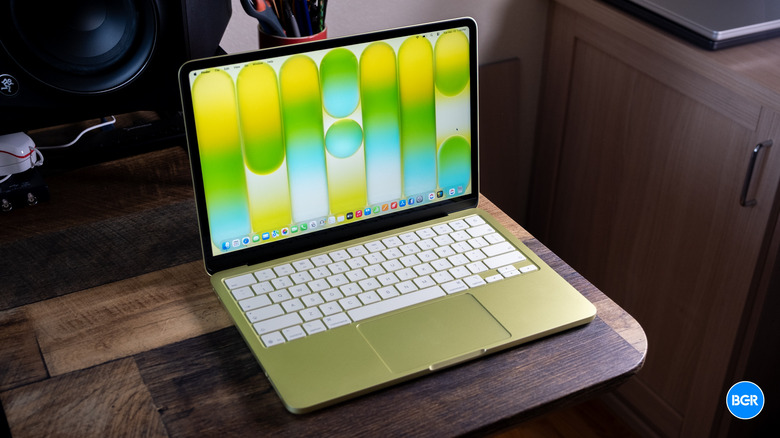
Most MacBook Neo reviews have painted the same picture in the weeks since Apple unveiled its cheapest-ever laptop. The MacBook Neo offers unbeatable value, packing respectable specs into a durable aluminum body and supporting a regular macOS experience despite running on a premium iPhone chip instead of an M-series processor. The compromises are understandable, and they're not necessarily deal breakers, especially for specific categories of buyers, like first-time Mac owners who do not need support for heavier workloads, students who want a laptop for school, and consumers who routinely use an iPhone or iPad instead of a MacBook for most of their computing needs. However, the same compromises that allowed Apple to hit the $599 price point may become a problem for existing Mac users who may consider buying a MacBook Neo instead of a MacBook Air or MacBook Pro because the Neo is much cheaper.
Starting at $599 ($499 for students), the MacBook Neo may seem like it offers a complete package, but more experienced MacBook owners will immediately notice a few issues that may impact their overall experience. One of the most glaring omissions is the fact that the cheapest version of Apple's budget-minded laptop doesn't support Touch ID authentication, a security feature available on all other MacBook models, including the slightly pricier $699 MacBook Neo, the MacBook Air, and the MacBook Pro. While that can be fixed by spending extra for the more expensive MacBook Neo configuration, other potential issues await — issues that may only become obvious in the long run.
The display isn't on par with Apple's other MacBooks

The MacBook Neo features a 13-inch Liquid Retina LCD screen that is slightly smaller than the 13.6-inch screen of the cheapest M5 MacBook Air or the 14.2-inch mini-LED screen of the M5 MacBook Pro. The display size is a potential limitation, as it reduces the available screen real estate you may be used to working with.
On top of that, the screen isn't quite as good as the other displays Apple uses for the more expensive notebooks. The MacBook Neo display can reach up to 500 nits of brightness, like the MacBook Air, but it doesn't support True Tone technology or wide color (P3) gamut. If these are features you need for eye comfort and creative workflows, the MacBook Neo isn't for you. On that note, the MacBook Pro has higher brightness, going up to 1,000 nits, and supports a 120 Hz refresh rate (ProMotion).
You can fix some of these display issues by connecting the MacBook Neo to an external monitor. However, you should know that the MacBook Neo's USB ports look identical but work differently, as only the connector closest to the hinge supports DisplayPort and can be used for an external display. That may be a limitation inherited from the MacBook Neo's A18 Pro chip — the same chip used in iPhone 16 Pro models, which can also only connect to a single monitor at a time.
Connectivity options are limited
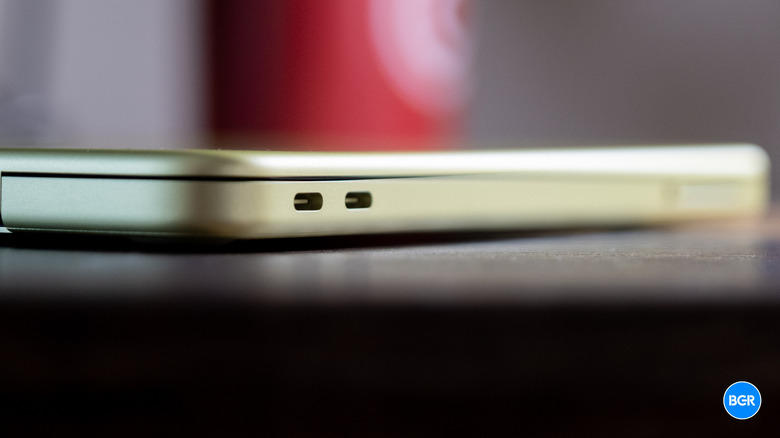
Apple includes two USB-C ports with the MacBook Neo, but as mentioned, they are not identical, which can cause several problems. Only the USB-C port closest to the hinge supports USB 3 transfer speeds (10 GB/s), while the second USB-C port is limited to USB 2 connectivity (480 Mb/s). There's no Thunderbolt support like you'd find on the MacBook Air and MacBook Pro's ports, which would have otherwise offered much higher transfer speeds and the option to use multiple external monitors. MacBook Pro models also come with a built-in HDMI port and an SD card slot that aren't present on the MacBook Neo, and both the Air and the Pro also feature MagSafe connectors that offer faster battery charging than the Neo.
When it comes to wireless connectivity, the MacBook Neo supports Wi-Fi 6E and Bluetooth 6. That's somewhat in line with what other MacBooks offer. The M5 MacBook Air supports Wi-Fi 7 and Bluetooth 6, and so do the M5 Pro and M5 Max versions of the MacBook Pro. The base M5 MacBook Pro is a strange exception, matching the MacBook Neo's Wi-Fi 6E tech, but featuring only Bluetooth 5.3 support. Still, the base M5 MacBook Pro is a more versatile option for wired connectivity.
Depending on your needs, the USB-C setup may be the real deal breaker when you consider the differences between the two ports. You may need an adapter to connect fast SSDs to the MacBook Neo while using an external display and charging the laptop.
A smaller battery with slower charging

Both USB-C ports can recharge the MacBook Neo's 36.5-watt-hour battery at speeds of 20 W with the included adapter. Reviews have shown that battery charging speed can go up to 30 W with an appropriate charger. But the MacBook Neo doesn't offer MagSafe support, which brings fast charging to the MacBook Air and MacBook Pro in addition to the extra protection. The magnetic MagSafe charger will snap away with ease when the charging cable is accidentally snagged.
Whether you charge the MacBook Pro with MagSafe or USB-C, you'll benefit from fast charging either way, and the same is true with the MacBook Air. As long as you have the right power adapter (70 W for the MacBook Air and 96 W or 140 W for the MacBook Pro), you'll get fast-charging speeds. The MacBook Neo doesn't have that luxury. If your workflow involves using the MacBook on battery for most of the day, be aware that the laptop will charge slower than Apple's other models.
The smaller battery also means that the MacBook Neo will not last as long as the MacBook Air or MacBook Pro. The budget laptop is quoted as offering all-day battery life, which means up to 11 hours of wireless web and up to 16 hours of video streaming. The MacBook Air offers four more hours for browsing and two more hours for video streaming. The cheapest M5 MacBook Pro gets even longer battery life than the base 13.6-inch MacBook Air. The good news is that the MacBook Neo is rated to last 1,000 charging cycles before the battery drops below the 80% threshold that signals the need for a battery replacement. However, you'll deplete the battery faster (and charge it slower) than on the pricier MacBooks Apple sells.
The keyboard and trackpad don't compare well to other MacBooks

The absence of a fingerprint sensor (Touch ID) on the keyboard can be fixed by upgrading to the more expensive 512 GB MacBook Neo model, but the keyboard has one other issue that existing MacBook owners may care about. The keyboard doesn't have a backlight system, which can be a problem when working in a poorly-lit environment. A backlit keyboard is the standard across all of Apple's current MacBook Air and MacBook Pro models.
Also, the MacBook Neo incorporates a multi-touch trackpad instead of a Force Touch trackpad. That means you're actually pressing the trackpad when clicking, something that doesn't happen on the MacBook Air and MacBook Pro. The more expensive laptops feature Force Touch trackpads that don't actually move — instead, force sensors and haptic feedback give off the impression of clicking when pressing firmly on the trackpad. It may not be a major trade-off, however, though more experienced users may notice its absence, especially consumers who prefer using the built-in trackpad over external mice.
Memory and storage might be a bottleneck

Say you can get used to the absence of MagSafe and a backlit keyboard, you're fine with the smaller display and the more limited USB-C connectivity options, and you think the MacBook Neo is the right laptop for you; there are two more important details to take into account before upgrading to a MacBook Neo, especially if you want to hold on to the laptop for several years. Those details are memory and storage, and they might be the most important MacBook Neo compromises to consider.
The MacBook Neo comes in just two SSD options: 256 GB and 512 GB. If you buy the $699 version, you get both Touch ID and more storage. Comparatively, the cheapest MacBook Air and MacBook Pro come with 512 GB of storage, which can be upgraded up to 4 TB. It goes even higher for the M5 Max MacBook Pro (8 TB). Coupled with the slower USB-C ports, which will impact external data transfers to fast SSDs, the MacBook Neo's built-in storage may become an issue.
But the biggest problem is memory, as the MacBook Neo only comes in a single RAM version: 8 GB. Reviews have shown that the MacBook Neo is quite versatile, supporting more complex workflows and even light gaming. Apple's RAM optimizations aside, 8 GB may still not be enough for more intensive workloads, like complex video editing and high-end gaming. It's not just about the present. If you want to keep the MacBook Neo for several years, you may run into memory issues in the future, when upgrading the software to new macOS releases or running other specific apps, including AI applications, that may need more RAM than their current versions.