

That Black Mesh On The Side Of Your AirPods Isn't A Speaker – Here's What It's For
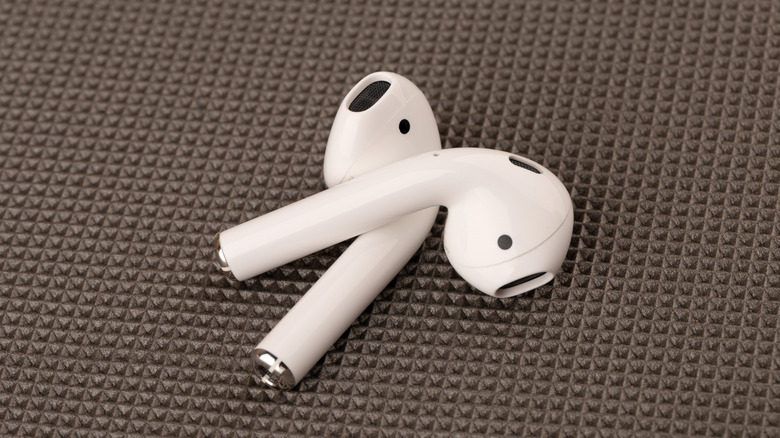
AirPods are Apple's signature wireless earbuds that have been around for almost a decade at this point. Over multiple generations, the design hasn't changed all that much: white buds, long stems, and silicone ear tips (at least on the AirPods Pro models). Another AirPods staple is the black mesh cutouts that have been there since the beginning, in one location or another. At first glance, it's easy to confuse the mesh as some kind of speaker, but that's not the case.
The black mesh sections are actually vents, and they serve a couple of important functions. Primarily, they're a passageway for air moving in and out of the AirPods acoustic chamber. The main driver for each bud lives inside the chamber, and those drivers need proper airflow to deliver crisp, clear highs and deep bass.
The vents also help to equalize pressure when wearing AirPods for a more comfortable listening experience, and according to the AirPods subreddit, to improve the efficacy of features like active noise canceling (ANC) and transparency. The latter is a function you'll find on many pairs of recent wireless buds, which lets in a small amount of ambient sound, allowing you to talk to someone nearby while the AirPods continue to filter background noise.
The mesh on your AirPods has a penchant for collecting dirt, wax, and other gunk
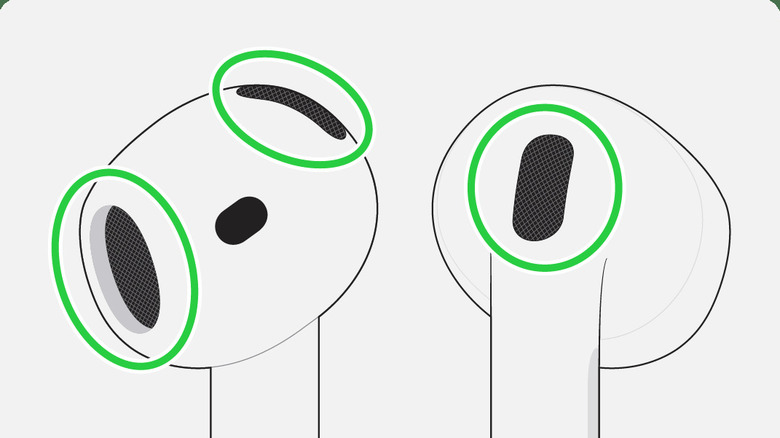
The AirPods vents serve a few important roles, and that means keeping them clean is critical. It's easy for the mesh material to gather wax, dirt, and other debris. Too much buildup may result in diminished audio quality (which can be improved by changing some settings) or reduced ANC/transparency performance. Fortunately, cleaning the vents isn't too difficult, but first you'll want to gather some supplies.
Apple recommends using distilled water, a soft-bristled toothbrush, a couple of small cups, paper towels, and micellar water infused with PEG-6 Caprylic/Capric Glycerides. That scary-sounding chemical is just a synthetic cleanser that's used to dissolve oils and dirt. Start by adding a bit of micellar water to one of the cups, then dip the toothbrush in it. Holding your AirPod with the mesh facing up, you'll want to gently scrub in a circular pattern for about 15 seconds.
After scrubbing, flip your AirPod over and use a paper towel to blot-dry it, ensuring the towel makes contact with the mesh. If the mesh still looks dirty, repeat the process until you're satisfied with the result. To finish up, rinse the micellar water off the brush bristles by dunking them into a second cup of distilled water, and gently brush the mesh again to get any leftover micellar liquid. Let your AirPods dry for a few hours, and they'll be ready to go for your next music session.