

5 Cool PlayStation 5 Accessories You Can 3D Print

We may receive a commission on purchases made from links.
Buying a gaming console isn't cheap, especially after Sony's PlayStation 5 price hike. But there's more to it than the console — just a basic setup leaves your battle station cluttered with controllers, headsets, and all the cable spaghetti that comes with it. While some of the coolest PS5 gadgets can help, makers know that their community will be packed full of solutions ripe for a weekend project. 3D printing gives users the power to make their own setup for the price of a spool of filament.
Want to mount a PlayStation 5 to the wall? Not a problem at all. How about turning a controller into a mini steering wheel because you don't have the room for a big racing peripheral setup? There's an STL file for that. Immersion and customization have never been cheaper, and now gamers can make their own gear from the comfort of their own home. Even the HDD or SSD that's lying around the front of your PlayStation 5 can now have a console-mountable storage solution.
The sky really is the limit, especially if you have a 3D scanner like a Creality Raptor to then print something cool on a multi-toolhead printer like a Prusa XL. These projects are ready-to-print courtesy of the maker community on Thingiverse, so if you're trying to save money after buying a pre-owned PS5 to help avoid the price hike, these projects are for you.
Clip-on controller and headset holder
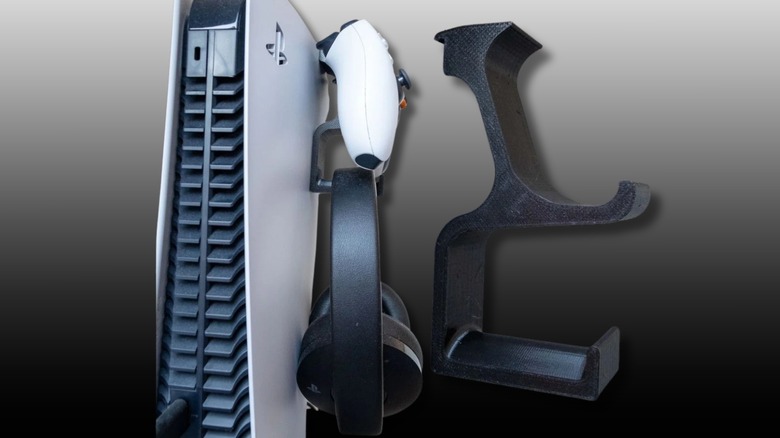
Struggling to find a convenient place to store controllers and headsets when not in use? The controller and headset holder by ElQuinco is a great solution that clips onto the side of a PlayStation 5 console (if you can reach that high). Instead of having a DualSense controller and a headset lying around next to your PS5, this clip-on bracket keeps the essentials together in one tidy spot. It's a lightweight design with no screws or adhesives needed, making it a no-worries quick solution that isn't going to damage a PlayStation 5 faceplate.
The designer tested the holder with a Sony PlayStation Gold Headset and the Bose QC 35, but it should accommodate most standard gaming headsets. The holder can be printed in around 90 minutes using standard PLA filament, and it prints with zero supports, making it the perfect beginner 3D printing project. This holder is actually a remixed wall mount project, with this version being for players who prefer to have their PS5 gear in one place. Just make sure to pick the right colored filament to match your PlayStation 5's faceplates. You might also want to print the holder solid or with a high percentage infill to make sure it survives slams after Call of Duty sessions.
Mini wheel
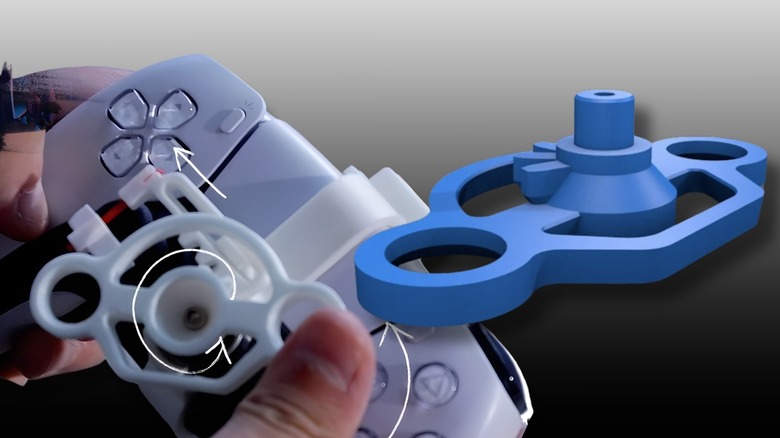
"Gran Turismo 7" and other racing games on PlayStation 5 feel a lot more immersive when using a racing wheel, but a full racing rig is expensive and takes up a lot of space. The PS5 mini wheel from LinkMertens is a clever mechanical mod that snaps onto a DualSense controller to give players precise steering control. By using a rack-and-pinion system to translate the rotation of the small wheel into the horizontal movement of the thumb stick, makers can look forward to a tactile modification that doesn't require opening the controller itself.
You'll need a few bits of hardware in addition to the 3D printed parts. Assembly requires one 608 bearing and an M3 screw which helps prevent the plastic from snapping under the pressure of intense turns. An infill of 25% should be adequate for gear durability on a competent 3D printer like a Snapmaker Artisan or the more budget-focused Elegoo Centauri Carbon 2. Using PLA here should be absolutely fine, but for a more robust print, ABS or nylon would offer more peace of mind when it comes to durability. Whether your printer can use those materials usually comes down to making sure the hotend can reach the required temperatures and the nozzle has a reinforced stainless steel tip for any abrasive hybrid materials.
PlayStation 5 wall mount
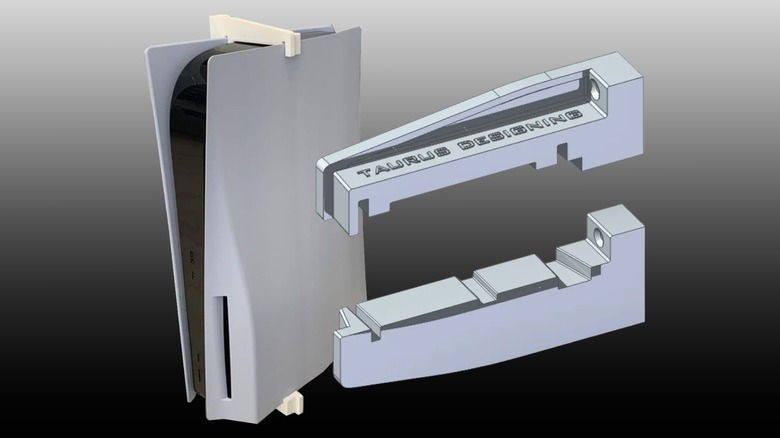
A PS5 wall mount like the one by Nik_601 is perfect for adding a bit of style to your setup while saving space. This mount uses three brackets that are held in place by screws to ensure stability. The PS5 is quite heavy, so using a strong filament like PETG or ABS rather than standard PLA should help prevent warping over time. For those who want to make sure the mounts look as premium as their PS5 faceplates, going slowly with the print and turning on variable layer height will result in a smoother finish with less noticeable print lines. Make sure to have fine sandpaper on hand to clean up the rest of the print once it's completed.
The designer updated the project to include both left- and right-sided mounts, so users can orient their console based on where the PlayStation 5's cables are running. It's best to print this project at a 0.2 resolution with at least a 30% infill to give the bracket enough structural integrity to keep the PS5 safe and secure on the wall. By mounting a PS5 behind a TV or on a wall, you can improve airflow around the console while creating a much cleaner look for your gaming setup. It's a very practical way to hide the bulk that is the PlayStation 5 while keeping its ports and disc drive easily accessible.
External HDD holder
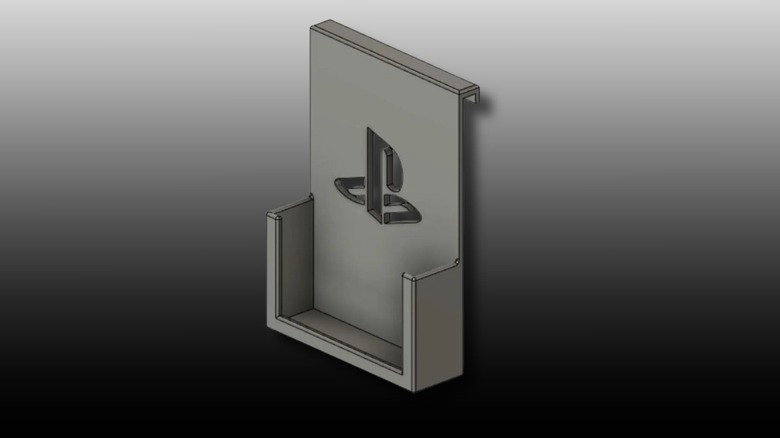
The internal storage of the PlayStation 5 is more than fast enough, and there's an easy-to-access M.2 port to expand its storage without compromising on speed. The issue is the price of M.2 SSDs with the current AI-driven memory chip shortage, so why not use the external SSD that's been stuck in the desk drawer collecting dust instead? The PS5 external HDD holder by WayneTarin is for Western Digital drives, but should fit a fair number of external SSDs and HDDs, and most 3D slicers support STL file modification if not. This mount keeps the drive tucked away neatly against the PlayStation 5's faceplate rather than it hanging around from a USB port, which reduces the chance of it failing and disconnecting.
This specific design fits drives with dimensions of 18.5 by 75 mm by 107 mm, according to its designer, who also included an updated file that allows for a bottom-entry cable, which can be a dream come true for cable management depending on which USB port is chosen on the PS5. It's always a good idea to keep external storage fixed and secure to ensure there's no accidental disconnections, which can lead to corrupt data if the drive is being written to at the time. This is a thin build that won't require infill — just print solid using PLA while picking a filament color that matches your PS5's faceplates.
External PlayStation 5 SSD enclosure
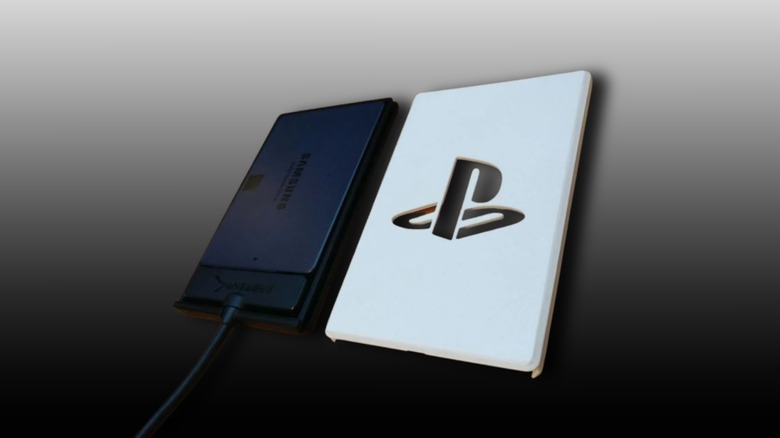
External hard drives stick out like a sore thumb, looking like plastic bricks harking back to the outrageous days of retro Mad Catz third-party accessories (you had to be there). To help with that, the PS5-themed SSD enclosure by Pjotrke can help provide a more cohesive look. The standard size fits 2.5-inch SSDs connected to a Sabrent USB 3.1 to SATA adapter, with the top cover featuring a PlayStation logo inlay to match the "sandwich" design of the PS5. Just make sure to use the correctly colored filament so the enclosure blends in with the console itself.
The designer even provided the STP files, meaning users can easily adjust the dimensions of the case in software like Fusion 360, with the option to import SVG files to add custom logos, change the branding, and even add a player's game tag for a personal touch. Pjotrke recommends using a low infill of 10% since the case isn't a load-bearing part, making it a quick and easy print. It's a great project to quickly test out a printer after calibration and to ensure a smooth-looking DIY project.