

Changing This One Setting Will Instantly Boost Your Kindle's Battery Life
Nothing ruins a reading session more than your Kindle dying right when the story is getting good. While this e-reader is designed with an impressive runtime lasting anywhere from a couple of days up to six weeks on a single charge, it still needs charging eventually. But what if you're traveling and nowhere near an outlet? Or if you want to settle into a long stretch of reading without getting interrupted?
There's one Kindle setting you should change to get the most out of its battery: Airplane Mode. It turns off your Kindle's wireless connections, so your device isn't constantly sending and receiving signals that can deplete the battery. In turn, you won't be able to get new books, sync your library, or use Kindle features like Wikipedia and Translate.
However, since your books are stored locally, Airplane Mode has no direct effect on the reading experience itself. You'll still have full access to your library, all while enjoying a longer runtime. In fact, one Reddit user reported that Airplane Mode increased their Kindle Oasis' battery life from two days to a week. Another Reddit user said their Kindle Scribe and Paperwhite can go from six days to a month with Airplane Mode on.
Airplane Mode is available from the Kindle 6th generation (which was released in 2014) and later. If you're not sure what version you have, you can check your Kindle model from the Settings. Once you've confirmed that your Kindle supports Airplane Mode, here's what to do next to activate it.
How to put your Kindle on Airplane Mode
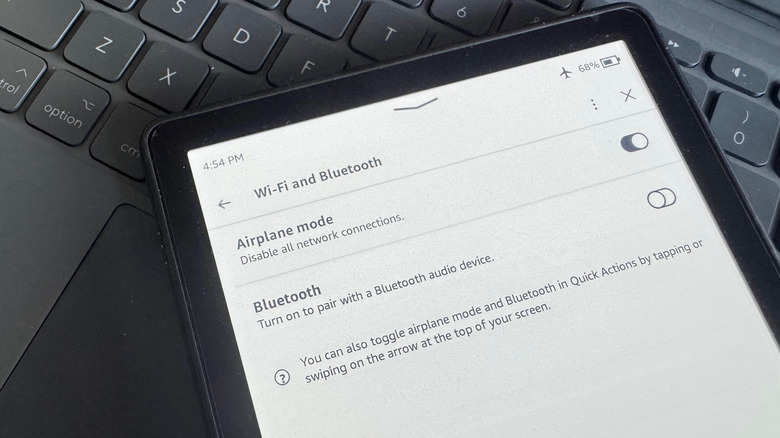
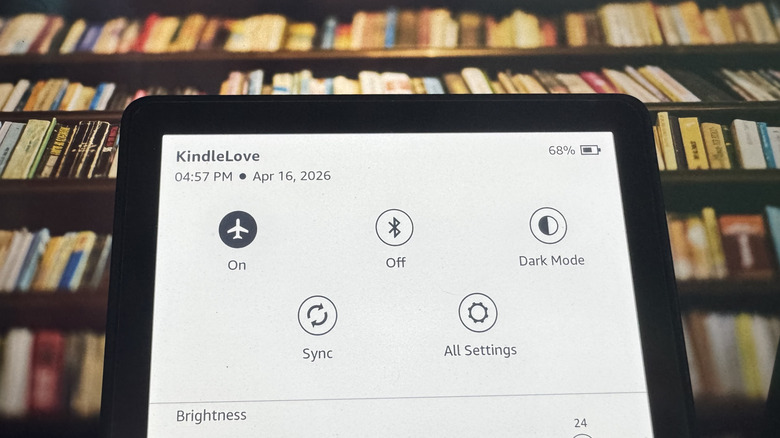
Turning on Airplane Mode on your Kindle is pretty similar to how you do it on your phone. On the Kindle home screen, open the Quick Actions panel by swiping down from the top. Then, tap on the airplane icon in the upper-left corner. If you're currently connected to Wi-Fi and have Bluetooth enabled, both will automatically turn off right away. An airplane icon will also appear in your status bar.
When you want to reconnect your Kindle to Wi-Fi — maybe to download books, sync your library, or browse the web — you'll need to switch off Airplane Mode first. Once you're done, it's best to put your Kindle back on Airplane Mode to make sure your battery lasts longer.
You can still use your Kindle's Bluetooth even after turning on Airplane Mode. This can come in handy when you want to use your Kindle's most underrated Bluetooth feature: Connecting to a Bluetooth speaker or earbuds to play your audiobooks or activate Assistive Reader on your regular books. Wi-Fi still stays off, though, but you get to enjoy listening to your books while still preserving the battery.