

4 Disadvantages Of A MacBook You Should Know Before Buying

We may receive a commission on purchases made from links.
Many see MacBooks as the be-all and end-all of portable computers, and for good reason. Apple's laptops are built to be long-lasting. In fact, they're featured on our list of dependable computers you won't have to replace for at least five years. MacBooks receive major software upgrades yearly, too, improving the overall usability and performance of the laptop. If you're already deep into the Apple ecosystem with an iPhone, iPad, and a pair of AirPods, MacBooks just make sense. They can increase your productivity by working seamlessly across devices.
But while MacBooks are pretty capable machines, they're not without some disadvantages compared to Windows laptops. The first — and biggest — trade-off is the price. MacBooks are undeniably expensive. And at that price point, you could get an equivalent, if not better, Windows laptop. MacBooks have additional drawbacks in both the hardware and software aspects. Before you go about buying one, it's important to know what these disadvantages are and how much they could affect your day-to-day use of the laptop.
Certain apps can't run on MacBooks

With macOS and Windows being two of the major laptop operating systems out there, many mainstream apps — such as Slack, Chrome, and Microsoft Word — are readily available on either platform. You'll generally have no trouble installing these apps and using them as you'd expect. That means for casual users who mostly rely on popular desktop apps or just use web apps, MacBooks can be just as capable as Windows laptops when it comes to software support. But for gamers and power users, it's a completely different story.
Some games don't have a macOS equivalent, so you can't install and play them directly on a MacBook. The biggest example of this is Valorant, which can only run on Windows PCs, PlayStation 5, and Xbox Series X|S. Fortnite, Counter-Strike 2, and Hogwarts Legacy also don't support macOS.
If you're an engineer or create CAD and 3D designs, you'll also be at a disadvantage with a MacBook. Major design software like SolidWorks and Autodesk Inventor are exclusive to Windows, forcing you to resort to less powerful alternatives. The same goes for users of niche apps like Microsoft Access and Microsoft Project. Many of Microsoft's apps support macOS, but Access and Project don't.
Aside from outright incompatibility with apps, macOS versions of certain apps may offer fewer advanced features. Take AutoCAD, for instance. Not every feature available on Windows — including Design Center, multi-windows, and rendering — is available on macOS.
MacBooks have limited ports
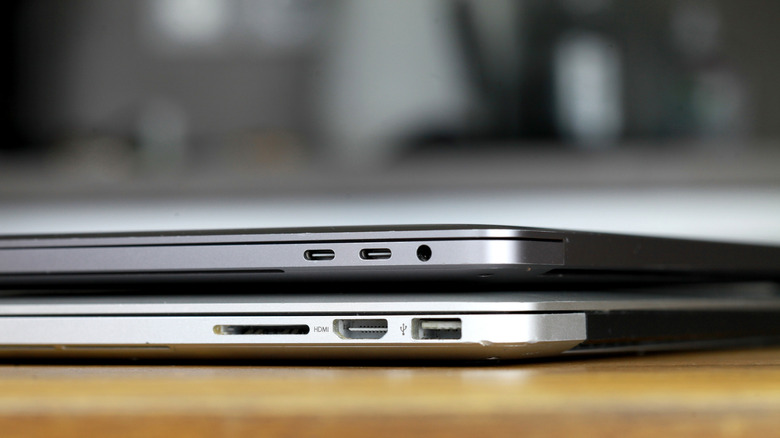
There's no doubt that the MacBook is a great machine, but as you use it, you'll likely start plugging in some accessories. Unfortunately, MacBooks aren't as flexible in that area due to their limited number of ports built in. On all three MacBook models available in Apple's 2026 lineup, most of the ports are just USB-C. The MacBook Pro does have am HDMI port and SD card slot as well, but that's it. USB-C ports are versatile and can be connected to all sorts of devices, from storage drives to monitors. But not every MacBook accessory in existence can be directly plugged into the USB-C.
Unlike many Windows laptops, MacBooks are missing two traditional ports: USB-A and Ethernet. USB-A ports are the primary way you can connect a USB mouse, printer, or desk fan to your device. The Ethernet port, on the other hand, is how you can use wired internet on laptops, which is usually faster and more reliable than Wi-Fi. MacBooks also don't include a Kensington slot — the hole on the side of the laptop that looks like a port but isn't. While this wouldn't really affect the performance, it's still nice to have for security reasons.
As a workaround to this MacBook limitation, you'd have to purchase a separate USB-C hub. This allows you to plug in more types of devices, all while using just one port on your MacBook. There are plenty of USB-C hub options on the market, such as the Anker 6-in-1 USB-C Hub or the Ugreen Revodok 6-in-1 USB-C Hub. When picking one, find a model with all the ports you know you'll use on a regular basis.
MacBook models have the same physical design

To the untrained eye, the MacBook Pro, Air, and Neo may all look the same at first glance. All three models generally have similar physical design and hardware build. This makes them great for general use cases, but in terms of variety and specialization, they're not as flexible. The MacBook Pro is the biggest among the three, with its wide screen and thicker chassis. The Air, just as its name suggests, is lighter, noticeably thinner, and smaller than the Pro. The Neo, on the other hand, is slightly smaller than the Air and comes in different colors like Citrus and Blush, which aren't available on the other models.
In comparison, Windows laptops — even those from the same brand — come with a host of hardware options and designs. If you want something lightweight but powerful, you can go for an ultrabook model. They're typically slim, but perform well enough for your daily productivity needs. If you're into gaming, you'd want a gaming laptop. They usually come with a cool-looking design, cooling systems, and a high-resolution display, although heavier than usual. If you like the portability of tablets but need the full computing power of laptops, a 2-in-1 laptop is just the thing for you. They're equipped with a touchscreen that typically supports a stylus and can be folded to become a tablet or completely removed from the keyboard. There are also business laptops with professional-grade durability and sophisticated security features, or rugged laptops designed to withstand the harsh outdoors. This wider range of laptop types allows you to pick one more suitable to your personal and work requirements.
You can't upgrade a MacBook
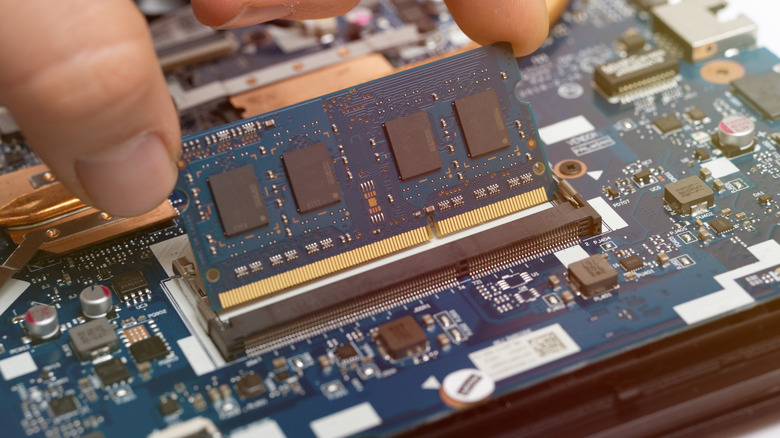
It has been several years now since Apple started shipping MacBooks with soldered RAM and storage components, to make the laptops as thin and portable as possible. This might be a plus for many, but the drawback is making MacBooks non-upgradable. With RAM soldered to the silicon, you can't simply buy a new module, open up the laptop, and replace the built-in hardware. Once you buy a MacBook, you're stuck with the exact same specs until you upgrade to a new device. While that might not be a problem in the first year or two, your needs could evolve over time to the point that your MacBook can no longer handle them.
To avoid this huge RAM problem when buying your next laptop, you might be better off with a Windows device instead. Some of the latest Windows models come with removable RAM and storage, particularly gaming laptops like Alienware 16 Area-51 and ROG Strix G16 2025 or business laptops like Lenovo Thinkpad T14 Gen 6. If you insist on going with a MacBook, its non-upgradability is one of the disadvantages you should consider before heading to the Apple Store.
It's best to be extra thoughtful about which RAM and storage tiers to go with. If you're a casual user and don't see yourself using the MacBook for demanding applications, base RAM configurations — 8GB on the Neo and 16GB on the Air and Pro — should be enough. If you'll be editing photos and videos, streaming, and gaming, aim for at least 32GB. For storage, you could likely get away with the lowest tier and just move some of your files to the cloud.