

Microsoft Is Giving Away Free 3D Print Files To Adapt Your Xbox Controller's Sticks
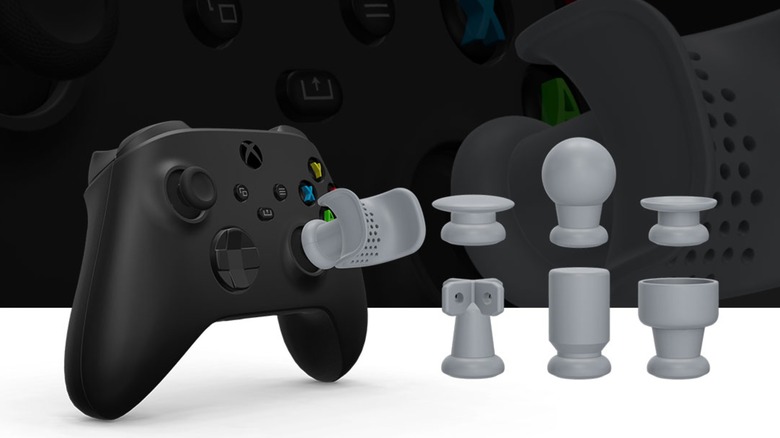
Many people can play video games with no problems, but certain physical disabilities make it difficult or impossible to use standard controllers. This often requires specialized peripherals such as the Xbox Adaptive Joystick or the PS5 Access Controller (one of Sony's weirdest controller ideas ever). Microsoft is now offering a new peripheral designed to let people with various physical disabilities play games — so long as they have access to a 3D printer.
Recently, Microsoft released a series of adaptive thumbstick toppers through the Xbox Design Lab website. These are not to be confused with accessories like the KontrolFreek FPS Performance Thumbsticks (which can upgrade your PlayStation 5 controller by increasing precision and accuracy). Instead, Microsoft's adaptive thumbstick toppers come in seven shapes suited to different disabilities. For instance, one topper is plate-shaped and intended for people who need body parts like their chins or elbows to manipulate objects, while another is goalpost-shaped and designed to control thumbsticks with palm movements.
Unlike other items available through Xbox Design Lab, adaptive thumbstick toppers aren't delivered as physical products. As the title implies, once you acquire the "item" (free of charge, mind you), you can download a compressed STL file from Xbox Design Lab that you have to unzip. Once that's done, you can plug the file into your favorite 3D printer program or send it to a 3D printing lab to turn it into a physical object.
How to acquire an adaptive thumbstick topper
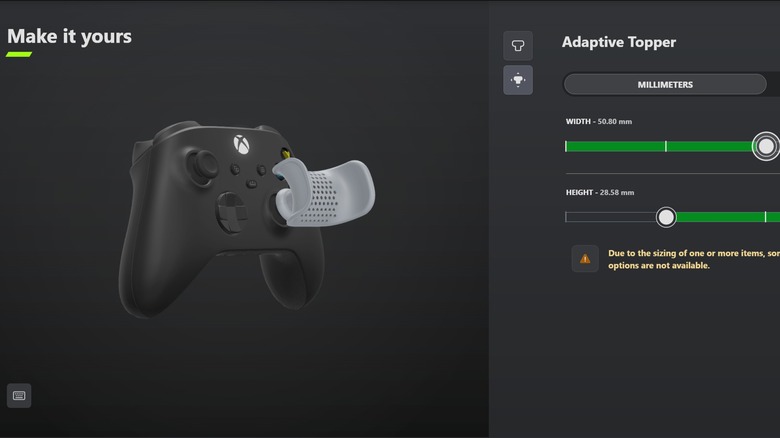
In order to obtain your own adaptive thumbstick topper, start by visiting the Xbox Design Lab site. Scroll down to the "Get Started" section and click on "Learn More" under "Adaptive Thumbstick Toppers. From there, pick whether you want a topper for a standard controller, an Elite controller, or an Adaptive Joystick. The difference between the designs is that the standard and Adaptive Joystick controller toppers come in three parts so they can fit over regular joysticks, whereas the Elite versions replace the thumbstick entirely.
Once you have selected your controller of choice, click "Design Yours." A new page will pop up where you can select your thumbstick shape. If you have trouble deciding, press the "Information" button (the "i" in a circle" next to the shape's name) to learn more about it. Next, click on either the icon that looks like a thumbstick with four arrows around it or the green arrow on the right side of the window to customize your thumbstick topper. Alter the "Width" and "Height" to pick the dimensions right for you (you can also choose between millimeters and inches), and move the mouse around while pressing down on the 3D image to look at it from different angles. Because of how the different toppers are shaped, some width and height combinations aren't available.
After you have finalized your topper, click the green button at the bottom of the window that looks like a checkmark over a controller. Give the product a name if you want, then click on the green shopping cart button to add the item to your cart. Finally, proceed to checkout. Fill out the onscreen information, and the zip file containing the STL data will download.
A few pointers for 3D printing adaptive thumbstick toppers
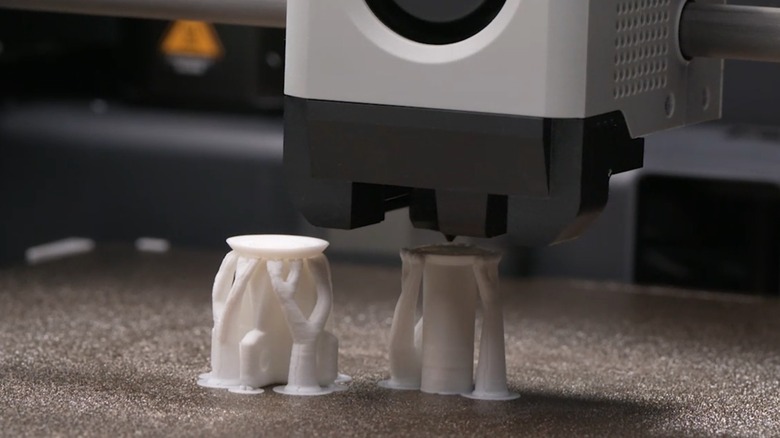
It probably goes without saying that if you don't own a 3D printer, you can still acquire an adaptive thumbstick topper if you send the files to a local printing lab. These locations are often reliable, and staff can probably deliver a better print than the average 3D printing hobbyist. However, this service will cost you money, so if you own a 3D printer, you are better off using it. But don't assume that just any settings will work.
Microsoft has provided several tips to help make the printing process as smooth as possible. First off, Microsoft recommends using an ABS material with 10% fill to make the accessory lighter without sacrificing durability. Furthermore, while you can customize the topper, Microsoft suggests ordering shorter and smaller ones to ensure the 3D printed parts are reliable.
When actually printing, you have two ideal orientations: right side up and upside down. The former gives the topper the cleanest finish, whereas the latter gives the accessory a better grip on the thumbstick. Furthermore, Microsoft recommends using organic or tree supports while printing and to avoid brim or raft supports, especially when printing Elite controller toppers — brim and raft supports can prove difficult to remove and damage the toppers. Finally, you don't need to scale the prints up or down; the STL files provide a 1:1 recreation of the final product. If you follow these instructions, you should make a durable and solid adaptive thumbstick topper every time. Barring random reasons that can cause any 3D print project to fail, that is; those can strike at any moment.