

5 Surprisingly Useful Android Apps That Aren't On The Play Store
With all the millions of apps on the Google Play Store, you're bound to find at least a handful that solve your needs. And if you're lucky, you might even have a host of options at your disposal, many of which have been downloaded millions of times and received consistently high ratings.
But while the Play Store is most people's default place for downloading Android apps, it isn't the only choice. There are actually several hidden gems that exist outside Android's official app store, all available for installation via Google's sideloading process. Unlike plenty of other apps from the Play Store, the third-party options listed below are mostly open-source and completely free to use — no upgrades, subscriptions, or one-time fees just to access more advanced features. If you're thinking about expanding your Android's functionality and want to explore outside the box, here are five surprisingly useful apps that you won't find on the Play Store.
WriteOn
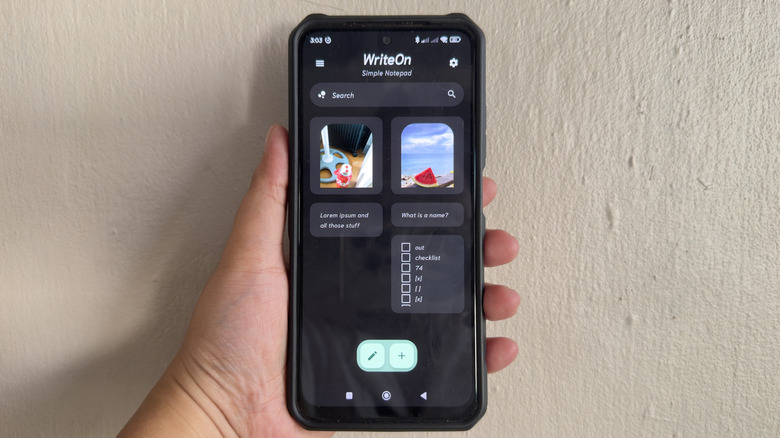
Taking notes on your Android phone usually means opening up Google Keep. But if you want an even more minimalist-looking note-taking app with more features, WriteOn might be a good fit. This app is a lot similar to Keep as it lets you format your notes with a checklist, numbered list, unnumbered list, and images. What makes WriteOn stand out, though, is the in-app calendar and calculator. You can view both right within a note, handy when you need to check dates while writing or do quick calculations without exiting WriteOn to hop on another app.
Other than creating regular notes, WriteOn lets you jot down temporary ones in the Scratchpad section. It's a basic text-only interface — no checklist or images. What you write here will be deleted once the app restarts, so that it doesn't clutter your notes list with items you don't really want to keep long-term. The Scratchpad is especially useful when writing down your group order at a restaurant or remembering your parking slot number. If you decide at the last minute you actually need the data you wrote here, you can export the note to a TXT file.
Another nifty feature included in WriteOn is Flashcards. It helps you review for an upcoming exam by displaying questions and showing you the answer afterward. You just need to build your database of questions and answers before starting the test. Unlike Keep, WriteOn gives you the option to save your notes as TXT, making them easy to transfer to and view on a different device like your computer or a friend's phone without WriteOn.
Fridgey
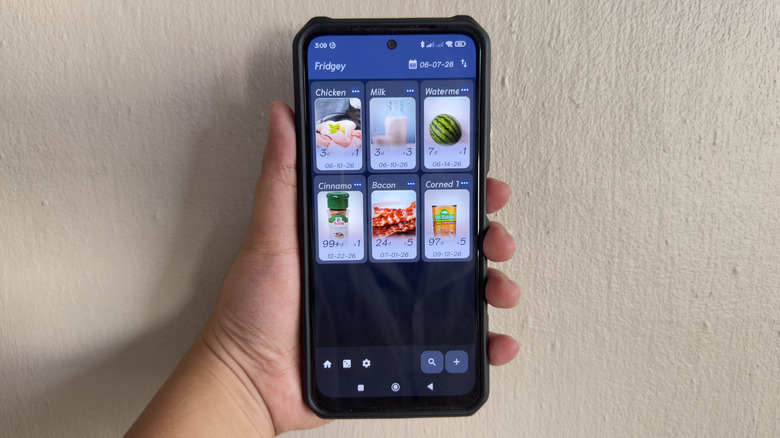
Keeping track of everything in your fridge and pantry is a job in itself. But all those different shelf lives and expiration dates don't really have to take up your mental space. There's one open-source Android app you can use to help you stay on top of your food stash: Fridgey. As an inventory app for your food, Fridgey creates a list of all the items you have on hand and sorts them by freshness. It puts the expired or soon-to-expire items at the very top, so the next time you go looking for food, you'll know to prioritize those products.
When creating the initial database, Fridgey asks for basic details to simplify the recording process. You just have to input the item name, quantity, production date or expiration date, shelf life (for production date), type of food, and image. By default, you have seven food types to choose from, including produce, seafood, canned food, meat, milk, cereal, and condiment. There's an option to add more food types if needed, though. The app also comes with preset shelf lives like three days and fourteen days, but you're free to add custom options to the list.
Once you're done recording all your fridge and pantry items, you should see the entire database on the Fridgey home screen. From here, you can decrease and increase the quantity of the items by selecting "Eat up" or "Supplement" from the item menu. If you use up all your stock for a specific product, it gets removed from the list, and you'll need to record it again the next time you go grocery shopping.
PrivacyFlip
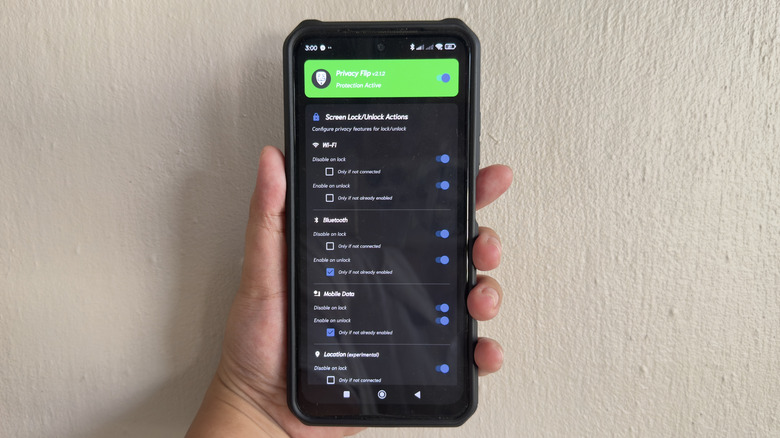
One thing you might not know about your Android phone is that even while it's locked, its Bluetooth, Wi-Fi, camera, and even microphone don't automatically stop working. Bluetooth and Wi-Fi remain connected and can still be used by apps. If you want to be extra careful about protecting your privacy, one Android app you should have installed is PrivacyFlip.
PrivacyFlip is a simple app designed to give you more control over what privacy features stay active when you have your phone locked. It allows you to "flip the switch" on seven critical Android privacy features: Wi-Fi, Bluetooth, mobile data, location, NFC, camera, and microphone. To prevent one from working when your device is locked, all you need to do is toggle on the Disable on Lock option. If you want to automatically enable the feature when you unlock your phone, make sure to switch on Enable on Unlock too.
Other than keeping your privacy features in check, PrivacyFlip features an option to help you save your battery. It does so by letting you enable battery saver whenever you lock your phone. When turned on, battery saver minimizes activities in the background, which, in turn, restricts some app features and saves your battery.
It's important to note that setting up PrivacyFlip isn't as straightforward as any other app. It's originally meant to work with rooted devices, but if your Android isn't rooted, it would take a couple of extra steps to activate PrivacyFlip. You'd have to go to a separate app (either Dhizuku if you have access to a computer or Shizuku if you don't have a computer) and follow the on-screen instructions there. But once you have PrivacyFlip ready to go, configuring its settings is as easy as one tap.
Timety
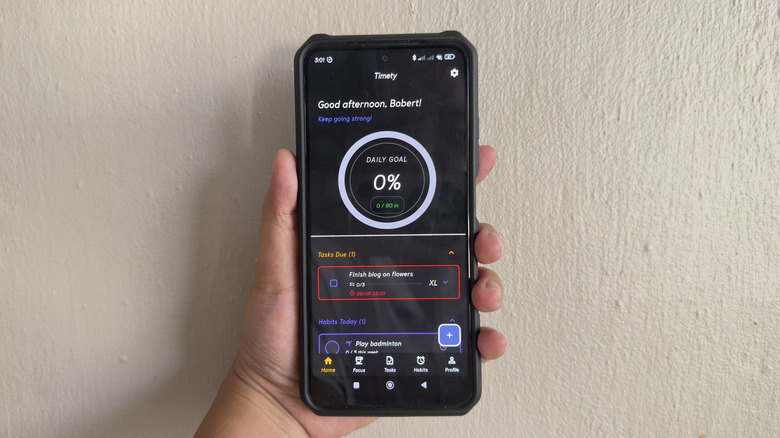
Timety is an Android productivity app with a to-do list, habit tracker, and focus timer all in one. Its to-do list section is more than just a typical checklist, as it comes with advanced details to keep your tasks organized. For one, you can opt to sort your tasks into custom categories. Timety also lets you set each task's priority and size (i.e., effort needed) from low/small to very high/very large, making it easier to pick which ones to do. If a task requires you to complete smaller tasks — like "cleaning the kitchen" means "putting away the dishes" and "wiping down the counter" — you can add subtasks to the main task.
Timety's habit tracker is just as detailed and customizable. For each new habit you create, you can set its custom icon, frequency (whether to do it daily or a certain number of times in a week), and a reminder. To make sure you don't skip a habit, Timety allows you to add a new habit to a habit stack. A habit stack is a group of habits done one after the other and usually starts with a habit you already do routinely (like drinking coffee in the morning or brushing your teeth at night). With habit stacking, you tend to remember the new habit since it's "stacked" with an old habit.
Finally, Timety's focus timer is essentially a counter for how many minutes you've focused for the day. It can run as a simple stopwatch that you start as soon as you start working, a flexible timer that counts down from a set time, or a Pomodoro timer that gives you 25 minutes of focus and five minutes rest alternately.
Lune
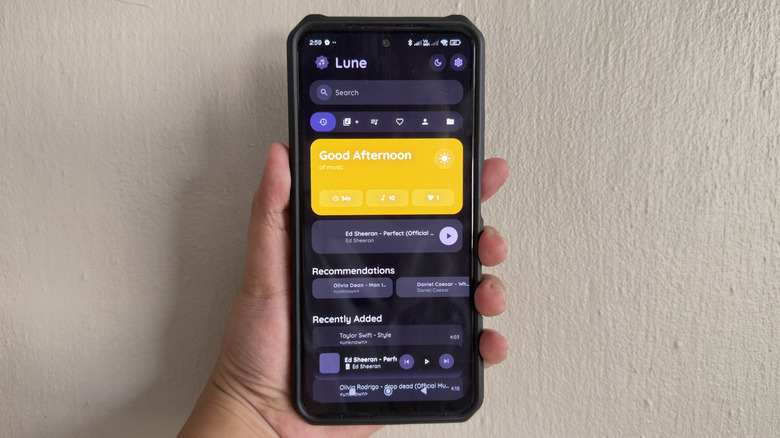
In a world where music streaming apps like Spotify and Apple Music reign supreme, there are still some listeners who want to play their own collection of locally stored songs. If you're one of those people, you'd appreciate Lune. This app is a completely offline music player that only plays songs saved on your phone, with support for Hi-Fi audio.
Like most other streaming apps, Lune lets you view your songs in several different ways. You can check the home screen, where you'll find the songs you recently added to your music folder, along with some recommendations to listen to. There's also a tab with all the songs stored in your music folder. Feel free to sort them by title, artist, duration, and date added if you want to play them in order, or press the shuffle button to play them randomly. If you want to group songs together, Lune has a Playlist tab for your custom playlist and a Favorites tab for all the songs you've marked as favorites. Meanwhile, in the Artist tab, your songs get sorted into the different artist folders to make them easier to find.
Lune's music player itself is just as versatile as other music apps. From the player menu, you can adjust the equalizer, turn on crossfade and automix, set a sleep timer, and even speed up or slow down the audio as needed. If you allow Lune's notification permissions, you'll be able to control the music playback from the notification panel and lock screen too.
How we ended up with these recommendations
To create this list, we mainly focused on open-source apps with Android support. We also looked for apps you'll likely use every day, whether that's for productivity or entertainment. Since open-source apps don't usually get a star rating on F-Droid (the Google Play Store alternative but for open-source software only), we considered the app's update history instead. It should have been updated within the past year, which can indicate that it's in active development and has ongoing support.