

15 Hidden Apple Intelligence Features Apple Didn't Talk About At WWDC

At Apple's WWDC 2026 keynote, the tech giant revealed plenty of fresh features that users can expect to get in the iOS 27 update coming in the fall. During the keynote, Apple mentioned all sorts of platform improvements, like redesigned app icons and fixes for Liquid Glass. It also introduced new child safety features for the iPhone. But among all the additional software capabilities announced, the biggest highlight is the upgraded Apple Intelligence.
Apple's AI feature suite is getting a major glow up in iOS 27 thanks to Apple's partnership with Google. One of the most notable Apple Intelligence-powered features to come to your device is a smarter Siri, dubbed Siri AI. In iOS 27, you'll get a dedicated Siri app, more capable interactions between Siri and your apps, and personal answers that draw upon personal context like content in your messages or email.
Apple Intelligence is also making its way into most, if not all, of your different built-in apps. For instance, you can now create a custom extension in Safari just by describing what you want, use Image Playground to generate wallpapers and contact posters, and get suggestions for your next actions in Mail. Apple unveiled more than 20 new Apple Intelligence capabilities in the WWDC 2026 Keynote, but it didn't actually talk about everything. Here are 15 hidden features powered by Apple Intelligence.
What else can the upgraded Apple Intelligence do?
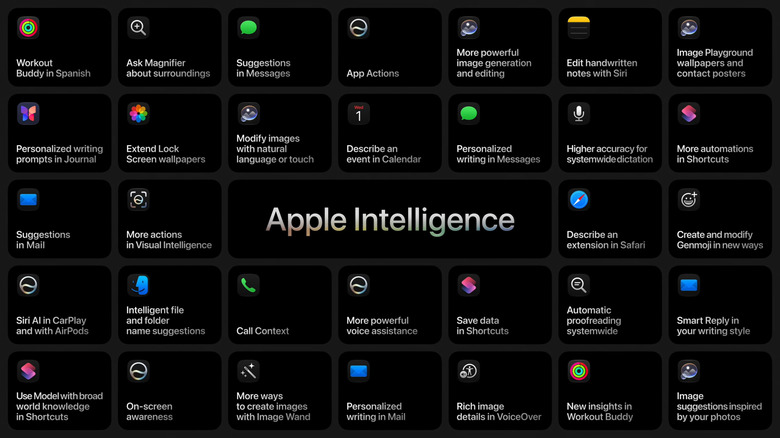
The new-generation Apple Intelligence is integrated into more essential iPhone apps, and there are at least 10 use cases Apple didn't present at the WWDC 2026 keynote:
- Shortcuts: With Apple Intelligence, the Shortcuts app gains more automations, the ability to save data, and the use of an AI model with access to broad world knowledge.
- Photos: You can now extend your Lock Screen wallpaper using Apple Intelligence, presumably to fill in the details if you want more area around the subject.
- Notes: Siri can edit your handwritten notes for you. Plus, the Image Wand is updated to generate images in new ways.
- Fitness: Workout Buddy now supports Spanish. You also get new insights from the Workout Buddy feature.
- Magnifier: The Magnifier's camera view can be used to learn about your surroundings.
- Journal: The app provides you with personalized writing prompts.
- Messages and Mail: You'll get personalized writing with the help of Apple Intelligence.
- Genmoji: Apple Intelligence offers new ways you can make and edit your Genmojis.
- Finder: You'll see suggestions for file and folder names.
- Accessibility: VoiceOver can now describe images in greater detail.
Apple is yet to announce how exactly these hidden Apple Intelligence will work, and specific details about what the features will do. We'll just have to wait until the stable iOS 27 arrives to learn more.