

iOS 27 Turns Your HomeKit Security System Into A 4K Powerhouse

In its WWDC 2026 Keynote, Apple revealed that Apple Intelligence — which is arguably one of the best iOS 27 features coming to the iPhone — is entering its best era yet. It's now smarter and integrated into more iPhone apps, including Safari, Shortcuts, Messages, and even Camera. But among all the Apple Intelligence features coming to iOS 27, one specific capability homeowners will appreciate is its expansion into HomeKit Secure Video.
HomeKit Secure Video is essentially a way for users to record security camera footage and store it on iCloud, ready for viewing across other Apple devices. At the moment, it only comes with a couple of features, such as activity zone creation, end-to-end encryption, and face recognition. It can also detect people, cars, or pets in the frame with the help of the on-device intelligence of the HomePod or Apple TV 4K (whichever one you're using as your home hub). But with Apple Intelligence, HomeKit Secure Video cameras become much more capable and convenient to manage.
Apple Intelligence and the Home app
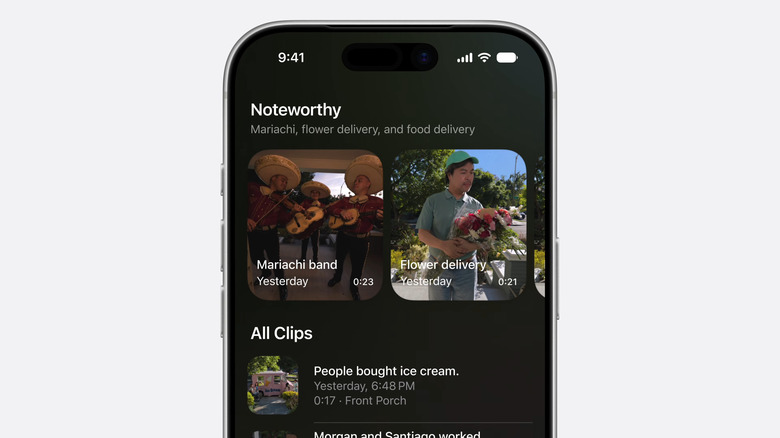
With the Home app utilizing the upgraded Apple Intelligence, HomeKit Secure Video cameras now support 4K resolution and include more AI-powered capabilities. One of its biggest new software features is the text description. Home can now better understand what's happening in footage and tell you who the person in the frame is and what they're doing. That means you won't have to watch each of the saved clips just to find the one you're interested in. Simply type a keyword in the search bar — like Sarah, flower delivery, or ice cream truck — and Home will pull up relevant footage showing your keyword. You can even browse through all the clips and read the descriptions next to them to check the activities your cameras captured.
To better protect your home, a Noteworthy section is created right above this full list of clips. It contains moments that the Home app deems more important and recommends you review. Using Apple Intelligence, the Home app can also group together clips from different cameras that might be involved in the same activity, such as a friend coming over who started lounging on the couch to watch TV. This way, it's easier to see the situation as a whole.
Beyond camera features, Apple Intelligence in the Home app keeps your Home notifications more organized as well. Instead of seeing separate notifications for every detected activity, you'll only get a single alert on your iPhone. While the activity is happening, though, the message on that single alert is updated to reflect the real-time changes. In turn, your Lock Screen and Notification Center won't be cluttered with multiple alerts mentioning the same general activity — like dad arriving at the driveway, entering the front door, and then leaving again.