

What Do The Symbols On An LG TV Remote Mean?
Your LG TV remote is one of the most important parts of your home entertainment setup, but it's also often underutilized. Sure, you always reach for it to turn on and off the TV, adjust the volume, and change the settings. But outside of these actions, it's mostly sitting on your TV stand, untouched. Part of the reason might be the confusing buttons. The symbols on your LG TV remote aren't as intuitive, so many users may ignore them altogether.
There are, of course, a handful of symbols you're already familiar with: the back button, which is an arrow pointing to the left, the Home button, which, as its name suggests, is shaped like a house, and the voice command button, which looks like a microphone. These are standard buttons you'll find across LG TV remotes (and most other major TV brands, for that matter), so they're easy to recognize.
The same can't always be said for the rest of the buttons on your remote, though. But don't worry — if you're wondering how to use your LG TV remote to its full potential, here's a detailed guide on what the symbols on your LG TV remote mean.
2026 and 2025 Magic Remote Control
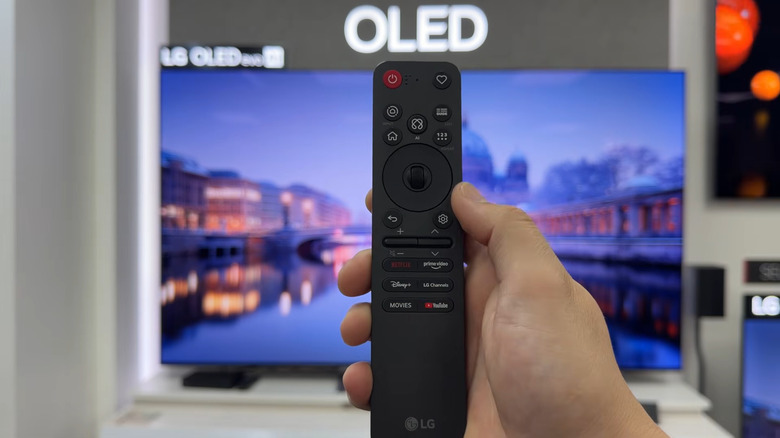
Compared to older LG TV remotes, the 2025 and 2026 Magic Remotes are much simpler with fewer buttons. They also look nearly identical, save for the top-right button and the branded shortcut buttons. Here's what the symbols on these LG TV remote models mean:
The box with a question mark symbol (2025 version) is the Accessibility button. Pressing it once launches the Accessibility app and long-pressing it opens the Accessibility Shortcuts panel. The heart symbol (2026 version) represents the Custom Menu, which means the button can be assigned to one of five actions: mute, input list, Accessibility app, accessibility shortcut, and live TV. You can set one action for a single press and another action for a long-press. To customize the button, go to All Settings > General > Accessibility > Control Features.
The home symbol with a circle means Home Hub, designed for managing your connected devices, such as your smart home devices. You can also hold down the Home Hub button to switch to a new input source. The Guide symbol means TV Guide. If you click it once, it shows the TV Guide in full-screen. If you long-press it, it displays upcoming programmes.
The 123 button provides access to more actions. On the home screen, this opens the Options panel with shortcuts to the Home Settings, Quick Guide, and User Guide. On any other screen, it brings up options specific to that page. You can also long-press the 123 button to enable the Audio Description (AD) or Secondary Audio Program (SAP). The LG TV remote symbol with the squiggly lines is the AI button that displays recommended content. It also lets you control the TV with voice commands when you hold it.
2024 LG Magic Remote Control and earlier
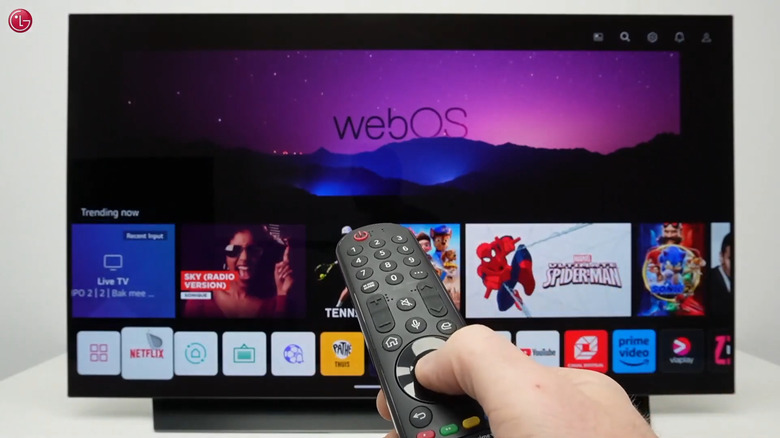
If your LG TV remote has colored buttons on it, then it's one of those models released in 2024 or earlier. These come with a complete number pad and multiple buttons with all sorts of other symbols. To better understand how to use these special-symbol buttons, check out this quick guide to the symbols on your LG TV remote:
The Guide symbol allows you to open the TV Guide with one press and the saved Programs list with a long-press. The remote button with three dots opens more remote functions, which include starting a recording, opening the program list, and accessing the TV/Radio option. If you hold down the button, it can turn on Audio Descriptions or Secondary Audio Program if it's available in your country.
The plug symbol next to the microphone is for accessing the input options. You can also use it to open the Home Hub with a long-press. The 0 button doubles as a shortcut to edit the Quick Access buttons. The number buttons on your remote can be assigned Quick Access shortcuts, like launching an app or switching to a specific HDMI input. When you press and hold the 0 button, you can then delete existing shortcuts or assign new ones.
The mute button, when pressed and held, can be used to bring up the Accessibility app. The N symbol at the bottom means your LG TV remote is NFC-enabled. This lets you quickly pair your TV to the LG ThinQ app on your phone by simply placing it on the symbol on the remote. Just make sure your mobile is also NFC-enabled.