

4 Office-Ready Laptops That Can Eat Chromebooks For Breakfast

When it comes to choosing an office-ready laptop for work, it can be easy to fall back on one of the best Chromebooks available. However, there are major disadvantages to choosing a Chromebook, with some hardware deliberately lacking due to the cloud-based nature of the operating system. Opting to go with another operating system can open the door to increasing your productivity, as you won't be jumping through hoops to find an equivalent app.
This isn't to say Chromebooks should be completely discredited. They serve a particular function and have become incredibly popular in the educational sector. They're cheap and they get to the point, but once you get into the office and need to work with a particular piece of software, it might not be compatible with ChromeOS. It's a huge disadvantage of Chromebooks, especially when it comes to professional software.
Of course, prices are going to be massively skewed at the moment. As the AI data center tech hoarding crisis impacts tech in almost every sector, non-ChromeOS laptops will be more expensive. That said, one of the top recommended Chromebooks by PC Mag, the $769.99 Acer Chromebooks Plus Spin 714, ventures into the price range of some of the laptops we'll be recommending, and these aren't as hampered by the operating system. We've attempted to keep the prices in line with what you'd expect to spend on a high-end Chromebook, but fair warning, that's not totally doable right now.
MacBook Neo

The new kid on the block for best-in-class budget laptop, Apple's MacBook Neo starts at $699 (or $599 for students). It packs a weird set of specs: 8 GB of RAM and a processor, the A18 Pro, that you'd usually find in iPhones. However, despite the low-looking specs, the tightly closed macOS ecosystem thrives, bringing a decent chunk of power for a massive variety of tasks. Would you be editing 4K video or intense CAD files? Probably not. Light content creation and working with productivity apps or communication programs? This will fly.
In tests with comparably priced devices, like the Framework 12, the MacBook Neo trounces its Windows counterparts in benchmark tests, despite only wielding the equivalent of an iPhone chip. As is the case with other alternatives coming out in its budget class as well, like from Dell, when Windows devices are shipped with only 8 GB of RAM like the Neo, they begin to suffer due to the OS' power demands.
But this isn't a MacBook lite or something equipped with a stripped-down version of macOS. It's running the full suite, with access to any app you'd run regularly on any other macOS computer. Where it falters is its port selection, with two regular USB-C ports, and one of those is rated at USB 2. Maybe use that one for charging, freeing up the faster port for USB hubs and docks.
MacBook Air M5
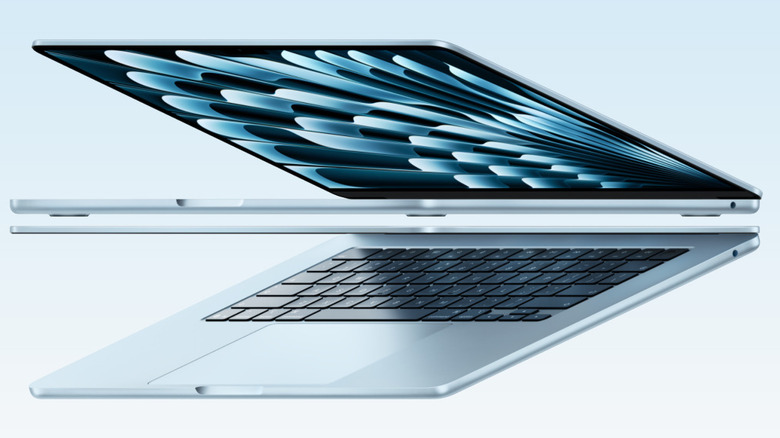
Two Macs being recommended? You better believe it. In 2020, when Apple swapped over to its own processors, the M-series, the original MacBook Air quickly became a top recommendation. Lightweight, relatively low cost, and punching above its own weight. That seat has been claimed by the MacBook Neo, but the MacBook Air's latest iteration with an M5 chip is still a killer purchase when it comes to an all-around device that won't especially break the bank.
Starting at $1,299, the MacBook Air M5 has been rated as one of the best laptops by Wirecutter — and in BGR's own review, we said that it was the necessary step up from the Neo for those who need more juice. It might not be a budget-friendly device, but it's a great middle step between the Neo and the now nearly $2,000 baseline MacBook Pro.
The M5 chip gives the Air enough power to run all your apps without having to worry about how they'll perform. These chips have a long shelf life, and Apple, while happy to cull old hardware, is still maintaining the original M1-based devices six years on. If you're in need of a device with a long tail and decent enough guts to power through most tasks, the MacBook Air M5 is the way to go.
Framework 13
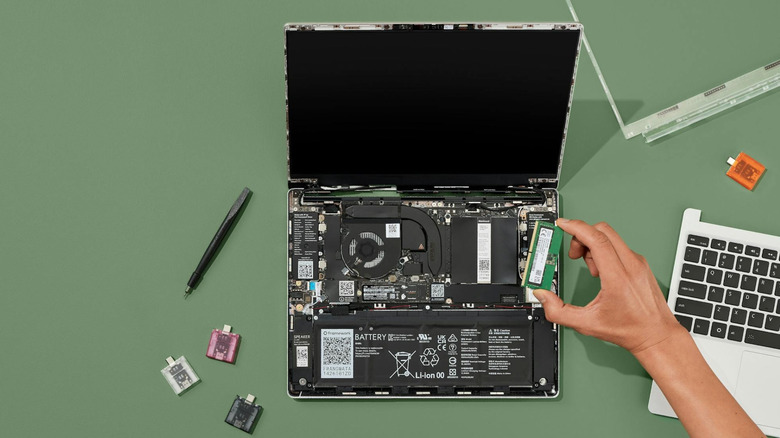
The Framework 13 is an incredible option for those who want some form of sustainability out of their devices these days. Fully repairable and upgradable, the Framework 13 can be as loaded as you need it to be. Aside from its upgradeable guts, it sports four USB-4 ports that act as a sort of hub. You can choose from a variety of expansion cards, like USB ports, video output, or storage.
While it won't blow anyone's socks off in terms of performance or price, what you're getting here is a laptop that will outlast any other on this list. Once the innards start to meet the upper ceilings of what you need out of it, you can opt to upgrade the mainboard, bringing with it the latest tech. The old mainboard can then be converted into a makeshift desktop PC for you to maybe turn into something else, like a media server.
Alternatively, there's also the Framework 13 Pro, which adds a nicer keyboard, touchscreen, and uses LPCAMM2 memory, which is what is both driving up the price and causing issues with availability. That said, the Framework 13 is a solid device that supports both Windows and Linux, and it can be outfitted to exactly your needs. The prebuilt version starts at $1,049, and the DIY version with an AMD Ryzen chip comes in at $849. There's also a DIY version with an Intel Ultra Series 1 starting at $799, but that's not something we'd recommend in 2026 for office use. With the DIY version, anticipate spending around $1,300 once RAM and the SSD are added.
Dell XPS 13

Dell's new XPS 13 brings the laptop down to around the same pricing as high-end Chromebooks and the MacBook Neo. While comparably priced, these will trounce Chromebooks in terms of what you can do on them, but also still maintain a lengthy battery life. Not the most powerful option on this list, the Dell XPS 13 is beaten in terms of raw power by the MacBook Neo, so we'd recommend ignoring the $699.99 version unless you want to go through some hoops to get Linux working. Windows is notorious for hogging up resources, and that 8 GB of RAM isn't going to get you far.
That puts the budget XPS 13 at a minimum of $899 or $799 for students, but at least you'll be secure in knowing that it won't flop out on you because of the underlying operating system. These make for great office laptops, with two USB-C ports ready for charging, power delivery, and DisplayPort 2.1, so you're not limited to a single USB-C port like on the MacBook Neo.
Where the Dell XPS 13 is a hit is in terms of efficiency. In Jeff Geerling's tests of the device, he found that with the XPS 13 at 50% brightness and idle, it runs at 3 to 4 watts. That dips further once the screen is off and only goes up 1 to 3 watts once Wi-Fi and video playback are introduced. When running compute efficiency tests, Geerling also found it came second out of every device tested, beaten only by the Mac Mini M4. Essentially, great battery life, even when it is being pummeled by software.
Methodology

The article was put together by leveraging the author's experience reviewing and working with PCs and laptops in professional capacities, along with third-party information from the web. This included gathering information from independent reviews, customer questions and reviews, and other coverage involving the laptops.
A broad spectrum of devices was considered, discounting any laptops that might have a gaming focus to them. As explained in the introduction, prices have skewed more expensive in nearly every facet, but laptops were chosen within that price range when we were able. Alternative features like 2-in-1 and touchscreens weren't considered; instead, we opted for a baseline, simple machine that will suit office work the best.