

5 Of The Best Anker Accessories For MacBook Users

We may receive a commission on purchases made from links.
Apple's MacBook lineup is pretty popular among folks who want a no-nonsense and powerful mobile computer with solid battery life and excellent build quality. Although MacBooks are pretty great on their own, you can enhance their functionality and everyday experience quite a bit with the right set of accessories. Anker, the mobile accessory brand, offers several products that work well with MacBooks, including its popular wall chargers and power banks. The company's accessory portfolio includes gadgets like USB-C hubs, Thunderbolt docking stations, and Ethernet adapters, which are fully compatible with macOS.
Anker accessories are generally well-liked for good build quality and reasonable pricing. The company also offers a 30-day money-back guarantee for undamaged products purchased directly from it and a standard limited warranty. If you're looking to expand your MacBook accessory arsenal, we've handpicked some of the best options that Anker has to offer, after carefully considering the feature set, buyer reviews, and expert opinion.
Anker 737 Power Bank
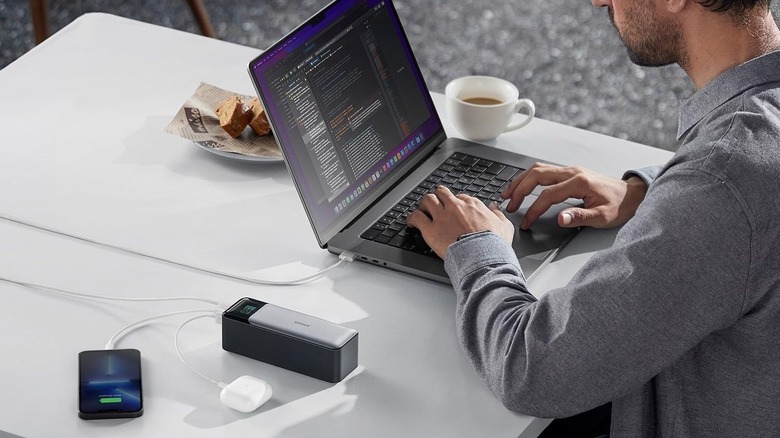
If you're often away from wall outlets and need something to keep your MacBook going, Anker's 737 Power Bank is worth considering. It comes with three USB ports, including two USB-C, which you can use to charge different devices, including your MacBook. The USB-C ports, when used individually, can deliver up to 140 W of power, enough to charge every single MacBook model, including the Pro versions, at top speed. The power bank also meets TSA's battery restrictions for flights. As a result, you can travel with it in your carry-on without issues.
You can also charge the power bank pretty fast, as it supports 140 W charging; however, you'll need a wall adapter of that wattage to leverage the feature. Additionally, you get a built-in display that can tell you the remaining battery, how fast the connected devices are charging, battery health, and more. It's important to keep in mind that while the power bank has a marketed battery capacity of 24,000 mAh, the rated capacity is only 13,500 mAh. As a result, you'll only get around 13,500 mAh worth of battery backup, which is enough to fully charge a MacBook Air.
The Anker 737 Power Bank costs $110 at list price and has received a good average buyer rating of 4.4 out of 5 on Amazon. Shoppers with MacBooks are generally happy with it, appreciating its fast charging, smart display, and the availability of multiple charging ports. However, buyers do note that it's chunky and heavy and stops charging if you connect a device to top up.
Anker Prime TB5 Docking Station
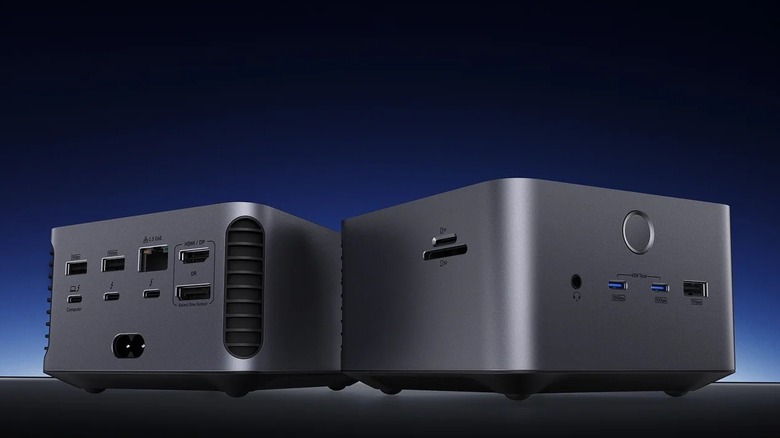
If you're looking to improve the port selection of your MacBook or set everything up for a desktop experience, Anker's Prime TB5 Docking Station can help. It's quite powerful and comes with an excellent port selection, including two Thunderbolt 5 ports, two USB-C 10 Gbps ports, one HDMI 2.1 port, and one DP 2.1 port. You also get a 2.5 Gbps Ethernet port and three USB Type-A 10 Gbps ports. Plus, the dock can charge the connected MacBook and supports up to 140 W charging. It's important to remember that this docking station works best with Thunderbolt 5 ports. While it'll work with older Thunderbolt ports, the functionality will decrease, as those ports have a lower bandwidth.
Experts from MacRumors, Apple Insider, and Tech Radar have good things to say about its solid construction, excellent port selection, and power delivery support. However, there are some concerns about its $400 price tag, slow SD card slot, and bulky design. Amazon shoppers have also given the docking station a reasonable average rating of 4.1 out of 5. If the Anker TB5 Docking Station doesn't fit your budget, you can consider the Anker Nano Docking Station as an alternative. However, as it's not a Thunderbolt dock, it lacks some features, the primary being its inability to extend your MacBook's display beyond one extra screen.
Anker Nano USB-C Hub
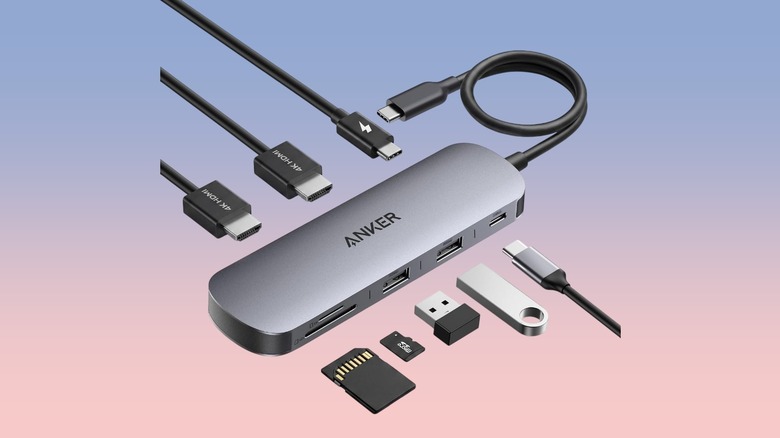
Whether you don't want to invest in a massive docking station or just need something portable to expand your MacBook's port selection on the go, the Anker Nano USB-C Hub is worth considering. It adds seven ports to your MacBook; however, one USB-C port is limited to power input, which can take up to 100 W from a wall outlet and charge your MacBook at up to 85 W. Other ports include one USB-C 5 Gbps port, two USB Type-A 5 Gbps ports, one HDMI port, and two card slots. It works with every single MacBook model, including the Neo.
Another highlight of the USB-C hub is its sleek and compact aluminum chassis, which not only looks good but also helps with heat dissipation. The Anker Nano USB-C Hub costs $36 at list price (available for $30 at the time of writing) and has garnered an average rating of 4.5 out of 5 on Amazon. Buyers like its port selection, pricing, and build quality. However, some folks complain about its reliability and getting defective units.
Anker Charger (140W, 4-Port, PD 3.1)
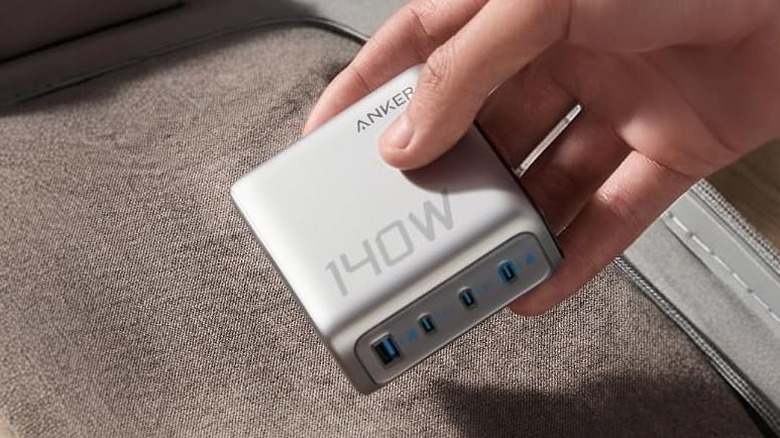
Thanks to Apple's support for USB Power Delivery (USB PD) in all MacBook models, you aren't limited to the first-party power bricks and can choose a charger that meets your needs. Anker has a pretty decent option in its 140 W power brick that packs four ports to juice up multiple devices simultaneously. Moreover, as the name suggests, it can deliver up to 140 W of power when using a single port, which is enough to top up any MacBook at top speed. As for other features, there is a USB Type-A port as well, which will come in handy to charge any accessories or peripherals.
Another notable feature of the Anker offering is the built-in smart display that provides information about the power being sent to the connected devices as well as the total power output of the adapter. The company also supplies a USB cable in the box. Experts from Tech Radar and MacWorld also like the Anker wall adapter and its multi-port fast charging.
The Anker 140 W charger will cost you $80, and you can choose from two color options. Amazon shoppers have rated it at 4.4 out of 5, with folks highlighting its charging speeds, built-in smart display, and build quality. That said, a small selection of buyers note getting defective units and overheating issues.
Anker PowerExpand USB-C to Gigabit Ethernet Adapter
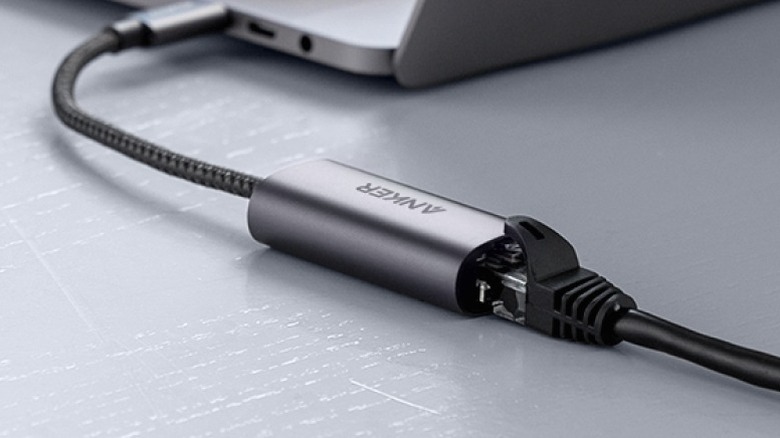
There are some clear advantages of going with an Ethernet connection over Wi-Fi on your MacBook, as you get a more reliable connection and lower latency. However, Apple doesn't include an Ethernet port on any of its current MacBooks. Fortunately, there is an easy fix for this. You can either go with the Anker dock that we mentioned, or you can grab the Anker PowerExpand USB-C to Gigabit Ethernet Adapter to simply convert the existing USB-C or Thunderbolt port to an Ethernet port for your needs. It's easy to use, lightweight, and compact. It also uses nylon braiding for better cable durability.
Unfortunately, as this is a Gigabit Ethernet adapter, you are limited to 1 Gbps or lower speeds, and if you have a faster connection and want to enjoy the same speeds on your MacBook, this will act as a bottleneck. In such a case, you'll be better off getting a faster adapter.
The Anker PowerExpand USB-C to Gigabit Ethernet Adapter is available on Amazon for $17. It has also received an excellent average rating of 4.8 out of 5 from Amazon shoppers, who highlight its seamless functionality and reliability. However, some shoppers complain that their units broke or stopped working within weeks or months of use.
How we selected these Anker accessories for MacBooks
Anker offers a wide range of accessories that you can use with your MacBook. However, not all accessories deliver the same experience or are equally compatible. While picking up our recommendations, we focused on accessories that work with all MacBook models and can come in handy for the majority of users. We consulted buyer reviews and expert feedback, when available, to refine our selection. Finally, all our recommendations have received an average buyer rating of at least 4 out of 5 on Amazon, indicating that they are generally well-received among users.