

Why Do Some USB Ports Have A Circle Symbol?
We may receive a commission on purchases made from links.
To find the ideal USB port for a specific purpose, you can fumble around plugging the connector into various ports, or you could simply look at one of many indicators that tell you precisely what port version and capabilities you'll get. Sure, USB Type-C ports look very different from USB Type-A, but each of those port standards has several versions. To tell them apart, you can look at the color — every USB port type has a different color — or you can look at the symbol next to the port, if there's one available. Those symbols include the standard USB trident, the trident with variations like 'SS' or numbers, a lightning bolt, and on newer ports, a circle with a number — technically a half circle. That circle symbol, which surrounds a number like 20 or 40 and has a USB trident protruding from one side, indicates a USB4 port.
USB4 is one of the newest specifications, and it uses the USB Type-C shape. The reason why this distinction is important is that, again, there are several versions of USB-C, each with unique capabilities. USB4 supports higher data-transfer speeds and higher power delivery, often denoted by the number on the symbol. A circle with a 20 is telling you it's a USB4 port that can handle speeds up to 20 Gigabits per second (Gbps), whereas a circle with a 40 indicates that it can handle nearly double — up to 40 Gbps. USB4 also natively supports the PD standard for fast charging, with up to 240 watts of power.
The circle symbol is your best option for high speed data transfers and fast charging
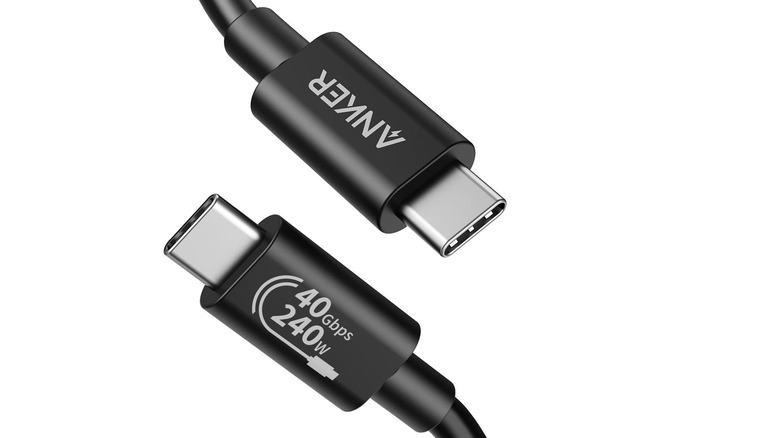
If you see the circle or half-circle icon with a number, that's the port you want to use for data transfers and high power delivery. Do note that you will need a compatible cable as well; USB cables often have the same symbols printed on them, and if they don't, the manufacturer will often list the specifications, such as maximum data transfer rates and power output capabilities. This is why you want to avoid cheap or generic USB cables, and also why it's not really safe to charge your phone or devices with a cheap USB cable either.
There is another circular symbol that can appear near USB ports. It's the power symbol – a circle with a line through it. If and when you see a power symbol near a USB port, often right next to the USB trident, it means the port is always-on, so it will charge and power devices even when the computer or core system is switched off, because it's always receiving power. Teal, red, and yellow colors on the USB ports may also indicate an always-on charging port. Learning the symbols, colors, and varying indicators will really help you navigate the world of USB standards and specifications, which, admittedly, can get quite confusing at times.