

4 Disadvantages Of The Steam Frame You Need To Know About
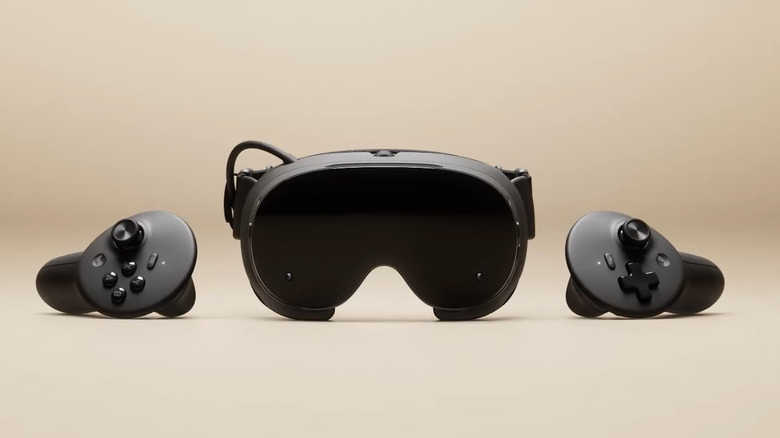
The Valve Index revolutionized what it meant to game in virtual reality (VR) back in 2019, but it's been seven long years since then. There have been other great VR headsets released since then, but fans of the original Index had been waiting for Valve's next entry in the VR space. Valve revealed this new device last year, and now, the Steam Frame is finally available for purchase.
User reception toward the Steam Frame has been mixed. For many, it's a worthy successor to the Valve Index and a VR headset that dominates many others when it comes to gaming. This is true in certain aspects. It provides better latency than most consumer wireless VR devices on the market, its use of foveated streaming allows more efficient bandwidth management, and many consider its PC game streaming experience to be among the best. If all of that wasn't enough, it even has built-in processors that let it run games locally to act as a standalone gaming device.
However, just as there are many who praise what Valve has done, there are also those disappointed by certain choices. The device carries a premium price tag, for example, but doesn't bring any significant hardware upgrades over existing standalone VR devices. There are also many areas where it falls behind competitors, such as visual quality and battery life. It's still one of the most complete packages for a gaming-centric VR headset, but there are some things you should know and be mindful of before getting a Steam Frame.
1. A price that will break your wallet

Console prices have been rising, largely due to the rapid scaling of AI infrastructure and a shortage of RAM. We got a glimpse of this with the Steam Machine being incredibly overpriced. Unfortunately, the Steam Frame's cost isn't its saving grace either. The device starts at $1,059 for the base 256 GB model and goes up to $1,299 for the 1 TB variant. It's certainly not the most expensive VR headset around — Apple's Vision Pro starts at $3,699 — but the Steam Frame's price still puts it in a higher price tier than most competitors, including the Meta Quest 3 from 2023, which is currently one of the most popular VR headsets on the market. The Meta Quest 3 with 512 GB of storage costs $599 on Amazon, and you can get one even cheaper on the secondary market. Even when paying the full price, the Quest is still nearly $500 cheaper and has double the storage.
That being said, there are certain factors that may make the Steam Frame worth buying. The headset provides much lower latency than other devices, offers support for Steam's expansive library of games, and allows the use of a complete Linux-based desktop environment in VR. However, in terms of hardware specifications, it doesn't bring anything revolutionary. It's still a good device if you want a VR headset specifically for gaming, but there are cheaper options available that offer just as much as (and often more than) the Steam Frame.
2. LCDs simply cannot replicate OLED visuals

OLED panels have become the standard for users wanting the best visual fidelity. The ability to provide true blacks and unparalleled color contrast makes OLEDs especially desired for gaming. However, despite Valve advertising the Steam Frame as a VR headset made for gamers, the Frame resorts to using dual 2160 x 2160 LCD panels.
This isn't a huge problem for the average user. If you're used to the quality of a Meta Quest, you won't have any complaints. However, for VR and gaming enthusiasts, this presents a missed opportunity. Its $1,000+ price puts the Steam Frame in the same price tier as headsets like the Bigscreen Beyond 2, which boasts dual 2560 × 2560 Micro-OLED displays. Even the wired $500 PlayStation VR 2 from 2023 features dual OLED panels — a headset that costs less than half as much as the Steam Frame.
The visuals are still great, and additions like foveated streaming and a high 144 Hz refresh rate make for a generally decent experience. However, for those used to OLED displays for gaming or people who want to stream movies at the best image quality available in VR, there are better alternatives available.
3. Poor battery life when running games locally

The biggest factor in how good a standalone VR headset performs is its processing power. After all, if the processor isn't powerful enough to render a game, there's no point in getting a standalone gaming headset to begin with. However, one factor that often gets overlooked is battery life, as running games locally can be very taxing on the hardware.
Unfortunately, the Steam Frame has a poor battery even when compared with cheaper VR headsets. When streaming, the battery can last anywhere from an hour and a half to around two hours — which is standard for VR. However, using the Steam Frame as a standalone device and running games locally can drop its battery life to less than an hour. According to tests done by Gamers Nexus, the Steam Frame lasted just 55 minutes when playing a game locally at 90 Hz, compared to the Quest 3's 120-minute playtime. In this scenario, the Quest lasted twice as long as the Steam Frame while being nearly half its price. It's also worth noting that the Steam Frame lasted only 47 minutes when playing at 120 Hz, though that is a more extreme scenario.
The Steam Frame's battery issues can be somewhat mitigated. The device works fine while charging, so you can use it for longer periods of time both while at home and while traveling with a power bank. There's also the option to greatly increase battery life by lowering settings. In the same tests by Gamers Nexus, the Steam Frame's battery life extended to 124 minutes and surpassed the Quest at the lowest settings, running at a 72 Hz frame rate.
4. Monochromatic passthrough limits its use as a mixed reality machine

Standalone VR headsets are rarely used solely for gaming. They're exceptional productivity devices, letting your work environment move with you, and are great for watching content, such as films. The Steam Frame's ability to run a complete Linux desktop environment locally gives it an edge over most other headsets on the market. However, one limitation makes it difficult to recommend the Steam Frame as a productivity-centric VR computer.
Most VR devices come with passthrough, which is the ability to use on-device cameras to look through the device and at your surroundings. This lets users be safer and more aware, and it's also just more convenient. Most relevant to the topic, however, this allows the use of mixed reality for productivity, where users can display digital interfaces in the real world using augmented reality (AR) and passthrough. The Steam Frame does have passthrough, but it's monochromatic — you cannot see any color using it. To do so, you need to purchase a separate module that costs $149.
The lack of color makes for an incredibly subpar experience if you plan on wearing your headset around the house. Looking at colored AR elements against a monochromatic background can be disorienting, and you lose access to one of the biggest conveniences that come with mixed reality: the ability to use other screens while wearing a VR headset. Normally, you're able to use passthrough to view extra screens alongside your desktop monitor, to use your headset while watching TV, and to look at your phone without removing the device from your head. These aren't possible on the Steam Frame — unless you don't mind half your screens being colorless and in lower resolution.