

A Hidden Feature In Google Find Can Make Sure You Never Lose Your Keys Again
One of the oft-overlooked benefits of connected technologies is the chance to stay connected to the most beloved and important parts of our lives. A smart security camera gives us remote access to our home or private spaces. A smart speaker or voice assistant enables us to control tech around the home without lifting a finger. A small GPS tracker might let us keep track of an object's whereabouts, even when it's misplaced. Speaking of finding lost items, Google recently added a somewhat hidden feature to Android through Gemini that can help make sure you never lose critical items again, like your keys or wallet. The best part? You don't need anything extra to make it work, like a GPS tracker, location tag, or additional gear.
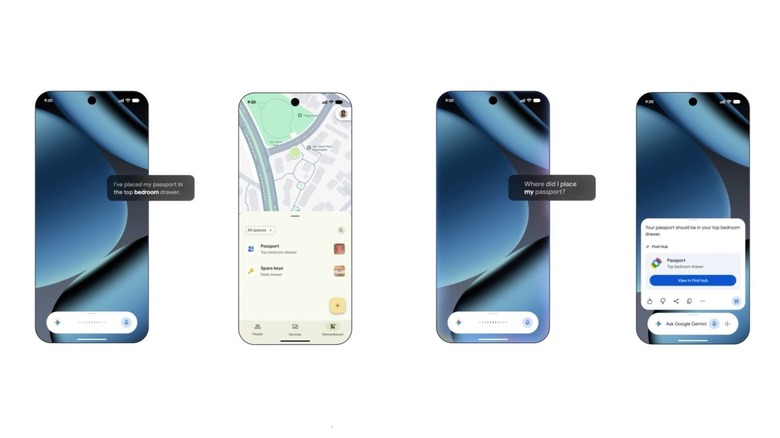
You can simply ask Gemini, "Hey Google, where did I put my keys?" Of course, the assistant won't know the answer unless you tell it first, which is the core of the entire feature. Anytime you place or put down something special and you want to remember where it is, you tell the Google Assistant in plain terms. You can even add an optional photo of the item's placement. "Hey Google, remember that I stored my wallet on the kitchen counter." Then, when you need to find your item, you can ask Gemini, or you can use the Find Hub — the location will be marked on the map. Pretty cool, no?
It's simple, effective and an excellent way to make sure you never lose important items again, big or small. No more searching under couch cushions, between the crevices of furniture or scouring drawers, shelves, and bins. This new feature is one of many ways Google wants Gemini to take over your Android phone.
You can also track a whole lot more with the Find Hub and Gemini
Thanks to the Google Find Hub, which works with a wide range of devices, you can also use the feature to find, locate, and stay informed about a breadth of belongings, including other mobile devices — those of family members, too — wearables, headphones, and designated trackers or the items you have attached the related tags to. If an item has a "Works with Android Find Hub" tag, you can track it through the Hub and on a map.
The Google Pixel Tag is a solid example of a tracker you can attach to or associate with virtually anything you own. Connect it to your keys, stow it in a bag or some luggage, or attach it to expensive gear like a Steam Deck or Switch 2. The Google Pixel Watch also recently received Find Hub compatibility, so you can track your smartwatch. Imagine leaving your expensive or most-used items on a table at a coffee shop, at a friend's house, or simply forgetting them; Find Hub can help you reconnect and secure them. Leave an item around the house? No problem, most devices can be pinged remotely, whether to send an audible alert or alarm or to vibrate so you can better find where they are. But it always comes back to the useful local-finder feature, which doesn't require any extras and lets you call out where you've placed something.
There are quite a few free Gemini features, just like the location finder, that make the platform accessible to everyone with an Android device and beyond. Gemini is effectively becoming the ideal personal assistant for mobile.