

8 PC Speakers Small Enough To Fit Under Your Monitor

We may receive a commission on purchases made from links.
Getting a decent pair of speakers is one of the cheapest ways you can upgrade your PC. However, finding the perfect stereo setup can be incredibly difficult. One issue you may face when searching for a speaker for your desktop computer is getting one small enough to fit under your monitor. This is especially true for users with limited desk space, and those having monitor stands with little room for adjustment. It's also important to keep your monitor at eye-level to avoid bad posture, and pairing a higher desk with a tall monitor stand can make that difficult.
Fortunately, there are a number of great compact speakers just small enough to fit under a variety of monitor setups that still provide solid audio performance. These include exceptionally budget-friendly stereo setups, but if you're still struggling to get any that fit, soundbars are an amazing alternative as well. Whether a speaker fits on your desk or not ultimately depends on your specific setup, but you'll find at least one here that suits your workstation. More information on how we selected these products can be found at the bottom of the article.
Creative Pebble V3
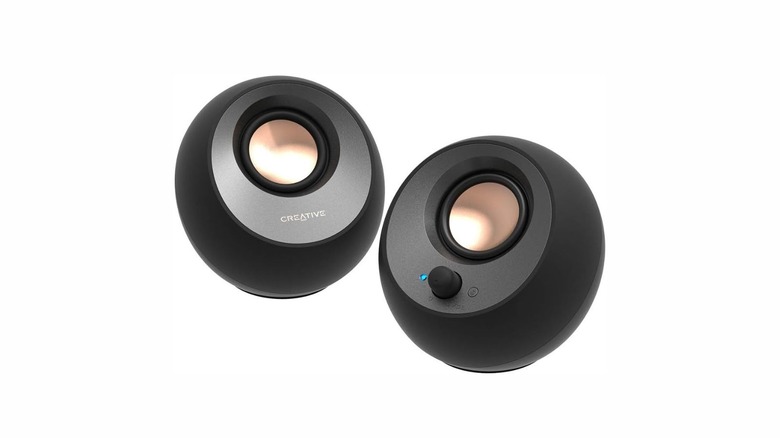
When it comes to buying compact desktop speakers on a budget, Creative's Pebble lineup is frequently among the top recommendations. They're stylish, small enough to fit anywhere on your desk, cost very little, and offer surprisingly clean sound. If you're looking for a compact setup that sounds good and gets loud without emptying your wallet, the Creative Pebble V3 is a great cheap alternative to your monitor's built-in speakers.
Standing at just 4.6 inches tall, these orb-shaped speakers feature a 45-degree angled design that directs output to your ears for a clearer listening experience. Unlike its predecessor (which relied on two cables), the V3 uses a single USB-C connection for power — though a USB-A adapter is included in the box for older ports. The volume knob and the Bluetooth pairing buttons being on the right speaker make them easy to use, and the LED status light is also bright enough to easily show connection status.
You can find a pair of Pebble V3 speakers on Amazon for around $42 with a 4.4-star rating across more than 5,000 reviews. Pebble speakers — and specifically the V- and Pro-series devices — are some of the most highly recommended audio setups if you're on a budget. Just keep in mind that these $40 speakers won't be competing with anything high-end.
Audioengine A2+ Gen 3
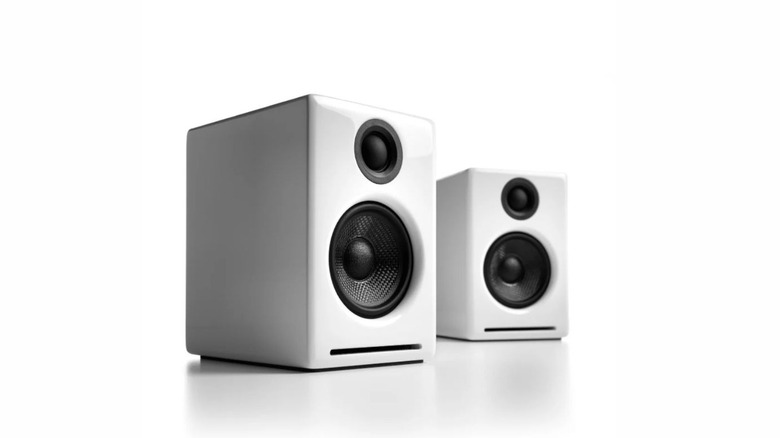
If you've looked for good PC speakers in the past half a decade, chances are that you've seen Audioengine around — especially their older models. The A2+ Gen 3 is the latest version of the A2+ series of speakers, bringing reasonable sound quality without taking a lot of space.
With a height of just 6 inches each, the speakers sit comfortably under high-raised monitors and fit easily even on smaller desks. The left speaker is active, housing all the main connections and controls, including a handy volume and power knob, a Bluetooth pairing button, a USB-C port, a standard 3.5mm jack, and RCA inputs. The speakers each house a tweeter and a woofer as well, giving a more balanced range of audio. What makes the A2+ Gen 3 stand out from previous models is that it supports Bluetooth 5.3 with aptX Adaptive, an upgraded Bluetooth codec. However, note that these speakers can only function if plugged into a wall outlet, and they don't have the best bass performance.
Priced at $299, the Audioengine A2+ Gen 3 can be bought from the official Audioengine website in five different colors. For those that want a better bass profile, consider getting the $299 Audioengine S6 Powered Subwoofer to pair with your setup.
Edifier G2000
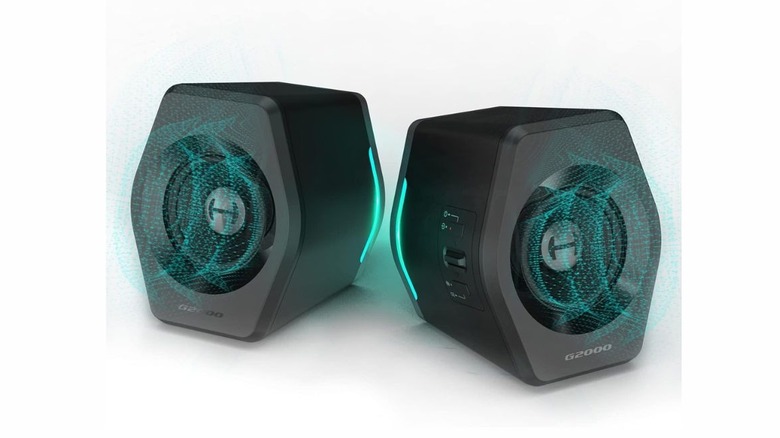
Edifier speakers are always a solid choice if you're looking for reliable audio on a budget. If you've considered popular compact options like the Edifier G1000, then the G2000 offer a noticeable upgrade in audio quality, volume, and connectivity options. These speakers are small enough to fit comfortably under most monitors, so you can say goodbye to bulky speakers.
With a 5.1-inch height, the G2000 are slightly larger than the G1000, while offering several improvements too: significantly higher RMS and peak power, along with a dedicated subwoofer output port which the G1000 didn't have. The right speaker functions as the active one and carries all controls: a power button, a volume switch, and an EQ button at the side to switch between different modes, including Music, Gaming, and Movie mode. Holding the EQ button changes the RGB lights — with an option to turn them off entirely. As for connections, the speakers support USB, 3.5mm auxiliary, and Bluetooth. The speakers don't have the biggest bass output, but connecting a dedicated subwoofer using the aforementioned subwoofer port can alleviate this. These speakers also require connection to a power outlet to work.
The Edifier G2000 can be found on Amazon for $110 in four different colors with a rating of 4.6 stars based on more than 3,000 reviews. Users praise their light weight, compactness, ease of setup, and audio quality for the price. However, if you're looking for something closer to audiophile-level sound, we recommend going for a higher-priced alternative.
Creative Pebble Pro
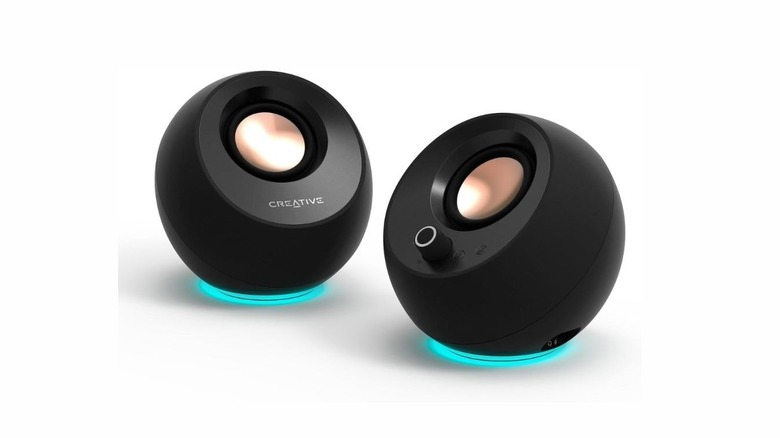
The Creative Pebble V3s are good speakers for the price, but if you're willing to slightly increase your budget, you can get the much more powerful Creative Pebble Pros. These speakers have the same orb-like design as the V3s and feature the same height, but the Pros are a major improvement in a variety of areas.
For instance, the Creative Pebble Pro can dish out much clearer audio at higher volumes without distortion, while the proprietary BassFlex technology provides a decent level of bass for a woofer-less compact speaker in this price range. Connectivity is improved, with an upgrade from Bluetooth 5.0 to Bluetooth 5.3. There's also customizable RGB lighting on the lower half of each speaker whereas the V3s only come with status LEDs.
As far as prices go, they're nearly twice as expensive as the V3s — which still makes them relatively cheap, at $69 for the pair on Amazon. The speakers have amassed over 2,100 reviews there and maintain an average user rating of 4.2 stars.
Logitech Z407
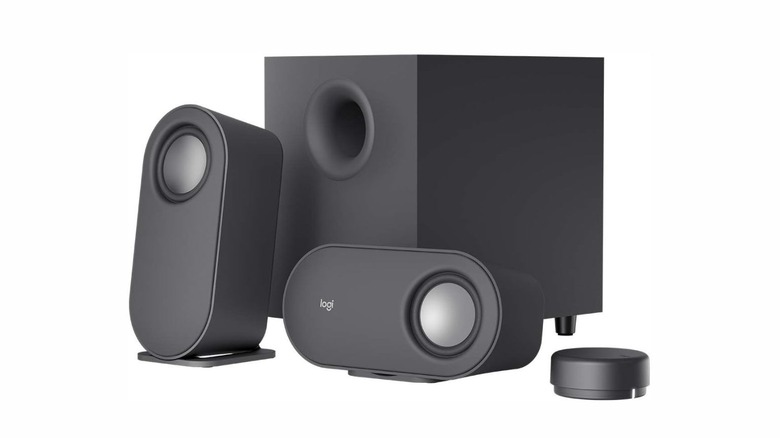
If you want a speaker setup that comes with a subwoofer for that extra bass, the Logitech Z407 is one of your best options. The speakers are relatively affordable and compact enough to suit most people, earning them a spot on many reviewer's best-of lists.
The speakers are on the taller side, standing at 7 inch each. However, their design allows for a horizontal orientation, where they only take up 3.7 inches. Contrary to other speakers, there aren't any media controls on the speakers themselves. Instead, there is a separate battery-powered wireless control dial that is used to pause/play, adjust volume, and skip to different tracks. The wireless dial is one of the best speaker control solutions we've seen, especially for users with bigger desk tables. However, the lack of any physical buttons on the satellites themselves makes losing the remote a major annoyance. The speakers can work either over a Bluetooth 5.0 connection or through a 3.5mm auxiliary connection, and they connect to the subwoofer with an RCA cable. Speaking of the subwoofer, it's also relatively small compared to some, but still manages a decent sound profile.
The Logitech Z407 setup sells for $116 on Amazon and carries a decent 4.3-star rating across 3,900 reviews. One thing to note is that you cannot use the setup without the subwoofer, as the stereo satellite speakers are passive and require a connection to the subwoofer – which is connected to a wall outlet – to function.
Mackie CR3.5
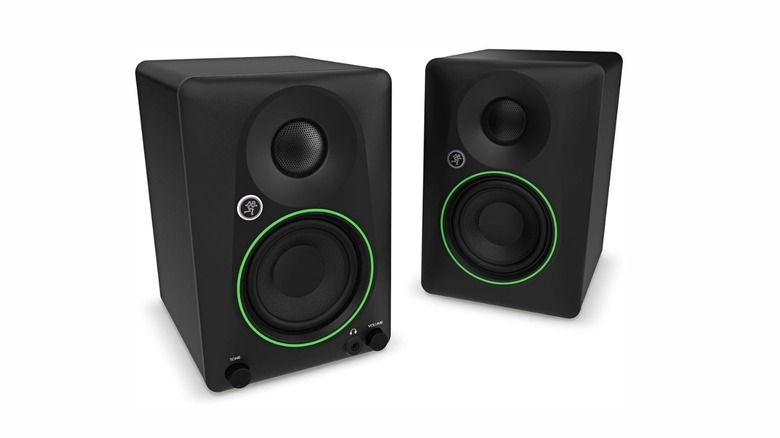
On the bigger side of computer speakers, the Mackie CR3.5 stereo speakers stand 8.1 inches tall, making them the tallest option on the list. While not fit for shorter stands, they're still a good pick for those that like their monitor higher up. If you prefer to keep your screen more than 8 inches from the desk, these studio monitors are some of the best you can buy at this price.
However, the Mackie CR3.5 speakers still manage to look sleek. Unlike many other options, the active speaker here can be configured to be either the right or the left one in your setup, but it requires an outlet for power. Alongside a 3.5mm headphone jack and a volume knob, the active speaker also comes with a tone control knob. The back contains TRS, RCA, and auxiliary inputs alongside a Desktop/Bookshelf mode switch. The box includes an auxiliary to RCA cable, a standard auxiliary cable, and a power cable. Both speakers include a tweeter and a woofer to handle high-frequency and low-frequency sounds.
The CR3.5 can be bought from Amazon for $100, with another (Bluetooth supported) version, the Mackie CR3.5BT, available for $130.
Bluedee Computer Speakers
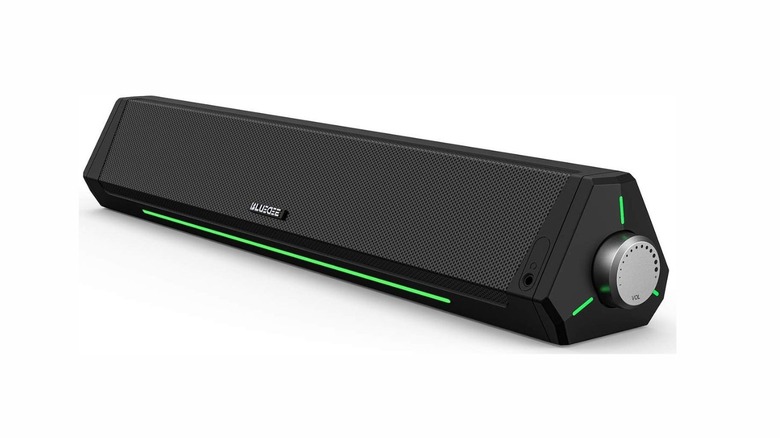
If you can't find traditional speakers in a size that fits your need, you could also buy a soundbar. Most people think they're only used with TVs, but soundbars work exceptionally well with a PC setup due to their horizontal form factor mirroring your monitor's, while many companies develop soundbars specifically for gaming setups.
The Bluedee Computer Speakers soundbar requires only 2.7 inches of vertical space to fit under your monitor. All important controls can be reached on the device's right: volume controls, pause and play, controls for the RGB lights, and toggling Bluetooth on or off. As for connection, you can use either a 3.5mm auxiliary connector or connect through Bluetooth 5.0.
While a decent option that can provide surprisingly powerful audio, it's still a budget soundbar. So long as you want an affordable improvement on your monitor's built-in speakers and aren't looking for high-fidelity audio, the Bluedee Computer Speakers soundbar is a worthy option. With a $60 price point, the soundbar can be found on Amazon with a 4.3-star rating across more than 7,700 reviews.
Cyber Acoustics CA-2890
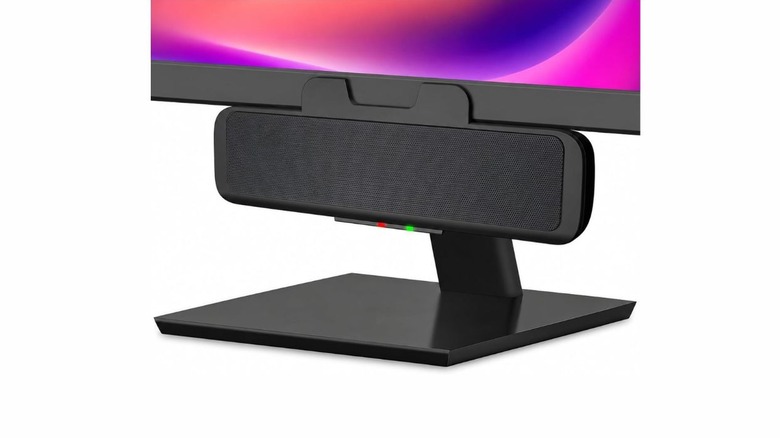
One of the biggest advantages to using a soundbar for your PC setup is that they take up little vertical space and match your monitor's profile nicely. However, if you've got a monitor stand with a thicker base, or have a smaller desk, or simply don't have enough space between your monitor and keyboard to fit a soundbar, a clip-on option like the Cyber Acoustics CA-2890 is perfect for you.
At around 2.8 inches in height, it connects to your computer using a single USB-A cable, while a USB-C to USB-A adapter comes included in the box. The clip-on latch works with monitors up to an inch thick. You'll find media playback and volume controls on the front of the speaker alongside two LED lights that show either on or muted.
This will set you back just $25 when buying from Amazon, where it carries a 4.2-star rating across 2,100 reviews. It gives a surprisingly decent performance for the price with little to no distortion even at high volumes.
How we chose these speakers

PC speakers come in different sizes, and user preference in monitor height also varies. Those with taller tables might want their monitors lower down, while others might opt for taller stands to keep the monitor at eye-level. This list of speakers includes those as small as just above 2 inches to those bordering on 8 inches in height. We've also added soundbars for those that barely have any space to fit speakers under the monitor.
There are many great PC speakers on the market, and we've covered a variety of different prices alongside different sizes. The cheapest ones on this list are $25 and provide decent audio for the price, while pricier ones reach $300. Each of the compact speakers we've mentioned is easily purchasable on Amazon, carrying positive user ratings with an ample number of reviews.