

Baseus SpaceMate RD1 Plus 14-In-1 Docking Station Review: Turn Your Laptop Into A Full-Blown Workstation
We may receive a commission on purchases made from links.
Laptops have been steadily outselling desktop computers in the past few years, especially as they're often more convenient to purchase, own, and use on a daily basis. You also get the advantage of portability, allowing you to simply close the lid if you want to move elsewhere. However, they're not very ergonomic to use and may come with a few limitations, especially for people who spend hours in front of a computer, as the form factor forces you into an unnatural position.
This is why some people still get these home office upgrades like an external monitor or two, mechanical keyboard, ergonomic mouse, and even a dedicated speaker. But getting these upgrades would often mean plugging or unplugging multiple devices into your laptop every time you want to move. Even if you use wireless devices in your office, you'd need to pair them whenever you're setting up your workstation unless you bring your peripherals with you (which kind of defeats the purpose of a laptop's portability).
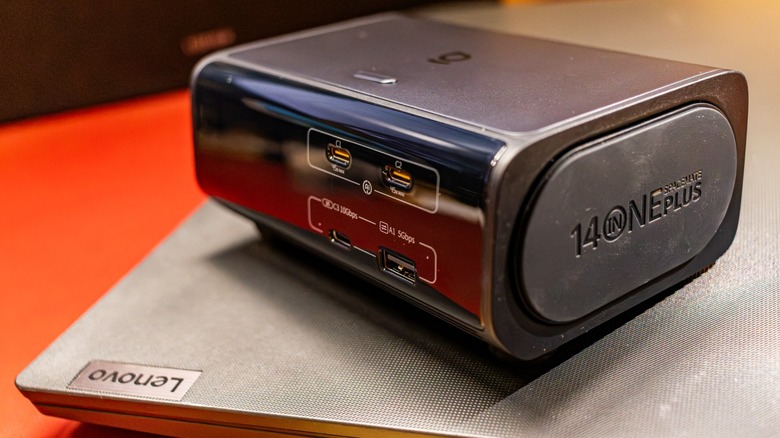
You can fix all those inconveniences with the Baseus SpaceMate RD1 Plus docking station — this device is designed to sit on your desk and unify all your physical connections. You'll only have to deal with a single cable each time you arrive and leave with your laptop, but is it worth the extra cost? Baseus sent us one unit to find out.
Almost every port that you need
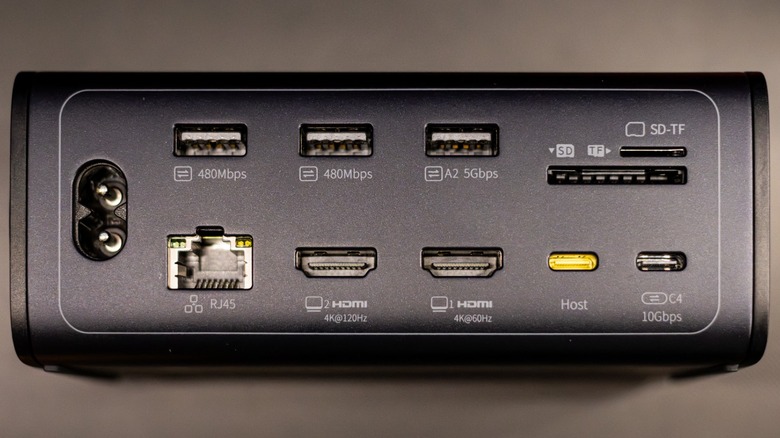
The first thing, and probably the most important thing about any docking station, is the number of ports that it comes with. The SpaceMate RD1 Plus does not disappoint: At the back of the unit, you get two 480Mbps USB-A ports suitable for slower devices like your mouse and keyboard, one 5Gbps USB-A port for faster devices that you leave on your desk like an external drive for backups, a 10Gbps USB-C port for modern devices like a 4K camera, an SD card and microSD card reader, two HDMI ports with a maximum resolution of 4K@120Hz (depending on your monitor configuration), and a gigabit Ethernet port for wired internet.
There's also the USB-C host port where you plug your device in while charging it at up to 100 watts. Note that I specifically said "devices," as I've tried using the docking station with my iPad Air and the RedMagic Astra 2. I found that it could turn these tablets into a replacement workstation somehow, although I was still constrained by the limitations of their operating systems and the fact that they do not support multiple monitors. Of course, we cannot forget the outlet port that powers the whole thing, and accepts 100-240 volts AC at 50/60Hz, meaning you can use it practically anywhere in the world. Up front, you get another 5Gbps USB-A port and 10Gbps USB-C port, making it easier to plug in temporary devices to your workstation, plus two USB-C charging ports.
Dual-screen limitation
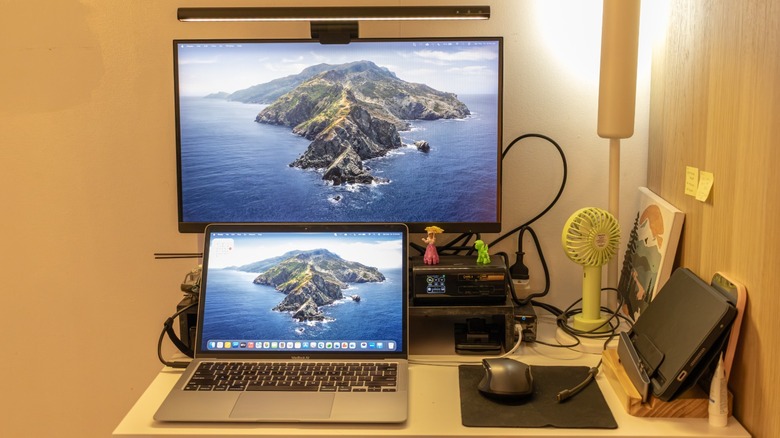
One of the more important things that a docking station lets you have is a multi-monitor workstation. The SpaceMate RD1 Plus comes with two HDMI ports, allowing you to attach up to two 4K displays to your laptop. There are some caveats to this, though: First is that your laptop must support USB-C with DP Alt Mode, or at least Thunderbolt 3, if you want to use external screens with this dock. If you have an older device that does not support these standards, you'd need a dedicated DisplayLink dock.
This dock has another limitation relevant to high-end gamers, specifically; it can only output to a single 4K@120Hz display. If you want to use two external 4K monitors, the maximum refresh rate will drop to 60Hz. Aside from this, you'll also be limited to a single output if you're on a Mac, as the dock does not have the necessary hardware to display two different outputs, even if your MacBook supports it. Hypothetically, the only solution in that case would be if you replace your dual monitor setup with a single ultrawide screen instead.
Leave your fast charger and power bank at home
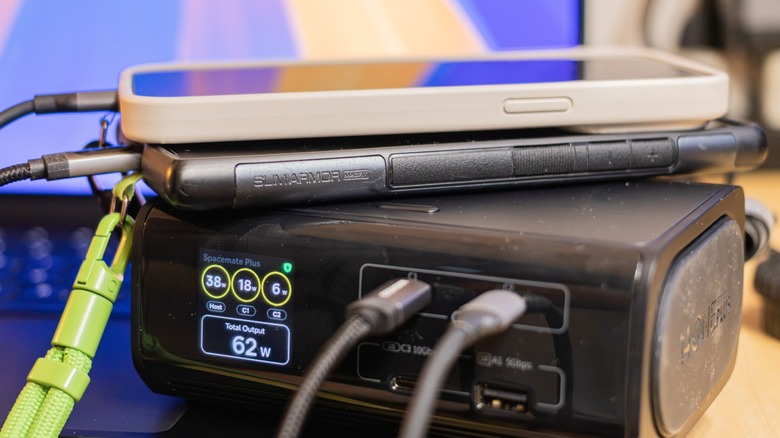
Those who like commuting light will probably be conflicted between bringing a fast charger or power bank with them, and having a smaller bag. This docking station solves this problem by giving your two 45-watt USB-C charging ports right at the front. This should be good enough to charge your smartphone and tablet simultaneously, while still leaving enough headroom to keep your laptop topped up throughout the day. The dock's 120-watt maximum power output means that you'll still have 30 watts left to keep your host device chugging along, even if the two front chargers are running at full tilt.
The dock does get a bit warm when you're using it, but that's pretty much par for the course with any fast charger. It does come with a quiet cooling fan to limit thermal throttling and ensure a smooth experience, though, so you don't have to worry about that.
Questionable card slot placement and other concerns
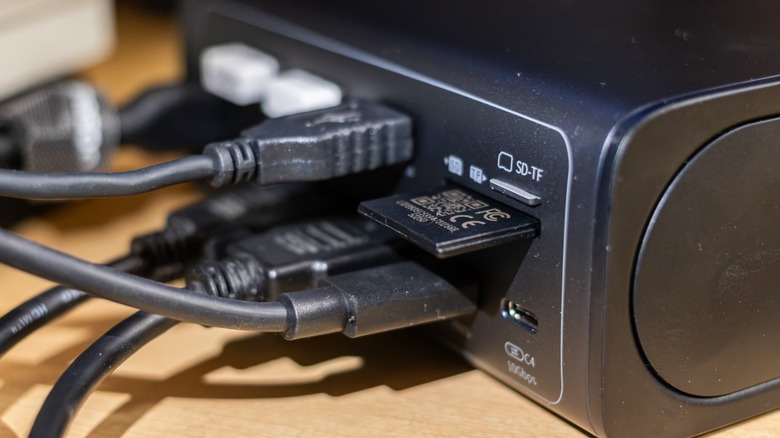
My biggest concern with the RD1 Plus is the questionable placement of the SD and microSD card slots. They're placed at the back right next to the USB-A and USB-C ports, making it harder to insert memory cards into the device. This is a weird decision, since removable media should be ... easy to remove. The placement means that I either have to fumble around near the edge of my desk or pull on all the cables to twist the dock a bit to make it easier to attach the memory cards, which is doubly hard to do with a tiny microSD card. In the end, I decided to use my separate card reader and attached it to the front USB-C port, which is far faster and more convenient.
The dock is unfortunately missing a 3.5 mm headphone jack, meaning I cannot attach my desktop speaker to it. While my speaker does have Bluetooth connectivity, I still prefer the reliability of a wired connection. If I were to keep using this station, I would have to find a USB-C to 3.5mm headphone adapter to make it work.
Another minor issue I take with the dock is the use of glossy plastic for the front face, especially near the ports. It's only a minor nitpick, but the surface is a fingerprint magnet, and I end up needing to wipe it all the time with a microfiber cloth after charging my gear, or attaching a USB data cable for transferring files from my camera.
Quality of life features
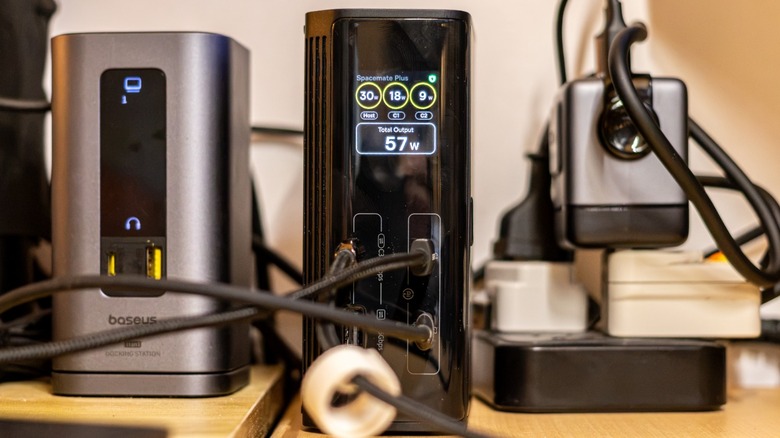
Despite these flaws, Baseus did add a couple of quality-of-life features that I love. The first is the ability to place it either standing up or lying down. This gives users the option to place it in just the right position to fit their desk. For example, I have a lot of other things on my desk, so I'd rather have it standing up to save space.
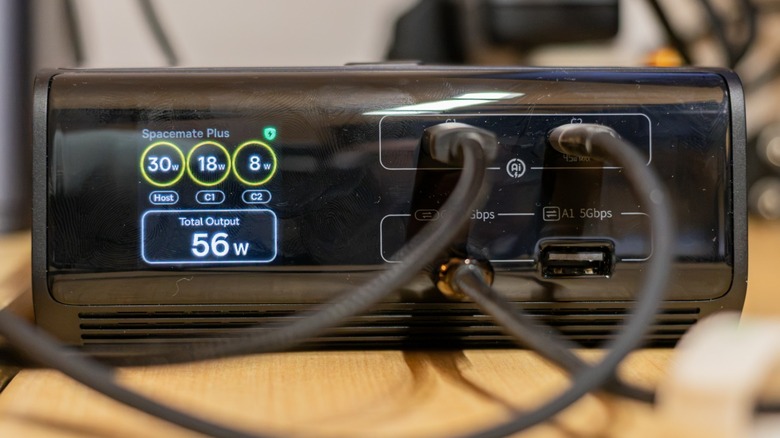
Alternatively, I could place it on top of my huge desk speaker on its side, making the front ports easier to access as needed. In line with this, the built-in LCD screen that shows the status of the various charging and data ports follow its orientation, which is a simple, but crucial addition.
It also comes with a function button that turns the display on or off, which is an important feature for those who want immersion and don't want to be distracted by the status of the dock. And if you press and hold it for two seconds, the dock will lock the laptop and the displays; long pressing it again would return you to computer's login screen.
A solid upgrade to make work more convenient
The Baseus SpaceMate RD1 Plus is a solid upgrade if you're tired of dealing with a mess of wires and cables on your laptop, or if you want to add multiple displays, but you don't have enough ports on your Windows PC.
It does have a couple of drawbacks, but that's something you might be willing to overlook for all the conveniences that it delivers, or if you simply don't use these missing features. The sleek and flexible form factor also makes it a great solution for nearly every office worker who wants to the ergonomics of a workstation and the portability of a laptop.
Its $259.99 price point might give you pause, though, making it one of the more premium options on the market. Still, the capabilities that it gives you could make it worth the cost. It's also available on Amazon at a discount sometimes, so you should snap it up if you find it at a good price.