

5 Useful Office Gadgets That Work With Your Chromebook's USB Ports
We may receive a commission on purchases made from links.
With Google Chromebooks being an affordable way to access the internet and Google's suite of cloud-based productivity apps, they're increasingly popular devices for certain business uses. Considering there's a variety of Chromebooks that users say are actually worth the money, it's even better if you can further expand their capabilities by leveraging some small (but mighty) USB accessories.
From USB devices that can expand your Chromebook's connectivity options to USB-powered lights that brighten you up during conference calls, each product listed here is more than handy in an office setting. Though some may argue that it's smarter to buy a different computer over a cheap Chromebook, that advice isn't so helpful when you have no choice but to use a Chromebook, as is the case in some academic or enterprise settings. Fortunately, we're pretty good at spotting useful gadgets to go with any kind of machine — if you're an office worker who happens to use a Chromebook, we've found some tech that can complement your Chromebook for office use, whether at home or in the workplace.
Before buying any of these gadgets to enhance your Chromebook experience, be sure to note your specific Chromebook model to see if you need any USB adapters to use certain items. Along with each device on this list being inherently useful in some capacity, we also examined several customer reviews on Amazon to ensure these products are, in fact, worth the money.
Benfei 5-in-1 USB-C Adapter Hub
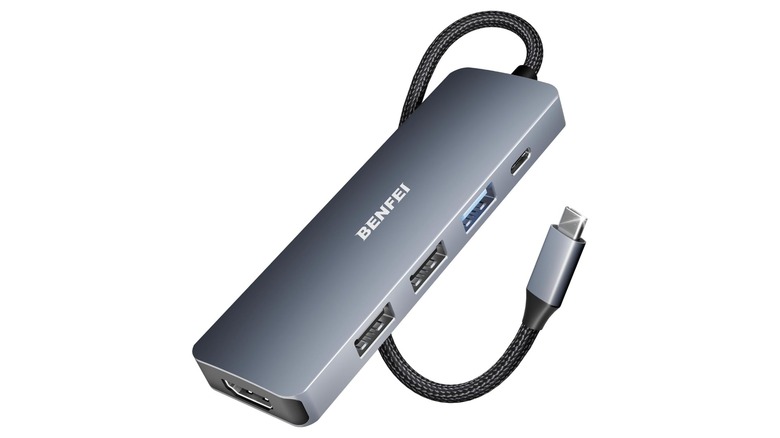
The Benfei 5-in-1 USB-C Adapter Hub typically goes for $9.99 on Amazon, but you're likely to find it on sale for a little less. The device features a 4K HDMI port, a single 100W USB-C charging port, and three USB-A ports. Along with the HDMI port supporting up to 4K resolution at 30Hz, the type-C port provides 90W of pass-through charging, with the other 10W reserved for additional interface operations. With a single USB-A 3.2 port capable of 10 Gbps transfer speeds, the other two ports support USB 2.0, which the company states is ideal for peripherals. The device can purportedly last for 25,000 use cycles or more.
Along with being the fifth-best selling USB hub device on the Amazon Best Sellers list at the time of writing, this Amazon's Choice item enjoys a 4.6-star rating following over 6,310 reviews. Customers give this hub high marks for its connectivity options and overall build quality. However, some customers report having issues with charging devices through this adapter. For the price, though, we'd say it's an essential tech accessory that every office worker needs, especially since 90% of reviewers have rated it 4 stars or higher.
Beyond the 5-in-1 hub, the company also offers a 7-in-1 option that includes SD card slots, as well as an 8-in-1 option that features a clamp for securing the dongle to flat objects. Naturally, each of these variants are priced differently, but we chose to highlight the 5-in-1 option given its value for the money.
Aikokok Wireless Bluetooth Rechargeable LED Laptop Mouse
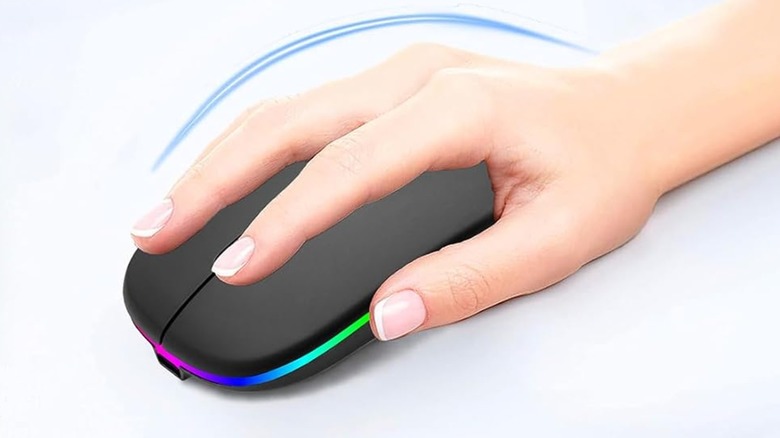
With a 4.3-star rating from over 5,170 reviews, the Aikokok Wireless Bluetooth Rechargeable LED Laptop Mouse typically sells for $9.99, though you may want to keep an eye out for periodic discounts. It's also available in a variety of both matte and glossy colors. Despite its modest price point, this mouse includes a stylish LED strip and a number of useful features, including the ability to choose between three different built-in CPI options. That feature might come in extra handy when you're done work and want to play some Steam games on your Chromebook.
The Aikokok mouse has 33 feet of wireless range, a fingerprint-proof surface, and a seven-color LED breathing effect that changes at random while the mouse is in use. It's also extremely quiet, which is ideal for office settings. It can connect to devices wirelessly via Bluetooth 5.2, but it also includes a USB-A 2.4G receiver you can use with your Chromebook's USB port. It's also chargeable with a USB cable (included). Aikokok claims the mouse has five days' worth of battery life and 30 days' worth of standby time from just a two-hour charge.
Based on Amazon reviews, customers find this mouse easy to set up and use while describing it as having good value for the price. Some users do complain about the mouse's battery life, but luckily, the mouse can still be used while it's charging. Nonetheless, 82% of customers have given this device 4 stars or higher, making it a mouse well worth considering for those in an office setting.
Uni SD and microSD USB 3.0 Card Adapter
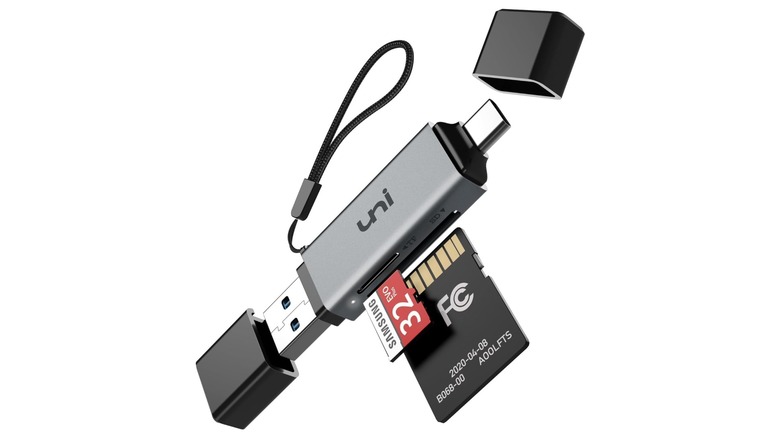
Along with assuming the number one spot on Amazon's list of best-selling computer memory card adapters, the Uni SD and microSD USB 3.0 Card Adapter has earned itself an Amazon's Choice label with an overall rating of 4.6 stars from over 33,680 reviews . The basic silver model sells for just $9.99, but for $3 more, you can opt for the silver or midnight blue version. This device works out of the box and doesn't require any additional software or drivers to use.
Capable of 5 Gbps data transfer speeds through either the USB-A 3.0 or USB-C connector, this adapter supports a variety of card types, including SD, microSD, SDXC, microSDXC, and more. With the ability to read and write to two cards at the same time, this adapter can also be used with a wide variety of device types — even smartphones. The dongle comes with an 18-month warranty and 24/7 customer support.
A whopping 93% of Amazon customers rated this item 4 stars or higher. Many buyers praise it for its sleek look and feel and for its data transfer speeds, with hundreds claiming it's a good value for the money. Customers do also report easily losing the dust covers for the USB plugs because they aren't physically attached to the device. If you want a cheap and simple way to upgrade your Chromebook's functionality, this adapter is an excellent choice.
Selfila Video Conference Ring Light

Another Amazon's Choice item, the Selfila Video Conference Ring Light boasts a 4.3-star rating with over 7,540 reviews. This device comes in black and white, with the black model costing $13.99 and the white one costing slightly more at $15.98. Along with being able to receive power through your Chromebook's USB-A port, this light can also be powered using any standard 5V, 2A USB power supply (or greater). The device provides multiple color temperature options for users to choose from so they can fine-tune the kind of lighting in which they'd like to present themselves.
This compact 4.5-inch video conferencing light can be rotated a full 360 degrees for maximum flexibility. With color temperatures between 3,200k and 6,500k, the device includes five different lighting modes alongside five different brightness levels. Users can set this item flat on a desk, but they can also use the included clip to attach the light to a laptop. The clip opens up to a maximum of 1.35 inches, so make sure the surface you want to attach it to doesn't exceed that.
Amazon shoppers give this product high marks for providing a good amount of lighting that especially helps during video calls. It's easy to set up and offers a good value overall, but some customers do find the clamp to be too tight to attach to a laptop screen. Nonetheless, with 83% of users rating this device 4 stars or higher, it definitely qualifies as a cool new gadget you may want for your desk.
Aiibe 128GB Dual Type Flash Drive
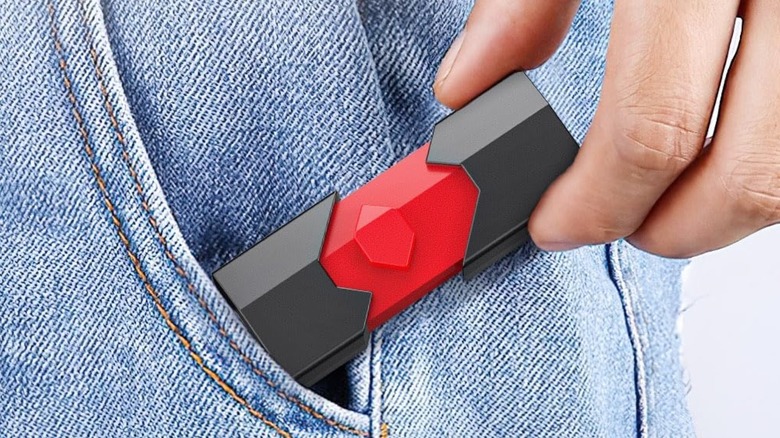
The Aiibe 128GB Dual Type Flash Drive product page showcases a multitude of storage size options at varying prices, but we specifically want to look at the 128GB USB 2.0 model that goes for just $15.99. If speed is a primary concern for you, however, there's a USB 3.1 version of the same drive that offers much faster read and write speeds for just $6 more. Should you decide to buy any version of this drive, be sure to look into a few tips that let you take full advantage of your USB sticks.
Buyers can switch between using the device's USB-A and USB-C connectors, both of which are retractable. The drive is compatible with a variety of devices without requiring additional software, and it's even capable of working with smartphones that support USB-C. It offers read speeds from 12 Mbps to 15 Mbps and write speeds of up to 6 Mbps. The company also claims the device is protected from water, drops, shocks, extreme temperatures, magnets, and even X-rays, thanks to its ABS enclosure. The drive's default factory format is exFAT, which is compatible with Chromebooks, so it will work with your machine right out of the gate.
With a 4.3-star rating and over 1,940 reviews on Amazon, customers enjoy this drive for its storage size and its ease of use. Though customers appreciate the overall quality and value of the gadget, some users report issues when transferring data using a smartphone, as well as slow data transfer with USB 2.0 models of all capacities. Even so, 83% of customers have rated this drive 4 stars or higher, making it a reliable option for your data storage needs.
Methodology
In addition to ensuring each item would be well-suited and useful for an office setting, we stuck with low-cost products under $20 to keep this list as affordable as Chromebooks are. We only selected products with a rating of 4 stars or higher and with thousands of reviews from Amazon customers. Along with highlighting the positives of each device, we also documented notable drawbacks that might explain the low price points. We gave bonus points to Amazon's Choice items or to devices that otherwise received some manner of quality endorsement from the retailer.