

USB Hub Vs. Docking Station: What's The Difference?
We may receive a commission on purchases made from links.
If you own a laptop with a slim port selection, such as the M5 MacBook Air or the new and affordable MacBook Neo, you have certainly considered USB hubs and docking stations to add more USB ports to your computer. Without these, you are essentially stuck with one or two usable ports to plug in all your peripherals, storage drives, and other devices. Fortunately, both are widely available and can sometimes be used even with portable gaming consoles, smartphones, and tablets.
While the USB hub and docking station (also referred to as simply a dock) monikers are often used interchangeably in colloquial conversations and even in some marketing materials, the two have notable differences. These differences impact their capabilities and features, which are good to know if you're in the market to shop for one. For example, USB hubs are typically compact and portable gadgets that are designed to increase the number of USB ports, whereas docks are usually meant for stationary desktop use and have a wider selection of ports.
What's a USB hub?
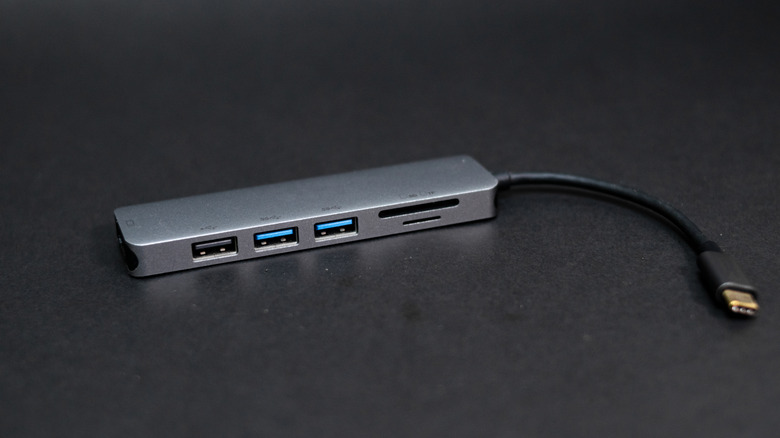
A USB hub is a compact device that can help you increase your computer's USB port selection. It has multiple built-in USB Type-A or USB Type-C ports and connects to your laptop via a USB cable. It essentially functions as a splitter, expanding the capabilities of a single USB port into multiple ports. As such, all connected gadgets or peripherals to a USB hub share the same connection, and the bandwidth they receive depends on how many devices are connected to a hub at any given moment and how much data they are transferring. This is often considered to be a downside of a USB hub.
USB hubs also typically draw power from the device to which they have been connected and don't have their own power supply, which further limits their capabilities. While many USB hubs are limited to USB ports, some can also include SD card slots and an Ethernet port. In the case of USB-C hubs, video output ports, like an HDMI port, and pass-through charging support are also becoming common. Another advantage of a USB hub is its plug-and-play nature. Keep in mind that some USB hubs that have multiple fast data transfer or newer generation ports (such as USB 3.2 Gen 1) may seek outside power for a stable connection.
As a result, USB Hubs are mostly suitable when you need something strictly portable and have limited connectivity needs, and mostly attach peripherals, storage drives, and an occasional external display to your machine. Two good examples of a typical USB hub are the Anker Ultra Slim 4-Port USB 3.0 Data Hub and the Anker USB-C Hub (5-in-1), the latter of which is a bestselling USB accessory on Amazon.
What's a docking station?
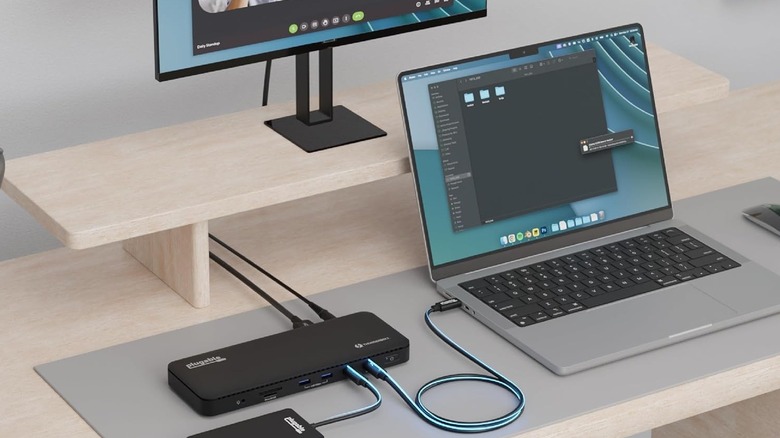
Docking stations, unlike USB hubs, are more capable gadgets that are designed to deliver a host of connectivity options and ports to your computer. Some of the most common connectors and ports you'll find on modern docking stations include USB ports (both Type-A and Type-C), SD card slots, an Ethernet port, and audio jacks. Docks also include multiple video ports for external monitor connections, and almost always require external power for their seamless functioning, and can also pass power through to your connected laptop for charging.
Docking stations come in a variety of form factors and are often designed to function as desktop devices, essentially converting your laptop into a desktop, except in the case of some mini-docks, which are mostly beefed-up USB hubs. A dock's range of capabilities often depends on the port they are connecting to on your machine. For example, a Thunderbolt 5 or USB 4 dock will typically be capable of handling multiple monitors, fast data transfers, and higher power delivery, compared to a regular USB-C dock. While many docks are typically plug-and-play, some may require drivers, often when they use DisplayLink tech for external monitor support.
You should choose a docking station if you typically need tons of ports or are looking to make a laptop your desktop replacement. Docking stations are also better when you want to connect multiple monitors to your machine. Keep in mind that docking stations are often much more expensive than USB hubs and can run into hundreds of dollars, depending on their features, whereas you can find a good USB hub for under $50. A good example of a solid docking station is the Plugable Thunderbolt 4 Dock. It has over a dozen ports, including three that can handle video connections.