

5 Android 17 Features Apple Needs To Add To iOS 27
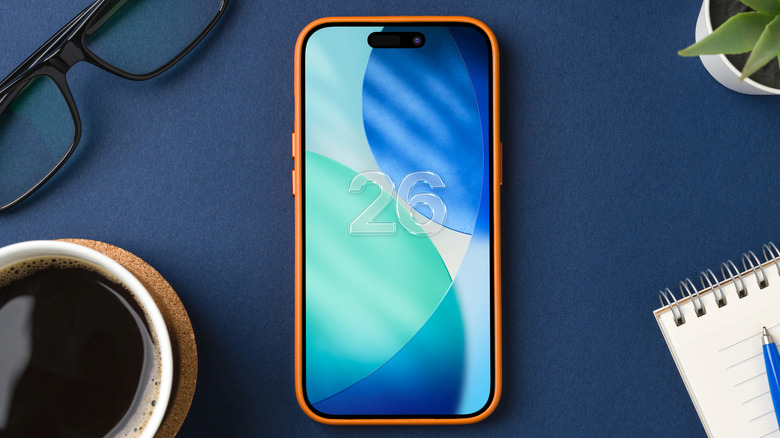
Google is set to release the official Android 17 update to supported Pixel phones by the end of June, after several months of beta testing. The company showcased many key Android 17 features in a keynote ahead of Google I/O 2026, where it demoed Gemini Intelligence – its latest AI initiative for Android. On the other hand, Apple's iOS 27 is also set to be unveiled soon at WWDC 2026. Apple is rumored to make overall stability improvements for its next iOS release, as well as bring improvements to Apple Intelligence, with the new Siri update being the highlight feature. Notably, Apple won't roll out all new features right at the beginning.
The company will continue to release updates with every new iteration of iOS 27. That gives Apple plenty of time to borrow some interesting Android 17 features to introduce on iOS 27. Android 17 has a bunch of useful features that make the smartphone experience better. So, we would love to see a few of them make their way to the iPhone via iOS 27. Of course, a few features may even be reserved for the upcoming iPhone 18 Pro and the foldable iPhone. Since both companies take inspiration from one another when it comes to design and features, here are some Android 17 features that we hope will make their way to iOS 27.
Gemini Intelligence's app automation

Apple announced Apple Intelligence at WWDC 2024, showing off a new AI-powered assistant that could understand user context by accessing data from iPhone apps and performing tasks on the user's behalf. Apple failed to deliver that vision with iOS 18, putting forward the plan to improve Siri until 2026. With 2026 now here, iOS 27 is expected to deliver that experience. Google, on the other hand, has steadily added several Gemini-powered features to Android. Fast-forward to Android 17, and Gemini Intelligence appears designed to go beyond Apple's original vision for Apple Intelligence.
Gemini Intelligence is not just about talking to an AI-powered assistant, like Gemini Live. Instead, it's like having AI built into the operating system to offer smart features when you need them. One of the key features of Gemini Intelligence is the ability to automate tasks that may require using several apps otherwise. For example, users may ask Gemini to buy concert tickets for an upcoming show, or plan a trip based on the information from a photo of a brochure. You can delegate these tasks to Gemini once the feature rolls out.
It's unclear if Apple Intelligence may offer such automation tasks in iOS 27, but the revamped Siri assistant should behave more like a standard chatbot. Google is also adding AI capabilities to Chrome on Android, which can offer internet-browsing-related automations, like summarizing articles, placing orders on e-commerce sites, and making appointments. A similar Apple Intelligence integration in Safari and throughout the UI could be useful.
Custom widgets
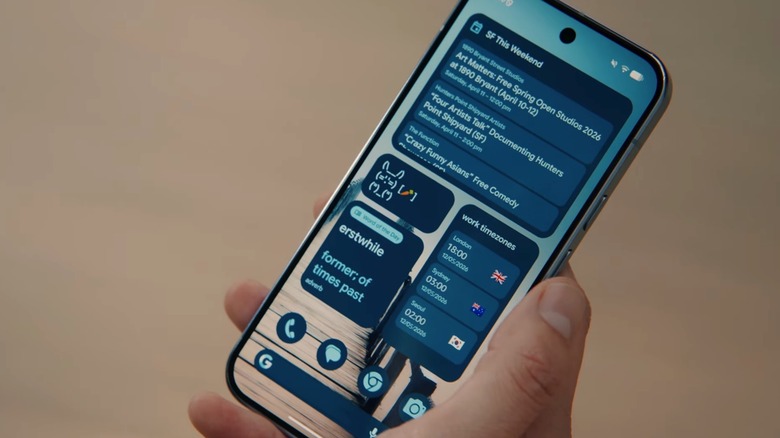
Android 17 will introduce generative UI features in Android, something Apple should also consider for the iPhone. With this, users can create custom widgets by combining existing widgets or designing new ones. The feature is part of Gemini Intelligence, and it uses AI to create a bespoke app-like experience. It's not exactly telling the AI to code a new app for you, but it's the kind of feature that will let users create more useful widgets than what's available from apps.
The Create My Widget feature lets users tell the AI what kind of widgets they want in natural language. There's no complicated menu of options to select from. The custom widgets can also appear on other devices connected to the same Google account, not just an Android phone. For example, a Wear OS smartwatch may show highly specific information from a weather app in a widget, rather than giving the user the complete weather data.
Creating custom widgets on iPhone could be just as easy, allowing users to create more complex tools that can present specific information. Rumors indicate that the Shortcuts app in iOS 27 can create such shortcuts and automations via natural language, but there's no information yet about the ability to create custom widgets.
Intelligent autofill
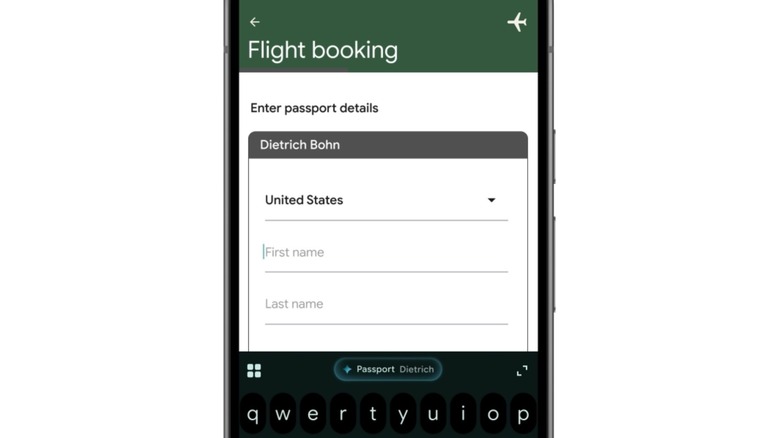
One of the best Gemini Intelligence features Google demoed during its Android 17 keynote is a new way to automatically fill forms. Intelligent autofill (Autofill with Google) is another feature iOS 27 should adopt for iPhone users in order to make filling out forms easy. The example Google demoed was filling out personal information when booking a new flight with a new airline, including passport details. The app would offer an AI button that would allow the AI to complete the form with information extracted from a photo of the user's passport.
The AI understands the context of what the user is doing inside an app and accesses on-device information, including contents of photos in the gallery. For example, Gemini can extract information such as your passport number, validity, full name, etc., from a picture of your passport. It can also fetch data from other Google apps, such as Gmail and Drive.
Apple should offer a similar feature for the iPhone, allowing the revamped Siri or Apple Intelligence to fill forms based on data that's already available on the device or via its own first-party apps like Apple Wallet and Mail.
Rambler

Android phones and iPhones already let users dictate messages, a feature that can be useful in scenarios where hands-free interactions with the phone are preferred. Gemini Intelligence introduces an improvement to the voice-to-text experience that uses AI to improve dictated messages. Rambler can remove repetitions and corrections from spoken language, as well as the inevitable "ums" and "ahs" that appear in natural speech. The feature cleans up the spoken message to make it sound as if it has been typed.
Rambler can also recognize and understand multiple languages during dictation, and polish dictated text messages that combine multiple languages. You can also use it to add emojis. The Siri revamp should support better voice interaction in iOS 27, including dictation for various chat apps. However, a feature like Rambler could be useful, as it would allow the user to quickly send clutter-free messages to friends and family by voice, because the AI would remove the unnecessary content that can appear when using dictation.
Pause Point
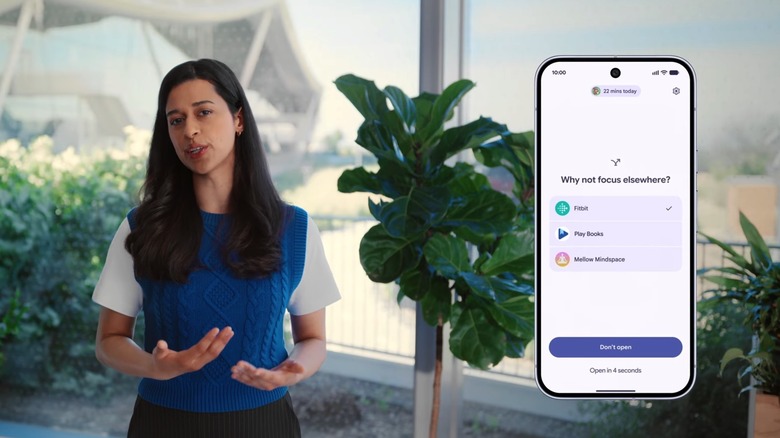
The Screen Time feature in iOS can help you reduce the time you spend on specific apps and manage screen time for younger iPhone users in your family. At the same time, Focus modes can help you reduce distractions when you're at work or in other settings by muting notifications from specific apps and contacts. Despite these features, the iPhone may further benefit from a feature similar to Pause Point, which Google introduced with Android 17.
The OS will detect when the user opens an app they marked as distracting and start a 10-second pause that lets the user decide whether they want to open the app or do something else. The Pause Point screen has a "Don't open" button the user can tap to prevent using the app. The feature may be useful for reducing doomscrolling habits, while also suggesting apps that can be more useful, like fitness and book-reading apps. Finally, Pause Point can be set to restart the phone before the pause ends – an extra break that might convince you not to engage with a distracting app.