

5 iOS 27 Features That Aren't Available On Android (Yet)
Google's Android 17 and Apple's iOS 27 are now official, each bringing new features that Android and iPhone users may appreciate, including more advanced AI features that will be available on both platforms. As with previous releases, each company developed a few notable features that the other company should copy. We showed you the Android 17 features that Apple should consider replicating for the iPhone, but now that iOS 27 is available in beta, there are a few new iPhone features that Google should adopt. For example, Apple has brought advanced AI editing to the Photos app that is missing from Android. Also, iOS 27 has included AI-powered Safari browsing features, a new bill-splitting tool that works directly in the Camera app, and a useful Passwords app feature that will make it even easier to deal with weak and potentially compromised logins. The ability to use natural language to control the Shortcuts app and tell the phone which automations to create, rather than trying to decipher the somewhat complex Shortcuts recipes, is another feature Google can replicate.
These features make use of AI, and that's not surprising considering that the new Siri experience and Apple Intelligence features were at the center of WWDC 2026. Siri has finally become the AI-powered assistant that Apple had promised two years earlier. Siri gets both a ChatGPT-like interface and access to the user's data, so it can understand context and offer smart features based on the user's needs.
As a whole, Google will likely replicate that entire Siri experience included in iOS 27, considering the company has already started. The new Gemini Intelligence platform announced for Android 17 will be available on Android phones that meet the hardware requirements, putting Gemini AI at the heart of the Android experience.
Spatial Reframing in the Photos app
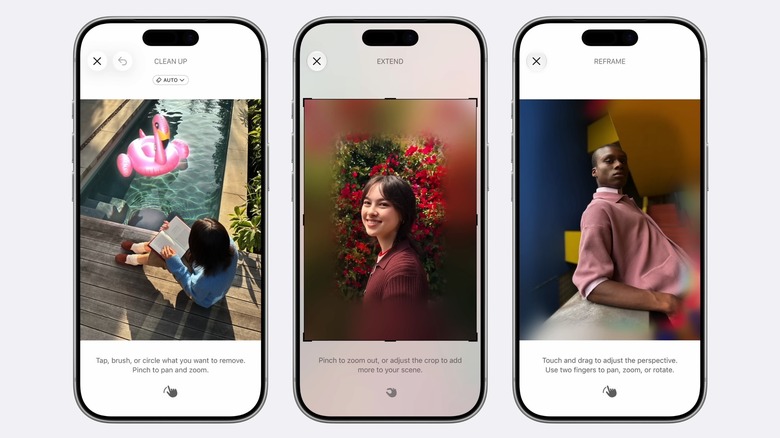
Called Spatial Reframing, the new AI editing feature in Photos lets users change the perspective of images as if they were reshooting the same photo from a different angle. Apple explained during the WWDC keynote that Spatial Reframing builds on the Spatial Photos capabilities Apple built into the Vision Pro headset and previous iOS releases. As a reminder, iPhones can already take Spatial Photos. A Spatial Scene feature in the app lets users transform images into 3D versions. The Spatial Reframing feature in iOS 27 builds on these features to let users reframe their images. iOS 27 uses on-device spatial models to let users change the angle of the original photo in real time. Parts of the image will get blurred once the perspective shifts, with Apple Intelligence filling in missing areas as it processes the final image via Apple's Private Cloud Compute server AI infrastructure, which Apple says protects user privacy.
Google has an Auto Frame feature in Google Photos that works similarly to Spatial Reframing, but the feature may benefit from clearer placement and promotion within Google Photos. Google has been ahead of Apple for several years when it comes to using AI to edit photos. The company has updated the Google Photos experience to support more advanced editing features, from the Magic Editor tool to Nano Banana integration, without specifically focusing on the newer Auto Frame feature.
The Photos app in iOS 27 also features other AI editing tools, including a Clean Up feature that is intended to improve the iPhone's ability to remove unwanted objects in images and an Extend tool that lets users add more background to their images. Apple will also use the same hidden SynthID watermark that Google supports in Android on images edited with AI.
Notify Me page-monitoring support in Safari
Google has added several AI features to Chrome over the years, including the ability to chat with the AI, summarize pages, and direct Gemini to browse the web. Google also added support for Gemini in Chrome on Android 17, though the feature will also be available on older Android releases. Gemini in Chrome allows users to take advantage of some of these AI-powered browsing features on their Android devices, and even automate some tasks. For example, the auto-browse feature will let users instruct Gemini in Chrome to purchase items or make reservations, features that aren't available in Safari on iPhone, whether the iPhone is running iOS 27 or an earlier version.
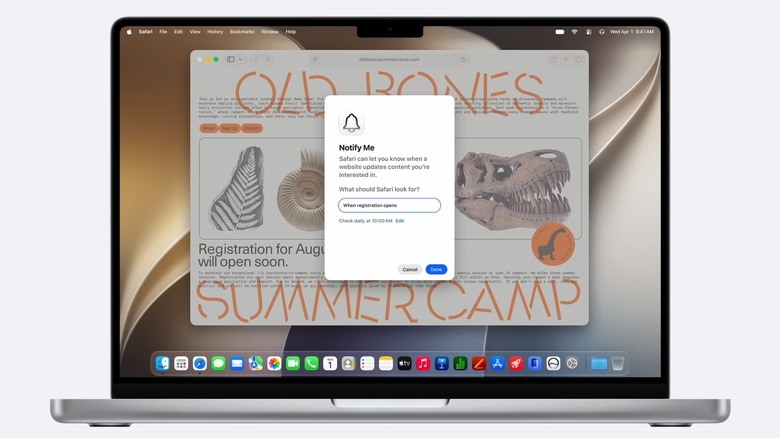
However, Safari introduces an Apple Intelligence feature that Google should consider copying. Called "Notify Me," the feature isn't related to automations similar to what Gemini in Chrome can offer. Instead, the feature will provide key notifications about changes on a web page. Instead of keeping a website open in a Safari tab only to watch for a specific change, like the listing or restock of a new product, or a price drop they're hunting, users can tell Safari to send notifications when those conditions are met. Last fall, BGR tracked iPhone 17 stock manually for a few months after the September release, as several models were sold out. A feature like Notify Me would have been helpful for the task.
The Safari AI will check daily at a specific time for the activity the user is tracking and send a notification as soon as it happens. The feature will be available across devices, including iPad and Mac. Google should consider updating Gemini in Chrome in the future to support similar functionality on Android and the web.
Custom shortcuts made with natural-language requests
The Shortcuts app is arguably one of the most advanced features in iOS, but it may also be one of the least used by regular iPhone owners. Longtime iPhone users who are more experienced with the iOS platform may have used Shortcuts for years, creating useful new automations. For example, shortcuts can be used to automatically lower the iPhone volume when starting a workout, or to turn on Low Power Mode at a predefined battery percentage. However, the Shortcuts app requires mastering the recipes needed to create these automations, which can be a daunting task.
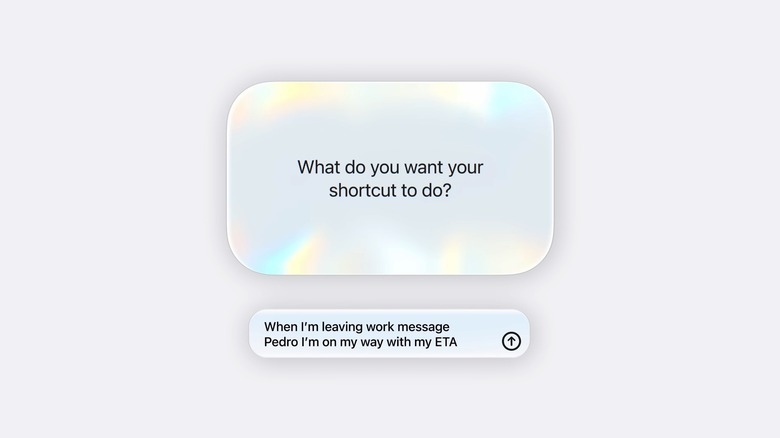
That's why the AI enhancement of the Shortcuts app in iOS 27 is so interesting. Instead of trying to fit all the parts of the shortcut recipe that make the automation work, users can interact with the AI and use a natural language command to create a shortcut. The shortcuts mentioned above may be created with such commands. You may tell the AI that you want the headphones' volume lowered each time you start a workout, or that you want Low Power Mode to kick in when the battery is at 50%. If everything works correctly, Apple Intelligence in iOS 27 should deliver that automation in the Shortcuts app.
Android 17 lacks a similar feature that would allow Android users to describe the kind of automations they'd like the phone to perform. Google did announce support in Android 17 for custom AI widgets, something iOS 27 does not offer, but widgets will only present specific information rather than offering automations.
Automatically split bills and pay your friends
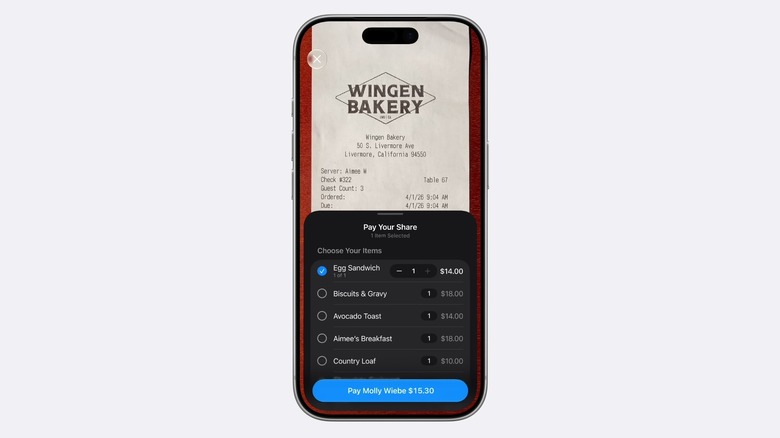
The Camera app also comes with Siri integration that allows the user to chat with the AI about content shown in photos and screenshots, which opens the door to more advanced features, like a new bill-splitting tool in iOS 27 that leaked before Apple's WWDC keynote. Apple demoed the feature during the keynote, showing how easy it will be to use. Pointing the camera at the bill triggers a new AI-powered feature that allows you to select the food and drinks you consumed during a shared meal and automatically create a total for you, including a tip. The feature works with Apple Cash, allowing users to pay a friend or family member for what they ate and drank at the restaurant.
The feature is part of the larger Visual Intelligence upgrade Apple announced at WWDC, which will be available in Siri across operating systems, including iOS 27. Apple said in a press release that "powerful image understanding and multimodal capabilities" will be available in Siri, which makes features like bill-splitting possible. The only downside of the feature is that it works with Apple Cash, which means it's limited to iPhone users in the U.S. A multinational group of friends that use iPhones and Android devices can't take advantage of it. At the very least, bill-splitting may help users quickly add up their check, even if they can't pay using Apple Cash.
Android already supports multimodal Gemini interactions. Users can share photos and live images with Gemini to ask questions and provide instructions. However, there's no bill-splitting feature in Android 17 that leverages various apps, like the Camera and Wallet in iOS 27, to power a feature like bill-splitting.
Automatic password change for compromised logins
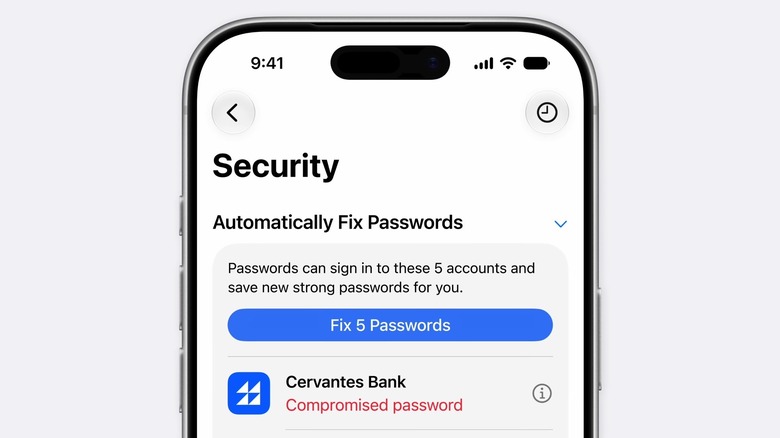
Setting strong, unique passwords for each internet service and app is one way to reduce the risk of having your accounts hacked. Password manager apps can then help store hundreds of different logins, credit card information, and secure notes. While such habits may prevent a hacker from using the same email and password combination to get into all your apps and services, it won't prevent service-side data breaches. Some accounts may still get compromised and require password changes. Thankfully, the Passwords app that's built into iOS can help both store logins securely and highlight compromised or weak logins. iOS 27 builds on that with a feature many users may have asked for: the ability of a password manager to automatically change a compromised login to something safer.
Apple built an Apple Intelligence automation in Safari and the Passwords app that lets users change passwords on supported websites with a single tap. The Passwords app will identify the logins that need to be updated. If you decide to use the built-in tool to change the logins automatically, the app will use Safari to navigate to the website, sign into the user's account, and then change the password to something stronger, which will be saved in the app. This feature removes much of the hassle of having to change passwords by automating that entire workflow.
Android users also have access to a default password manager, but it doesn't offer a similar automation for password changes. Gemini in Chrome can change compromised passwords on supported sites only, but the way Apple implemented the feature makes more sense, as it starts inside the password manager.