

5 Mobile Gaming Accessories Worth Adding To Your Kit

We may receive a commission on purchases made from links.
Mobile gaming has come a long way since mega hits like "Candy Crush," "Angry Birds," and "Temple Run" took over. These days you have full-fledged AAA console ports running on Apple and Android phones and tablets. For instance, there's "Red Dead Redemption" and "Alien Isolation" available on both Android and iOS. For iPhones and iPads in particular, you even have native AAA ports like "Resident Evil 4 Remake," "Control (Ultimate Edition)," and "Death Stranding Director's Cut." Then you also have AAA mobile games like "Call of Duty Mobile," "Genshin Impact," and "Where Winds Meet." And having the right accessories in your mobile gaming kit can really enhance these experiences.
No matter the game you're playing, there are several affordable, portable accessories that you can add to your kit. For instance, if you're a fan of shooters, you can consider getting some triggers, but if you're mostly playing action and adventure games, you might find a mobile controller offers a much better experience. If you're looking for something to sustain extended play sessions at high settings, you can get a fan. So if you don't have any of these yet in your kit, learning just how they can transform your mobile gaming experience is key to seeing their value.
Z108 Mobile Gaming Triggers
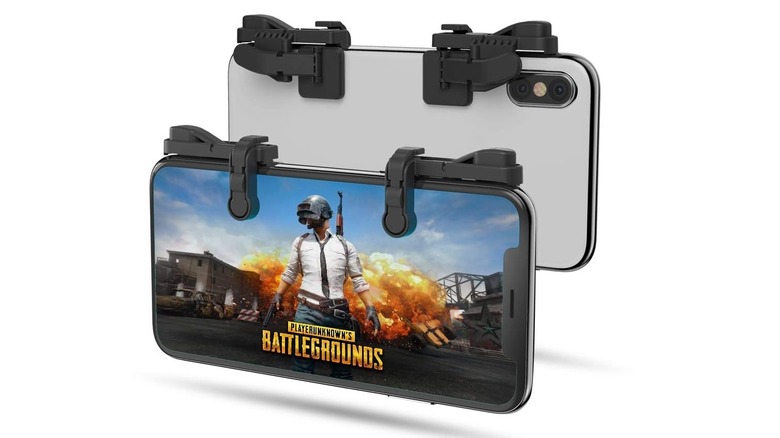
If you're fond of playing online shooters, such as "Call of Duty Mobile" or "Delta Force," Z108 Mobile Gaming Triggers can up your game. This is especially true if you're using two fingers for pretty much everything, including aiming, shooting, jumping, crouching, pinging, and activating special abilities. Two fingers can be slow. The triggers allow you to bring your index fingers into the mix so you can use them to aim and shoot (similar to how you'd use a controller), without contorting your fingers into a four-finger claw grip. Some people resort to using a controller, but the input lag of a Bluetooth connection and the imprecision of an analog stick can lead to frustrating losses if you go up against touchscreen users.
With the Z108 Mobile Gaming Triggers, you clip them on to the top corners of the screen. Many mobile shooters allow you to customize the position of the on-screen buttons. You just place the ones you want pressed to be where the touch pads of the triggers are. The most common layout is the left trigger for aiming and the right trigger for shooting, similar to the L2 and R2 buttons a PS5 controller. While they do obscure part of the screen, it's not a big distraction, especially on a tablet and when you consider the benefit of using four fingers. Also, they give you some much-needed tactile feedback. You can get this pair for $18.99.
8Bitdo Ultimate Gaming Controller
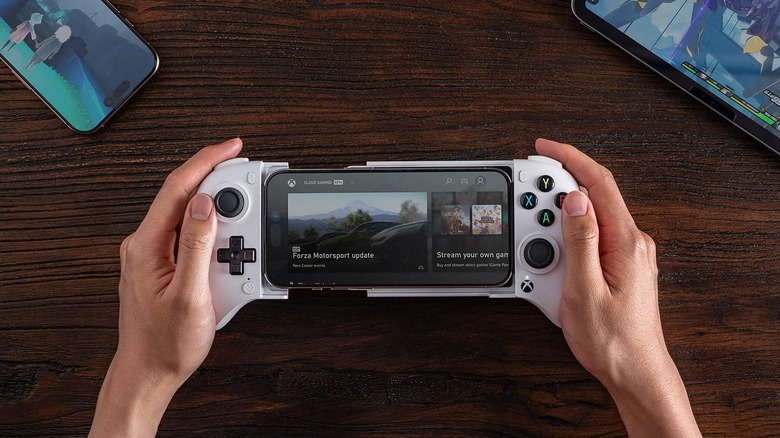
While not ideal for mobile shooters in competitive environments, a controller has its uses in games that require a high level of dexterity and timing. They can be more intuitive, especially if you have a console background, compared to touchscreen controls. This applies to games where you'd be doing actions like combos, dodging, parrying, and jumping. You're looking at games like "Zenless Zone Zero" and "Dead Cells." While you can use a wireless game controller from a reputable brand, using a mobile controller like the 8Bitdo Ultimate Gaming Controller can make your phone feel like an actual handheld console.
The 8Bitdo Ultimate Gaming Controller costs $49.99 and has Hall Effect joysticks and triggers, which basically means they detect input magnetically rather than through physical contact. This makes them highly resistant to stick drift, something that is unavoidable with modern controllers like the DualSense controller. Also, this is an Xbox-licensed controller, meaning it meets the Designed for Xbox requirements for connectivity, reliability, compatibility, and comfort. For that reason, it's advertised as the best controller to use for Xbox Cloud Gaming.
A note of caution, though, if you're going to use this controller for online multiplayer. There aren't a lot of controller players in the mobile gaming scene. And the games that do support controller input, like "Call of Duty Mobile," will match you with other players using a controller. This can lead to long queuing times, especially when you reach the higher ranks.
Gaming Finger Sleeves
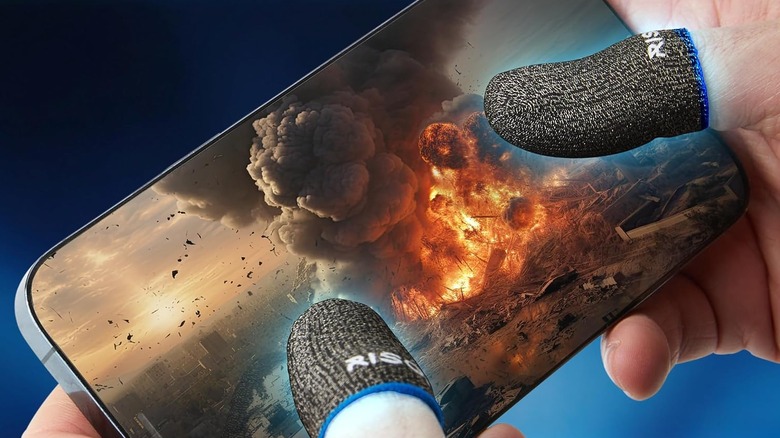
Some online lobbies in mobile games can be "sweaty" when you're constantly facing highly skilled opponents. Winning that way can be hard, so it requires speed and precision. The Risoka Gaming Finger Sleeves can help by allowing your fingers to effortlessly glide across the screen while absorbing sweat and oils, which add friction. This is better than the baby powder method, where you dab it on your thumb and fingers to help absorb sweat and reduce friction. However, by the end of the play session, your device's screen can be messy, and you'll be smelling like baby powder.
For $13.99, you get 10 of these finger sleeves, which is good because they tend to wear out over time. They're also breathable, which prevents moisture build-up from long, sweaty play sessions. The fibers of the finger sleeves are made from silver, a highly conductive material that improves the sensitivity of the finger sleeves. Furthermore, silver is naturally antimicrobial, meaning it reduces bacterial buildup that can lead to odors.
EarFun Air Pro 4

Good earbuds can be essential for an immersive gaming experience. They can enhance communication during matches. The EarFun Air Pro 4, which costs $79.99, is a good option for mobile games. It provides up to 52 hours of playtime. On a single charge, each earbud can provide 11 hours of playtime, and the case allows them to be charged an additional three to four times. A quick 10-minute charge can provide up to two hours of playtime, which is great if you can't fully charge them but want to jump into a quick game.
The EarFun Air Pro 4 has adaptive active noise-cancellation (ANC). This automatically reduces the level of external noise depending on how noisy your environment is. You can also tweak the level of ANC manually. The earbud can reduce the noise level by up to 50db. Then you have game mode, which can lower the latency of the audio to less than 50ms. However, the delay can still be perceptible, meaning it isn't suitable for competitive gaming (this requires a latency of below 40ms).
Other than that, they are great for listening to music since they support Hi-Res audio codecs like aptX and LDAC. The companion app allows you to personalize your experience with equalizers and sound modes. In-ear detection can discern whether you're wearing the earbuds, stopping playback when you remove them and resuming when you put them back in.
Black Shark FunCooler 5
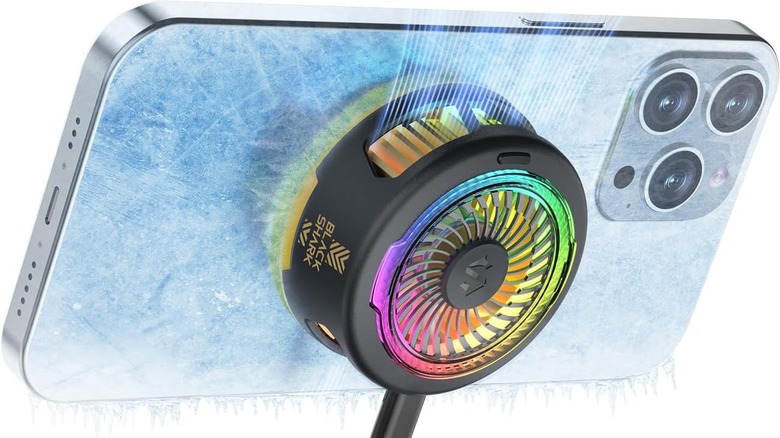
It happens way too often when you try to crank up the graphics in a mobile game, and you get a warning about overheating. That's because high settings can cause the CPU and GPU to generate more heat to sustain performance. If they get too hot, the mobile device will throttle performance to prevent overheating, tanking a game's frame rate. Since phones and tablets don't have fans to provide active cooling, that's where the Black Shark FunCooler 5 comes in handy.
The Black Shark FunCooler 5 costs $35. It's magnetic, so you can attach it to the back of your device or magnetic case to allow for sustained heavy gaming sessions. It also comes with clips that allow you to attach it to the back of a phone. Afterward, you just connect the fan to a wall adapter via a USB-C cable. It needs at least 20W of power for the best performance. In silent mode, the fan's noise level is around 30dB, which is similar to a soft whisper. In overclocking mode, the noise level is about 38dB, which is slightly less than the noise you'd find in a library.
The fan can deliver 35 degrees Celsius of cooling. It dissipates heat from the top and bottom so it doesn't hit your hands. For a bit of gaming touch, it features RGB lights, with four modes with different effects.
Methodology

We looked at gaming accessories that can be used by both casual and competitive gamers alike. You don't have to be a hardcore online player to see the value in something like triggers. They can be used with single-player mobile shooters like "Dead Effect 2" and "Bright Memory: Infinite." Finger sleeves and a fan can help make the experience smoother too. We didn't mention power banks because those are pretty standard recommendations for any kit involving phones and tablets.
Mobile gaming accessories tend to be cheap, unless you're going for something like a pro controller or high-end gaming headsets. So we looked at accessories that cost less than $80 but enhance your mobile gaming experience. We also made sure that they're available on Amazon and have a minimum rating of four out of five stars. They also need to have hundreds of ratings or more so we have a nice sample size to go by.