

9 Gadgets That Make Retro Consoles Much Easier To Use In A Modern Living Room
We may receive a commission on purchases made from links.
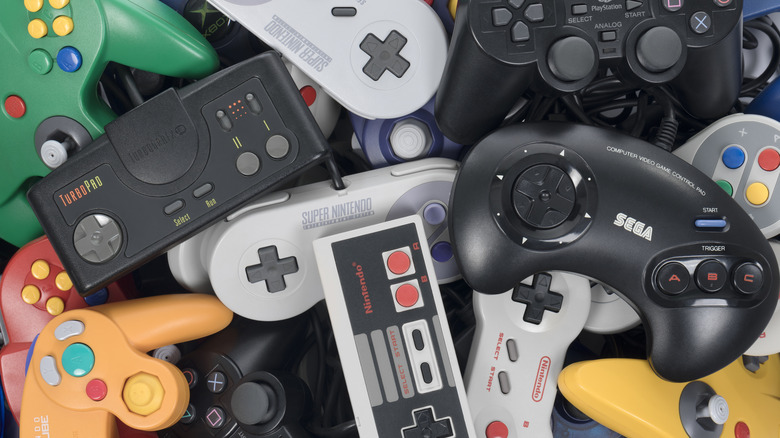
Video games have come a long way since the days of "Pong," but not everyone agrees that they've become better in every way. Many of the best games ever made are to be found in the vast multi-decade backlog of gaming history. So, it's no wonder retro gaming is so popular.
The ideal for many retro gaming enthusiasts is to play these games as intended, using original hardware. If we're talking about games that predate the first generation of HD consoles (i.e., the PlayStation 3, Xbox 360, and Nintendo Wii), then the ideal display device is a CRT or Cathode Ray Tube TV. Retro enthusiasts love CRT displays, but they are big and bulky. Not to mention, the supply of used CRTs out there is dwindling by the day, and some sellers want truly unreasonable prices for them.
Besides, eventually all the CRTs will be gone, and they aren't making any more of them. So we need to find good solutions to allow retro gaming in a modern living room, with a modern flat-panel display. If you want to get the best out of your classic consoles and games using the same TV that plays your cutting-edge, current-generation titles, you'll almost certainly want to pick up a few of these goodies.
A dedicated retro scaler makes old consoles easier to connect to modern TVs
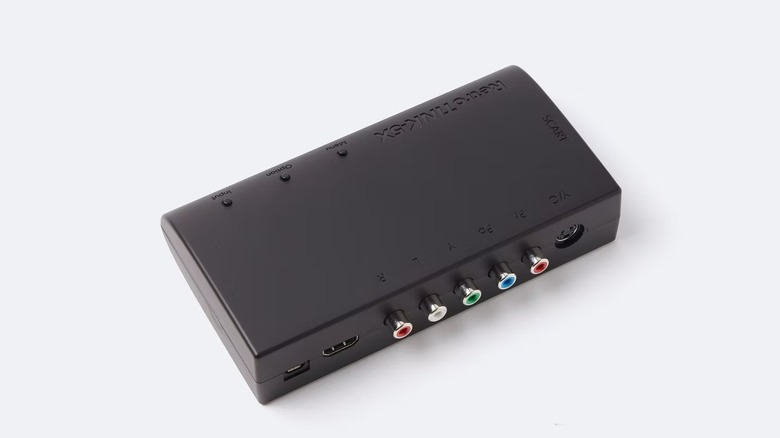
Pre-HD retro consoles generally use an analog video output such as RF, composite, S-Video, RGB SCART, component, or, in the case of the Sega Dreamcast, even VGA. Even if you have a modern flat-panel TV that still has these inputs, the conversion to a digital format for your LCD or OLED is usually less than ideal.
The 240p or 480i signals from these consoles require special handling to look good on a modern high-resolution display. It's not just about scaling the tiny amount of detail in these signals to large modern screens. The scaling process has to be fast enough so that you don't introduce display latency. Using a console like the NES with a CRT offers instant responsiveness, since there's no digital processing and too much latency can make these older games harder to play.
With the problem clearly outlined, the solution is a purpose-built retro video game scaler. A great example is the RetroTINK-5X Pro. At $325, it's not cheap, but this is the premium way to make your old consoles look good on a modern TV. Because it's FPGA-based and does have frame buffering, the RetroTINK-5X Pro has almost no lag. Unfortunately, it's limited to 1440p native output. If you want a 4K scaler, you'll have to spend more on higher-end models, but most people should be happy with 1080p output from the 5X Pro upscaled to 4K by the TV itself.
A RAD2X cable simplifies a single-console setup
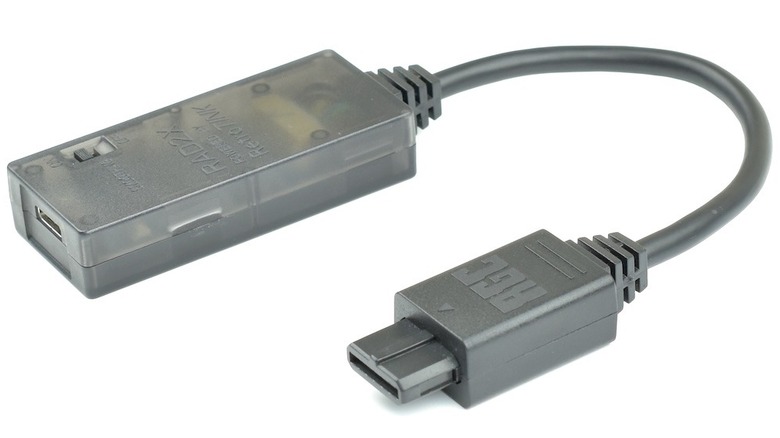
A big, expensive scaler like those from RetroTINK makes the most sense when you have multiple consoles that you want to connect to a single TV. Not only do these scalers have a variety of inputs, but they can also act as a switcher, so you don't have to keep plugging and unplugging consoles.
But if you only have one console that you want to use (e.g., a PlayStation 1 or 2), then you can get a scaler that's specifically designed for that console. This is much cheaper and simpler, while the results are often fantastic because the scaler only has one job. The RAD2X RetroTink HDMI cables are a great example of these. You'll see individual models for specific consoles such as the aforementioned classic PlayStations, Nintendo's NES and SNES consoles, Sega's Genesis and Saturn, and many more.
Time Extension lauded these cables, saying they're simple and efficient; a low-cost, low-latency solution to scaling your console for modern TVs. It's a plug-and-play solution that's perhaps expensive for a single "cable" but much cheaper than a multi-console scaler. The reviewers do mourn the lack of artificial scanlines, but this is a great solution. The scaling technology was developed in collaboration with the folks from RetroTINK.
A CARBY adapter gives compatible GameCubes a straightforward digital connection
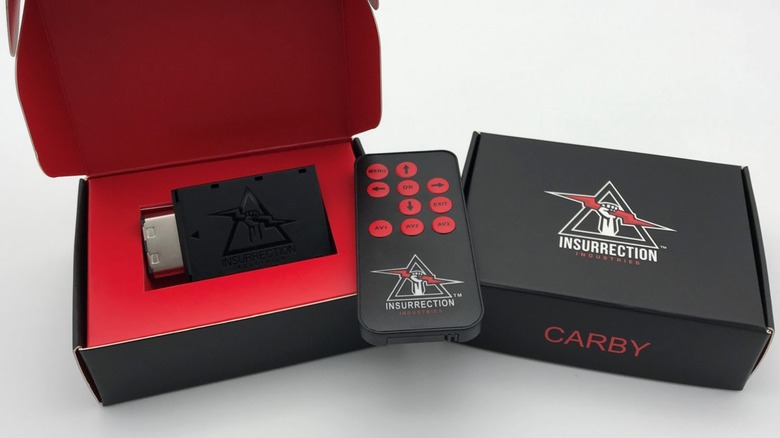
While we're on the subject of accessories for specific consoles, the GameCube never really got its due. It had lukewarm sales, though, of course, against the best-selling console of all time (the PS2); all sales seem mediocre. Yet, today people are discovering what a powerhouse of a machine this was, and it has a formidable library of titles.
Some specific models of GameCube have a digital AV port, which was far ahead of its time. If you happen to own one of these GameCubes, you can use a CARBY adapter to convert that to HDMI. It's a rarity for a console of this generation to have a true digital output without significant modification, but the DOL-001 GameCube's happen to have the right hardware to make this possible.
Of course, if you don't already own a GameCube model that's compatible with this adapter, you might find it difficult to source a used one for that very reason. The later DOL-101 models don't have the port, so if you're choosing between several seemingly identical GameCube consoles, it's worth confirming the model number. When Nintendo Life reviewed the CARBY, it noted that it was effectively the most affordable HDMI mod for the GameCube, as long as you had the right model. If you don't, other options exist, but they're significantly more expensive.
Component conversion cables help standardize a mixed console collection
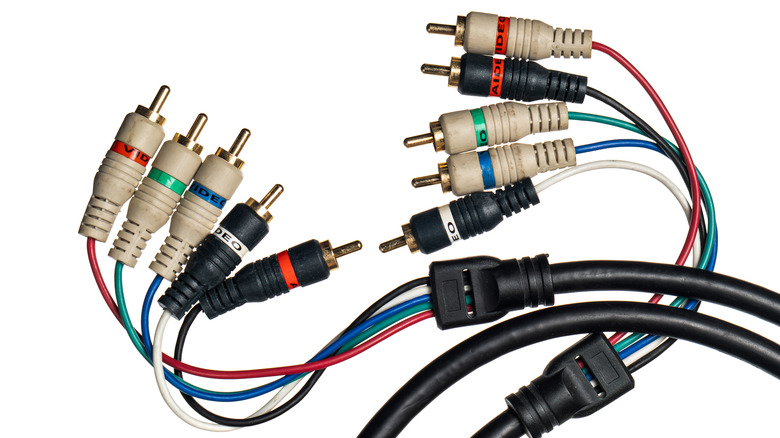
When it comes to analog video connection formats, component video ranks at or near the top when it comes to quality. This method of sending an analog video signal breaks it up into separate color and brightness signals. The TV then reconstructs the image with these separate, clean sources of information. Compare that with a single yellow RCA cable where you'll often see color bleed and various visual artifacts because all of the picture data is combined into one connection and some of it overlaps.
There are several cables and adapters out there to convert the RGB (Red-Green-Blue) internal video signal of a compatible console to component format. This does not include any upscaling, but it does provide your scaler with the cleanest possible analog video signal. As a bonus, if you convert your consoles to component video, you only have one type of video connection to deal with across the board. Which makes switching much easier, since your switch only has to accommodate component video, and your scaler never has to be toggled to a different type of input.
HD Retrovision sells a SNES yPbPr Component Cable, as one example. You'll notice that on the store page there's a list of SNES models the cable works with. Some are plug-and-play, and some require further internal modification. A cable like this isn't just beneficial for getting a clean analog signal to a flat panel; it's also excellent for CRTs with component inputs.
An automatic analog switch saves you from crawling behind the cabinet
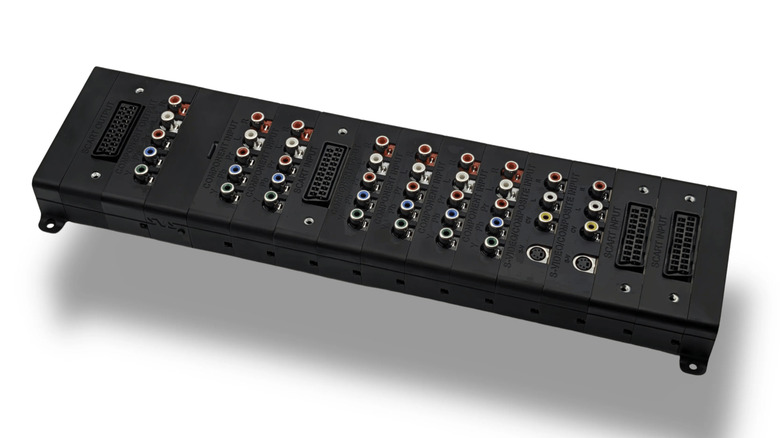
Earlier, we mentioned that a retro video game scaler can act as a rudimentary switch, but in general, these devices only have one of each type of retro video and audio connection. So while it might be possible to connect multiple consoles at once, they can't all use the same type of connection. This forces you to do a lot of plugging and unplugging. That's not only a time sink, but also wears down the connectors, which are only rated for a certain number of insertions.
The answer might just be an automatic analog switch, and the Scalable Video Switch in particular has made waves in the retro gaming community. An excellent video review by My Life in Gaming demonstrates how the SVS can unify a multi-console setup. Just like we use HDMI switches to tidy up our setups, this video switch means never having to plug or unplug anything once you have it all set up.
However, the SVS has a party trick in that it's modular. If you gain additional consoles, just add another module to the existing stack. You also only need to use modules that match the console outputs you own. You can configure up to 32 inputs and up to six outputs. The core module is $40, and then the price of each module varies by type and purpose, but is usually between $25 and $55.
An HDMI switch keeps converted consoles connected alongside newer hardware
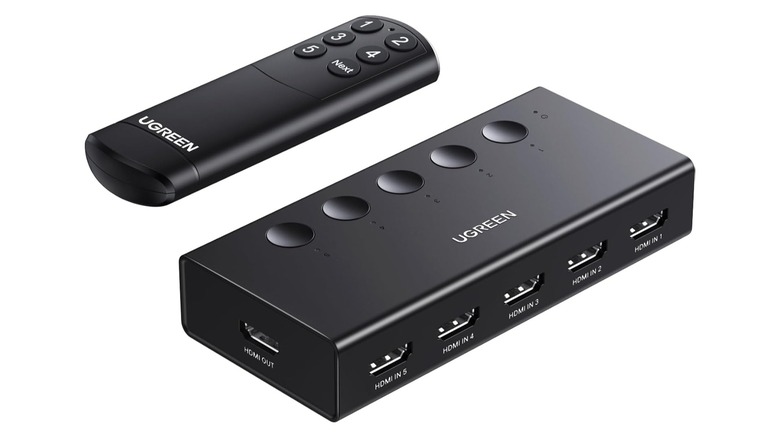
We touched briefly on HDMI switches earlier, but this essential TV gadget has a specific role to play when it comes to retro gaming consoles. While an analog switch like the SVS is perfect for connecting unmodified consoles to a modern TV, if you've had your consoles individually converted to HDMI, then you'll need a decent HDMI switch to manage them all.
If you've got a GameCube with a CARBY and several consoles with RAD2X cables, you'll appreciate centralizing them all to a single switch, which in turn only takes up a single HDMI port on your TV.
The switch doesn't have to be fancy or expensive either. UGREEN has a popular $29.99 5-in-1 HDMI switch that will do the job nicely. Since it supports 4K 60Hz, you can even plug 4K retro scalers into it. In general, we've been impressed with the best UGREEN accessories, so an affordable switch like this from the company is an easy recommendation. Though the thousands of positive user ratings don't hurt either.
A wireless receiver lets you use a controller you already own
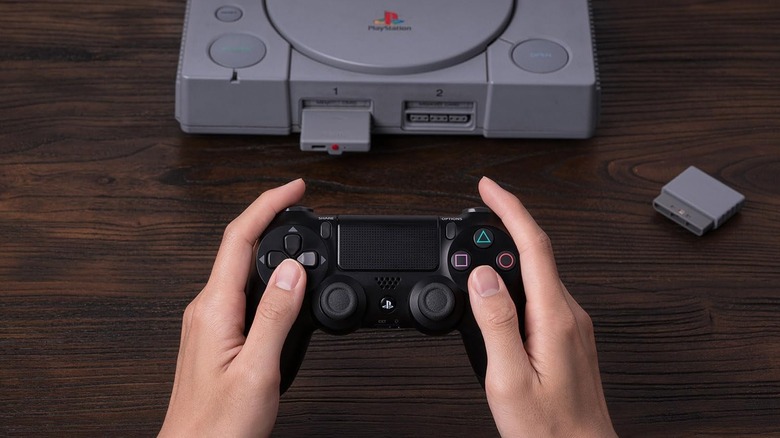
While your NES or PlayStation 2 can still be in great condition, even many decades after manufacture, original controllers for these devices usually aren't as fortunate. A controller takes on plenty of wear and tear by design, and so you can encounter loose analog sticks, buttons that don't work reliably, and various other issues that make an original controller unviable.
You can piece together working controllers from multiple donor units, and in some cases do repairs. There are various ways to make game controllers last longer, but ultimately that road leads to a dead end. The good news is that there are ways to use modern controllers with retro consoles. An excellent example is the 8Bitdo Bluetooth Retro Controller Adapter Receiver for PS1, PS2, and Windows. This receiver fits into the controller ports on the original PlayStation and the PlayStation 2, but can be bound to modern controllers from Sony, Microsoft, and Nintendo. Likewise, the company sells a version for the Nintendo GameCube, too.
As with all wireless controllers, a central concern is latency. While some users say they can detect controller latency using the 8BitDo, the company promises "Virtually lag-free" performance, and the vast majority of user reviews don't mention latency issues at all. So, your mileage may vary. If nothing else, this is a good mitigation against your dog yanking your consoles off the table because of a controller cable, which was a real problem in the '80s and '90s!
Controller extension cables let you keep the original feel
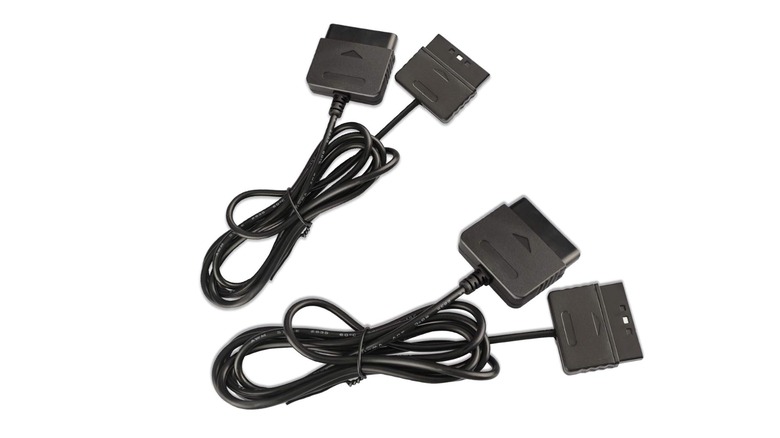
Part of the appeal of using that 8BitDo receiver is the ability to use a modern controller, but the other part has to do with putting some distance between you and your TV. Retro consoles were designed for the relatively small screen sizes of CRTs. If you were using a NES or PlayStation, it was normal to sit pretty close to the TV. When hooking up a retro console to a 55-inch or larger flat-panel TV, you might find it quite uncomfortable with the limited length of the standard controller cables.
The good news is that getting your hands on a simple extension cable, like the Xahpower PS2 extension cable, is cheap and easy. You won't find any lengthy professional reviews of these cables, as they either work or they don't. The main worry is build quality, but at $5 or $10 apiece, you might as well consider these consumable items. Less mainstream retro consoles also have extension cables from specialist retailers like Retro Frog, but you'll find they are often sold out. So if you want one, be sure to sign up for notification when the next batch goes up for sale.
By using an extension cable instead of a wireless receiver, you get the same latency as the original hardware and can use the original controllers, assuming yours are in good shape.
A modern memory card keeps PlayStation saves in one place
In the early days of video games, you had to finish your game in one session with no way to save your progress. Eventually we'd get level codes, and even some internal memory save slots in game cartridges, but for the most part saving was limited or absent. That became a real problem as games took longer and longer to complete, but with the fifth generation, consoles like the original PlayStation made memory cards go mainstream.
These devices are removable and let you store your save files within them. So, for example, you could take your game discs and memory cards to a friend's house and keep playing there, or rent a console while only owning the memory card to save your progress.
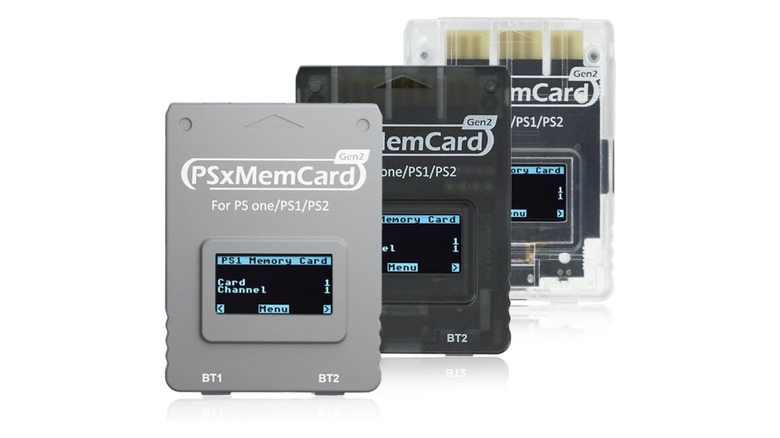
It was actually the 1990 SNK Neo Geo AES that first used a memory card, but that was so expensive that few people even owned one. Unfortunately, if you own an original PlayStation or PlayStation 2 today, you'll find the storage space of the cards quite limited. You can buy larger aftermarket cards, but even these aren't enough to preserve saves for large collections. For that, you want something like the BITFUNX PSxMemCard Gen2. It emulates multiple virtual cards and uses an SD card for storage. Even a small modern SD card will offer more space than you'll ever practically need, and since a computer can read SD cards, you can back up your saves and never lose your progress.
How we picked our examples
Since there are so many different kinds of setups and retro consoles out there, this is a list of accessory types rather than specific accessories. After all, if you're a Nintendo fan, it's not much help to recommend a Sega console accessory!
Retro gaming is a niche market with many small manufacturers often hand-building small runs of accessories. Often this means that the example is in fact the only product of its kind, or that few mainstream reviews of the accessory exist.
As such, we've settled on user ratings of four stars (with at least 100 ratings) being the bare minimum to qualify for the list, but with a heavier emphasis on endorsements on retro gaming forums and from retro gaming influencers. If setting up retro consoles in your living room sounds like too much of a hassle, you might also consider building a retro gaming PC instead of a console. It may not be original hardware, but thanks to advances in modern emulation, you might not even tell the difference.