

Eufy Omni S2 Pro Review: A New High-Water Mark For Robot Vacuums
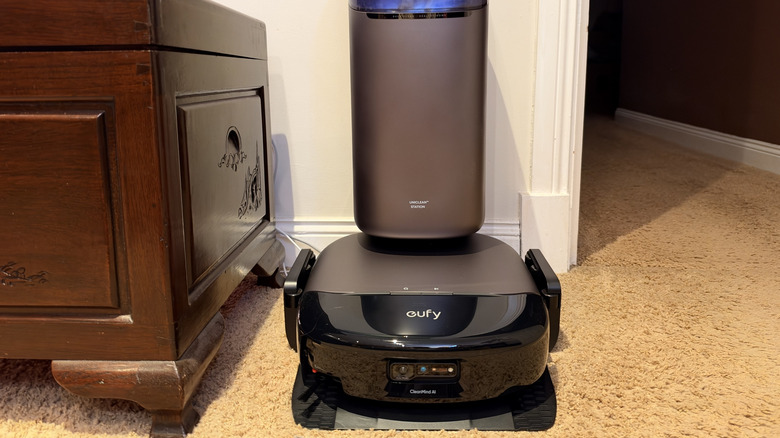
In 2024, Anker's sub-brand Eufy launched the Omni S1 Pro robot vacuum, which was the best that I had used up until that point. Then, earlier this year, it replaced it with the S2, which was even better. So, Eufy's new Omni S2 Pro robot vacuum should be an easy recommendation, right? It is, but for $1,699.99, the Omni S2 Pro is also the most expensive machine that Eufy sells, and it arrives while the Omni S2 is being discounted to $999.99. So, for me to recommend the Eufy Omni S2 Pro, it needs to justify that $700 price difference.
I'm pleased to say that it does. Eufy has put a 6-LED UV-C array in the cleaning dock, an electrolyzed water system for the mop in the robot vacuum, and says the S2 Pro is the first robot vacuum to use both to keep your home cleaner than ever. Alongside that, the S2 Pro offers 40,000 Pa of peak suction, a 290mm roller mop that can press down at 16 N, and a base station that washes the mop in boiling water and dries it afterwards.
I've spent the past few weeks using the S2 Pro in my apartment across both carpeted and hard floors. I don't know about you, but I always end up with more hair trapped in the carpet than I'd like to admit, so it's fair to say I put the dust-sucker through its paces. In fact, I've defeated plenty of robot vacuums that I've tested in the past, usually with hair wrapping itself in the vacuum's rollers or the device getting stuck somewhere in my home. But the S2 Pro didn't succumb to either of those problems. It's the new best robot vacuum I've ever used.
Design and build
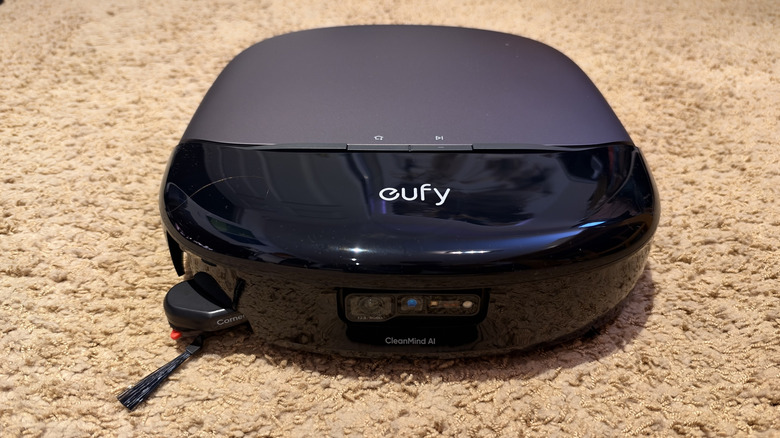
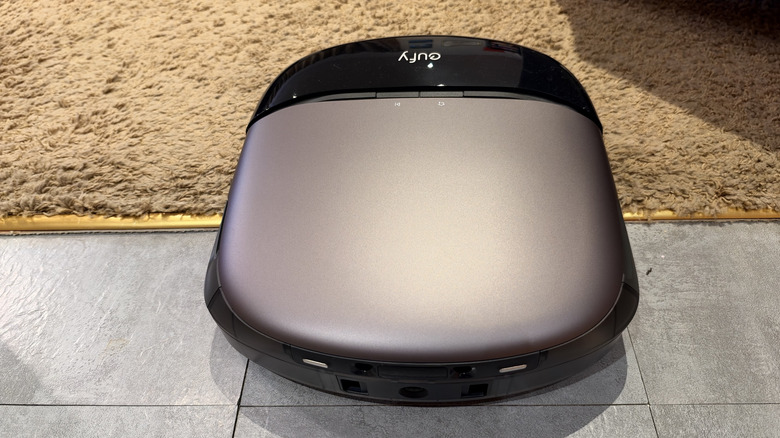
At 387 x 476 x 670mm, or roughly 26 inches tall and 19 inches deep, the Eufy Omni S2 Pro's base station is rather large. In a small apartment, you might have to rearrange some furniture so it fits, rather than simply being able to tuck it away somewhere. The robot itself measures 3.86 inches tall, which is also on the larger side, since several rivals are closer to 3.1 inches tall. The difference in size often will determine if the robot can fit under a bed frame or the sofa, or if it bumps off the edges of them instead.
Only a few base station components need putting together, and they snap together easily — you won't need any tools or a second pair of hands to get things going. For the price of the S2 Pro, you'd expect a premium device, and you'll notice that immediately from the build quality. Nothing creaks, rattles, or flexes when the robot drives on or off the base, and the plastic it's made out of feels dense rather than fragile. The LCD display on the dock is useful rather than gimmicky, telling you what the vacuum is doing at a glance without you having to pull out your smartphone.
The station's exterior is a bit of a dust magnet, so it joins the list of surfaces you'll have to dust in your house. It's hard to avoid this, but it feels a little ironic for a device that's supposed to clean itself. The side brush — which swings out beyond the vacuum's body to reach the edges up to the baseboards — is the part of the vacuum most exposed and vulnerable to damage when the robot gets near walls. It survived the few weeks I've been using the S2 Pro, but it's the piece I'd expect to have to replace first. If you're considering the S2 Pro against some of the other new smart appliances actually worth buying in 2026, this is worth bearing in mind.
Smart features
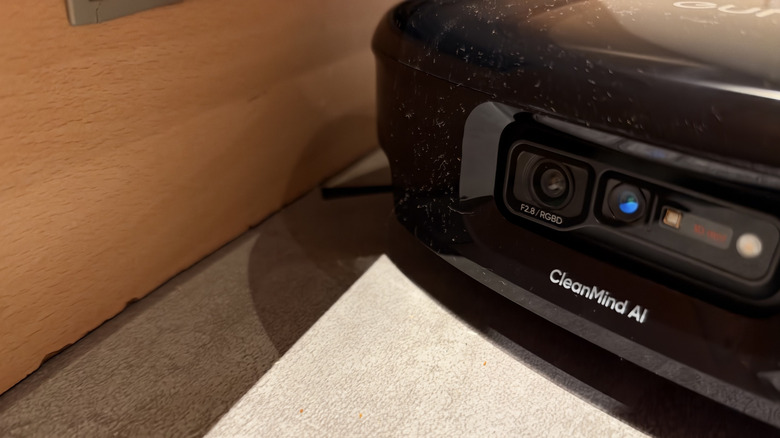
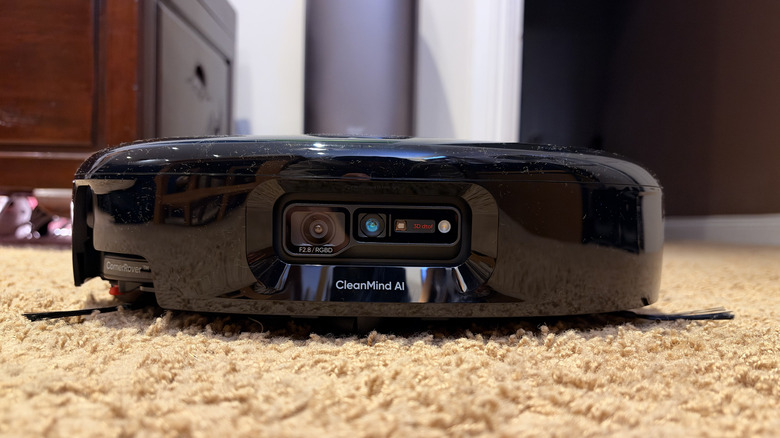
The Eufy Omni S2 Pro uses what the brand calls its CleanMind AI for navigation and obstacle avoidance. The system is built around a 3D ToF matrix laser that recognizes more than 360 different types of obstacles that are as small as 1cm, in daylight or in darkness. The vacuum can also identify rooms and floor types and adjust its suction and water flow automatically.
This system results in the best obstacle avoidance on any robot vacuum I've tested, beating the excellent S1 Pro that I previously used. It worked its way around shoes, charging cables, and random boxes left near the doorway, and never once got wedged. Anyone who has come home to find their robot vacuum stranded on a rug will understand how beneficial that is. My one criticism of the navigation system is that it's too cautious. The robot gives clutter a rather wide berth, which can leave an unswept buffer around anything you've left on the floor. Oftentimes, I'd rather it get closer to the objects and risk nudging them, but there's no sensitivity setting you can use to change this.
The UV-C system is one of the S2 Pro's flagship features, but it's a little harder to assess. Eufy claims a 99.99% disinfection rate in its lab testing against E. coli, S. aureus, influenza, and Aspergillus. I have no way to verify any of that at home. What I can tell you is that six LEDs run at a 275nm wavelength (which is the germicidal sweet spot to damage microbes) across a 120-degree beam to cover the full width of the floor beneath the robot. I have this setting toggled on in the app, and it casts a purple glow under the robot vacuum. Extra disinfection is never unwelcome, and it requires no effort to switch on the setting, but it isn't necessarily a feature you can notice working.
Cleaning performance
The Eufy Omni S2 Pro can handle 40,000 Pa of peak suction and 100 AW of airflow. Across the weeks I've been using the S2 Pro, I've never found a patch of carpet it had skimmed over. Hair is hard for many robot vacuums to handle, but the S2 Pro handled it with ease. Hair hasn't ended up wrapped around the brushes in the time I've been using the S2 Pro. Most robot vacuums would need to be cleaned manually in this sort of time, often with a pair of scissors to cut hairs away from the brushes. I wouldn't call it foolproof after just a few weeks of using it, but it's a great sign for long-term use.
The HydroJet roller spins at 240 RPM with dual scrapers flushing it around eight times per second, and the S2 Pro lays down clean water at 131 degrees Fahrenheit. The pressure is obvious, and its cleaning results are close to what I could achieve from manually scrubbing the floor. On the lower water settings, it sometimes left behind faint outlines of dried stains, so I often chose to run the heaviest setting. Its vacuum suction power doesn't seem to be quite as strong while mopping; it often left behind crumbs in the kitchen when it was mopping and vacuuming at the same time, but it would collect every bit of dirt if it was only vacuuming. My guess is that debris sometimes sticks to the wet roller and gets moved around rather than sucked up.
Eufy says the five-layer AeroTurbo filtration system locks 99.99% of allergens inside the vacuum and retains 97% of suction after 365 days of use. Of course, after only using the vacuum for a few weeks, I can't speak to this longevity, but it's reassuring to see. The S2 Pro also carries Asthma & Allergy Friendly certification from the Asthma and Allergy Foundation of America and Allergy Standards Limited.
Battery life
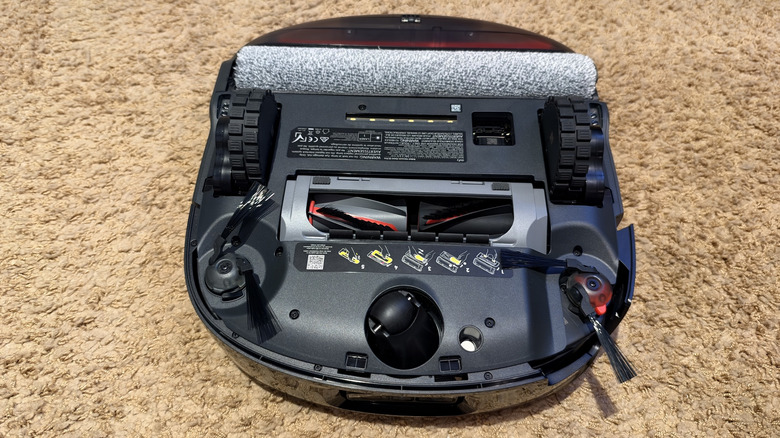
Unfortunately, Eufy doesn't publish the battery capacity or runtime figure for the S2 Pro, which is a strange omission on a robot vacuum at this price. But after using the robovac for a few weeks, I've been able to observe how it performs in the real world. With Max mode switched on. The robot can't quite finish cleaning my apartment on a single charge. It has to return to the base station partway through to recharge, which usually takes somewhere between 45 minutes and an hour to get enough juice to continue.
It also gives the vacuum a convenient time to empty the dust tank, which would fill up if it had been a while between cleans. When it resumed cleaning, it would pick up exactly where it had left off. Noise is reasonable in the standard modes but gets quite loud with Max mode enabled. While I didn't measure the noise, I'd think twice about running it in the early hours if you live in a shared building or have neighbors.
If I used the standard cleaning modes, it could usually finish cleaning my entire home in just one run. That being said, I don't suppose the battery life matters all that much. The recharge and resume cycle is entirely automatic, and since I usually set the S2 Pro off cleaning when I'm not at home, it doesn't really matter how long it takes or how often it has to recharge. But, if you're in a time pinch and want the floors cleaned before guests arrive, you probably want to run one of the lower-powered settings and accept the slightly less aggressive suction.
All-in-One Station
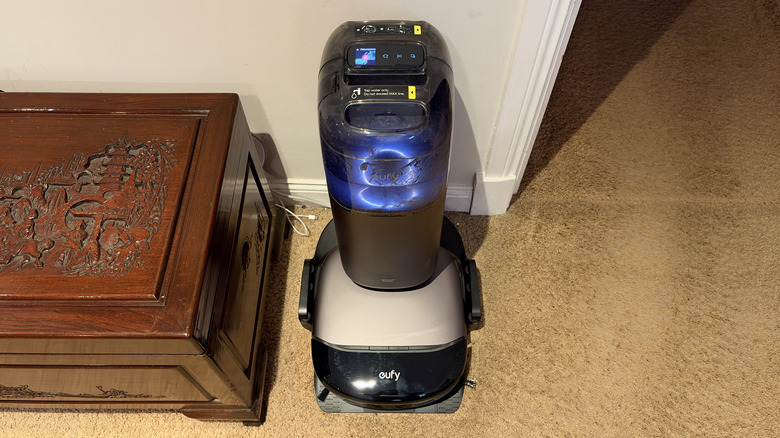
The dock, which Eufy calls the All-in-One Station, is sort of a self-cleaning machine that looks after the S2 Pro, reducing the amount of maintenance you'll need to do on the robot vacuum. It empties the robot's dust bin, washes the mop at 212 degrees Fahrenheit, dries it at 131 degrees, refills the water tank, dispenses detergent, and generates the electrolyzed water that Eufy says keeps the tank antibacterial for up to five days at a time.
It can handle five or six cleaning sessions before the clean water tank needs filling or the dirty tank needs emptying, and the dust bag hasn't needed changing yet in my weeks of use. Replacement dust bags cost $18.99 and fit the S2, S1, and S1 Pro as well.
There's also a built-in fragrance diffuser, which releases scent continuously while the robot cleans. The S2 Pro ships with Crisp Pine and Fresh Lavender scent options, and I've been using Crisp Pine, which smells quite good. It works better than I expected on carpet, though the scent fades within a few hours after it finishes cleaning. My capsules on the S2 lasted for around 6 months, and Anker told me the S2 Pro uses the same system. I haven't been able to test whether the old scent capsules fit the new machine, so don't assume your S2 stock carries over.
The mop drying cycle is my only complaint about the base station. It often takes quite a long time (a good few hours), and it's rather noisy, somewhere between a bathroom extractor fan and a hair dryer being used in the next room. If the station sits in your living room, you'll probably notice the noise, so you'll want to schedule cleans so that the drying finishes before you're trying to watch something on TV.
Companion app
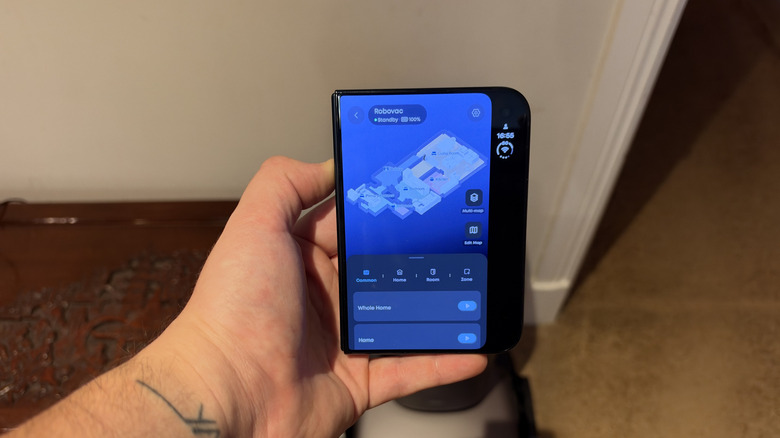
Setting up the Eufy Omni S2 Pro is just as easy as assembling the base station. The companion app walks you through setting things up, the robot maps your home by itself on the first run, and it will correctly mark room boundaries and even name them within the app. It also shows you the furniture in your room, so you can see exactly what the robot sees and correct it if necessary. From there, you can merge, divide, and rename rooms, carpets, or floor materials and draw no-go zones.
Some of the more useful settings require a few taps to access, so I'd recommend looking through all the menus before you finish the setup process. I'd make sure the UV cleaning toggle is on, switch on the heavy stain deep mop setting, and switch on accessory maintenance reminders. The app has worked flawlessly for as long as I've had the vacuum, with very little lag time between me tapping the button to set the robot off and it actually starting to clean. This sounds like it should be basic, but if you've ever used a cheap robot vacuum before, you'll know just how bad some companion apps are.
One area where the S2 Pro lacks is in smart home support. There's no HomeKit, so anyone running an Apple-centric house will have to manage this robot vacuum in its own app. At $1,699, that's a real omission, and it's the kind of thing that pushes people toward rival brands, no matter how good the cleaning is. If platform support is your deciding factor, it's worth seeing how the major robot vacuum brands rank against each other before you buy one.
Conclusions
The Eufy Omni S2 Pro is the most capable robot vacuum I've tested, and in the few weeks I've had it, I've stopped thinking about vacuuming entirely. The suction is more than powerful enough to handle thick carpet. The brushes refuse to tangle in hair. Navigation never gets the robot stranded, and the base station handles most of the robot's maintenance and disappears into the background. While combined mopping and vacuuming sessions can leave debris behind, and the obstacle avoidance is often too generous with its clearances, there's not much more I could ask for from a robot vacuum. Plus, with the UV-C disinfection, you can rest assured that your home will be more spotless than ever.
Whether the S2 Pro is worth $1,699.99 probably depends on your home. If you've got pets, lots of carpet, and someone with allergies, the S2 Pro's suction, filtration, and allergy certification make this option hard to beat. But for a small, hard-floor apartment, you're paying a large premium for a device with powerful suction designed for carpets, when the cheaper Eufy models (and several of the other robot vacuums that rank highest in 2026) could handle your home without a struggle.
The most obvious rival is Eufy's own Omni S2, which is often discounted below $1,000 from the launch price of $1,599.99. It has 30,000 Pa of suction and doesn't have the UV-C array, but for $700 less, it's a great option for most homes. The Roborock Saros 20 matches the S2 Pro's price with 36,000 Pa of suction, dual rotating mop heads, and a 212 degree Fahrenheit mop wash. At 3.4 inches, it's noticeably shorter, so it can reach under some items of furniture that the S2 Pro simply can't.
The Dreame X60 Ultra is also on sale from its regular retail price of $1,499.99, with 35,000 Pa of suction, which makes it the best value pick among the flagship options. None of these rivals offer UV-C floor disinfection, which remains the S2 Pro's exclusive feature. If your budget doesn't quite stretch to this flagship level, check out the cheap robot vacuums worth buying in 2026. BGR's list of the robot vacuums that owners say break down the least often is also worth a look. With all of that in mind, if you have pets, carpet, or allergies, and want the best in disinfection and cleaning, the Eufy Omni S2 Pro is one the best robot vacuums available in 2026.