

10 Of The Best Ways To Mount Your TV
We may receive a commission on purchases made from links.
Back when those CRT displays retro enthusiasts love so much were mainstream, you didn't have much choice when it came to placement and mounting. Small models might have been light enough to attach to a wall with an articulating mount, but anything medium to large in size was so heavy that the support system would have to be elaborate and expensive.
Fast-forward to the era of flat-screen TVs, and people quickly realized that they could also be hung on a wall just like a portrait. A basic wall mounting is quick and easy to do if you pay for a professional installation, and many people go for this option. The only real pitfall is mounting the TV way too high.
But the common wall mount you see everywhere isn't the only alternative to using the stand that came with your TV. There are numerous variations for mounting a TV, either attached to a structure or as a freestanding unit. A lot of the time, issues you have with your TV setup have more to do with how you've decided to mount your set than the technology itself, your content, or the seating arrangement. It's imperative, then, that you pick the type and style of mount that works best in the space where you need that TV to be. Here are 10 of the best options covering a wide range of settings.
Fixed wall mount
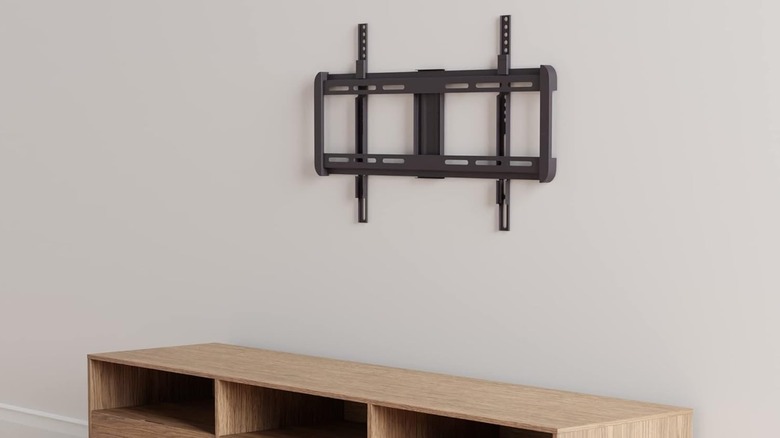
Let's start off with the vanilla option in the form of the fixed wall mount. This consists of a wall plate and the mounting bracket attached to the back of the TV. With this setup, the set sits parallel to and almost flush with the wall. It's the most minimal and elegant wall-mounting solution, but of course it offers no tilt or swivel functionality at all.
This is the best mounting option if you can mount your TV at exactly the correct height from the position where the viewers will be seated. However, for this to be viable, you need to plan everything else, such as the position of your furniture, the layout of the room, and where everyone will sit to watch.
If you ever want to change anything, you can't adapt the TV to accommodate a new layout and might have to change the mount type, which is mildly annoying, or install an entirely new type of mount, which can be downright aggravating. It's also a chore to access the back of your TV with a fixed mount. With a tilting mount, you can usually tilt the TV up and get your arm back there, but here you need to plan your cabling upfront. For this reason, it's best to install cables in all the ports of the TV even if you aren't going to use them right away. One major benefit of this somewhat boring option is cost. For example, the popular Amazon Basics mount is only around $30.
Tilting wall mount
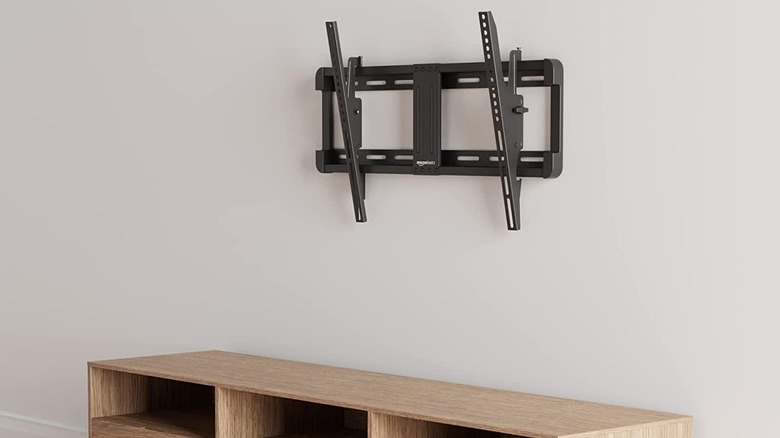
Fixed mounts are the only style of wall mount you'd need in a perfect world, but we don't live in a perfect world. Sometimes things need to be tweaked to accommodate the reality of your situation. Not everyone watches their TVs head-on, for example, and it's not always possible to mount a TV low enough to be in the ideal spot.
That's when you want to consider a tilting mount. This is pretty much the same thing as a fixed mount, but you can tilt the TV on the vertical axis so that anyone who has to look up at it will see the screen at the correct angle. Apart from allowing for higher mounting positions, a tilting mount also lets you compensate for reflections and glare from lights in the room. It's sort of like the tilt function of your car's rearview mirror for nighttime driving.
This type of mount also makes it a little easier to get behind the TV and swap out cables if you need to because it doesn't sit quite so close to the wall. However, it's not as secure as a fixed mount since it introduces moving parts into the equation instead of just relying on a solid frame. The good news is that a tilting model isn't much more expensive than a fixed mount. In fact, the tilting version of the Amazon Basics mount we mentioned above is actually a little cheaper than its more rigid cousin.
Full-motion articulating mount
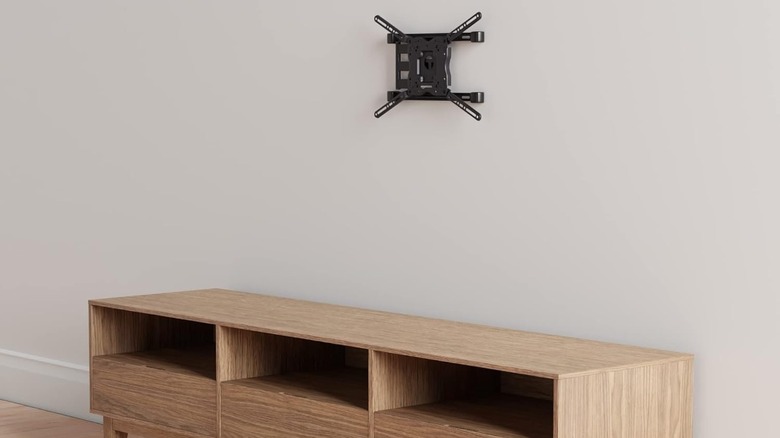
Both the fixed and tilting options offer very little flexibility when it comes to TV angle and position, but a full-motion, or fully articulated, mount goes to the opposite end of the spectrum. Typically, these mounts have an arm with one or more segments that allow movement from left to right, towards and away from the viewer, and with up-down tilt to boot.
This makes it the ideal solution for open-plan viewing areas where people might want to watch TV from different spots at different times. For example, you might want to watch TV from the kitchen, and then watch that same TV from the couch while eating dinner. This is also a great solution in places like bedrooms, where you may want to mount a small TV (32 inches, for example) but don't have a good place to permanently install it. A full-motion mount can be used to swing the TV out of the way when not in use, or adjust it for different positions viewed from your bed.
Unfortunately, these mounts come with a bit of a price premium. Sticking with the Amazon Basics series as the example, the full-motion articulating mount costs about twice as much as the tilting model. This is because of the extra moving parts and also because more material is needed to build these larger and stronger mounts. Since the TV is on an arm, it puts more strain on the wall and the mount itself, so you'll have to make sure your wall can handle it.
Corner wall mount or stand
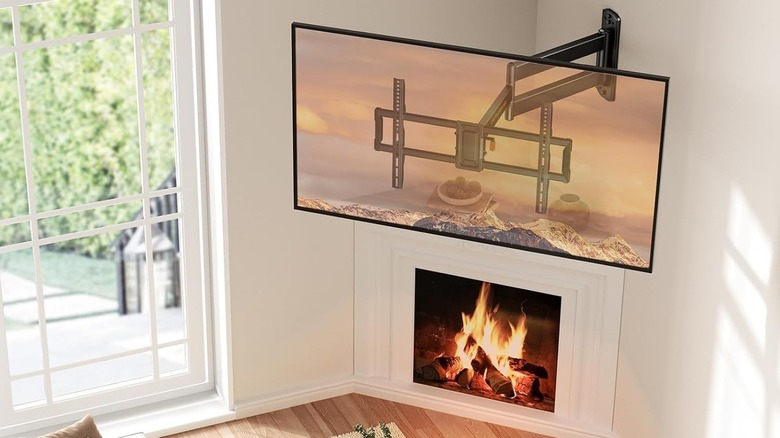
In some cases, you'll want to mount your TV in a corner instead of flat against the wall. Corners often go unused, and in open-plan setups or cramped rooms, putting your TV in the corner can be an efficient way to create a cozy viewing area while leaving the rest of the room free for other uses.
There are two main ways to achieve this, and it brings up the old debate about whether a wall mount or a TV stand is better, but from a new angle. A corner is far from being the worst place to put a TV, especially if you do it right, but do you prefer a stand or a mount? A corner TV stand is more expensive, since it is a larger piece of furniture, but it requires no drilling or special mounting considerations. It also means it's relatively easy to move your TV setup over to a different corner if the need arises.
However, a stand is not the most elegant solution. But how does a corner wall-mount differ from the usual flat-wall type? It all comes down to how the mount attaches to the wall. As you can see in the image above of the Perlegear Corner TV Wall Mount, it's that vertical pivot shaft that allows this style of mount to be installed near or in a corner, with the articulating arm letting you put the TV flat against the wall or centered in the corner as needed.
Pull-down fireplace mount

We've said before that you shouldn't mount your TV above a fireplace, and in general this holds true. However, if you deal effectively with the reasons you shouldn't do it, this can be a viable place to put your TV.
The first reason fireplaces are generally considered a poor place to mount a TV is that this puts the TV too high on the wall. This doesn't matter if people are going to watch the TV standing up, which can be the case if the TV is mounted above the fireplace in a home bar area or other room where the centerpiece isn't the TV itself. However, in most other situations, above a fireplace is simply too high. The other reason has to do with the fireplace itself. Soot and radiant heat aren't good for your TV, so in general you need to ensure that the TV is safe from the fireplace when the flames are roaring.
A pricey but practical solution to this is something like the MantelMount MM340 Above Fireplace Pull Down TV Mount. This mount uses a gas-piston system that lets you pull the TV down to a lower position while the fireplace is not in operation. If you want to use the fireplace, you simply push the TV back up to its higher position. Thanks to the complexity (and expense!) of it all, this is pretty much a last resort option if the only place your TV can feasibly go is above your fireplace.
Ceiling mount
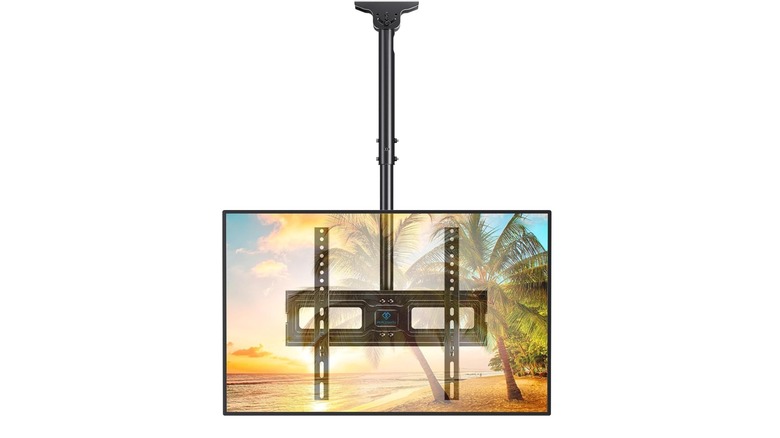
We've covered TV mounting solutions that stand on the floor and attach to the walls, so the only other flat surface that remains is your ceiling. As you've probably guessed, there's a TV mount for that. These mounts suspend a TV from the ceiling, and you'll see them in places like gyms, restaurants, conference rooms, or waiting rooms.
The need for these arises in areas where the walls are not available for some reason. In a big open-plan space, there might simply not be a wall nearby, or the walls already have other objects in the way, like closets or wall decorations. If you live in a loft apartment, or a place with large windows that take up too much of the wall to mount anything, this could be a good alternative to a floor stand.
The good news is that examples like the Perlesmith TV ceiling mount you see above aren't much more expensive than a simple tilt mount. However, installing ceiling mounts is a little trickier. They can only be attached to specific support structures in the ceiling, and they can't support the same maximum weight as a wall-mount solution. With ceiling mounts, we strongly suggest professional installation. On the plus side, these mounts usually offer plenty of swivel and tilt action. A 360-degree range of motion for swiveling is normal — just mind your cabling, which of course can't just twist around indiscriminately.
TV stand with built-in mount
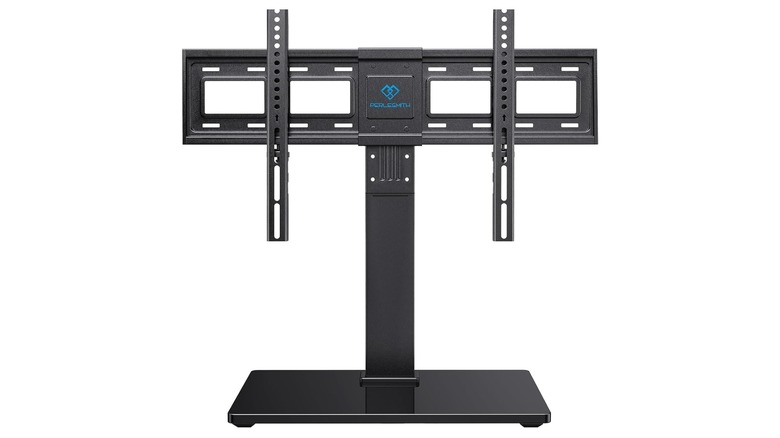
Your TV almost certainly came with some sort of factory-standard stand, most likely feet on either side of the TV that slot into proprietary holes, or a central stand that attaches to the TV using a proprietary plate. Most people would think that if you wanted the TV to be free-standing and not attached to a wall or ceiling, then whatever came with the TV is what you're stuck with.
However, there's no rule that says the standardized VESA (Video Electronics Standards Association) mount on the back of your TV has to be used for an attached mounting. There are many so-called "universal" TV stands that offer you features like tilt, swivel, or height adjustment in a free-standing solution. It might be just the alternative setup your TV needs if all you want is an upgraded stand.
If you rent or can't mount your TV to a wall for some reason, then this could be the best compromise. There are models that can stand on the floor, taking up very little space, if you want to forego having any sort of furniture-sized TV stand. Otherwise, a model that's designed to sit on top of a traditional TV cabinet (where your TV would usually go) can be a good middle ground that has the benefit of requiring no installation.
Rolling TV cart
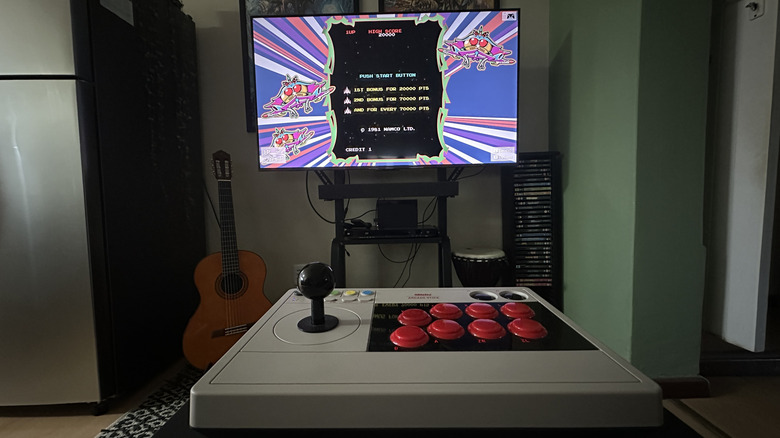
Remember how, when you were in school or at university, they'd sometimes roll in a TV on a cart? Did you ever consider that you could just buy a cart of some type for your own TV? Sure, these are mostly associated with boardrooms, classrooms, and the like, but there's no rule that says you can't just have a rolling cart for your TV at home.
Even better, many of them have integrated shelves where you can put a console, set-top box, or Blu-ray player. If you set it all up carefully and manage the cables correctly, you can roll your entire setup between rooms. As you can see in the image above, that's exactly what I've done with my own secondary TV. I can roll it into my bedroom (where there's nowhere to mount a TV) or roll it out into the living room as needed. I even found a soundbar mount that attaches to the back of the TV, so it's a complete solution.
There are some stylish options out there, and they don't all have to look like corporate AV equipment. Fitueyes has a nice rolling corner TV stand, which combines the benefits of a corner stand and that of a free-rolling cart, with integrated shelves for your AV gear. Just remember to engage the wheel locks once your TV is in the spot you need it to be. It would make for a rather expensive crash if it rolls away when you aren't looking!
Floor-to-ceiling pole mount
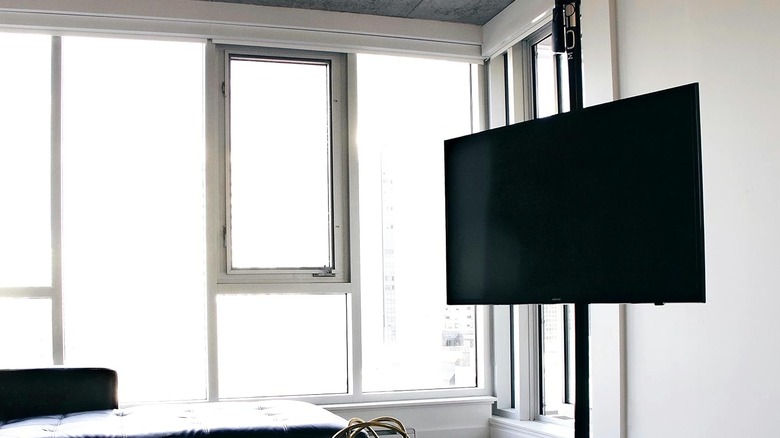
If you can't choose between a floor mount or a ceiling mount, why not both? Jokes aside, this is one of the more interesting options for mounting a TV. Instead of attaching to a wall, here the TV is attached to either a tension pole or a permanently installed column. It's the tension pole solution that's most relevant here.
Basically, you adjust the pole to press against the ceiling and floor until it's secure. Examples like the Mofopole above can be moved anywhere you like, as long as the floor and ceiling are close enough to each other. The pole has much more carrying capacity than a ceiling mount, since the floor is bearing the load. You can also usually mount shelves for AV equipment to the same pole, so you might not need any additional stands.
There are some considerations here, though. If your ceiling is made of something that the pole can mark or damage, this might not be your best option. Likewise, if your ceiling is slippery concrete or tiling, it might not be an appropriate solution. However, for the ceilings that many people have, it should be fine.
TV lift cabinet
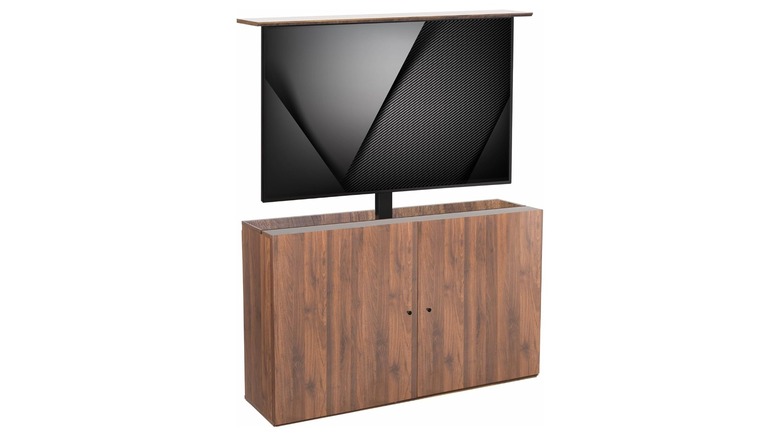
Our final candidate is the most elaborate and most expensive solution on this list, but if you value clean aesthetics above all considerations, it might be the perfect TV mounting option for you. Motorized TV lift cabinets like the Vivo model you see above come with eye-watering price tags but allow you to completely hide the TV when it's not in use. It just looks like any other cabinet. Then, when you're ready to watch some tube, you just push a button to activate the lift mechanism.
If you don't watch TV frequently and want a living space that doesn't look like it was designed with a TV as the focal point, this might be the best option for you. Price isn't the only downside, however. For one thing, the size of TV that you can use is limited. The Vivo above can only handle a 55-inch TV at most, and bigger cabinets have commensurate increases in price.
The other potential sticking point is that you can't just turn on your TV, but have to wait until it's done rising from the cabinet. It's very cool and will probably make you feel like a Bond villain, but it's likely to get old fast. Also, any motorized system will eventually fail. So it's a good idea to choose a lift cabinet that has an easy way to manually lift and secure the TV if something goes wrong with the motor.