

9 Quirky Desk Gadgets That Make Great Gifts

We may receive a commission on purchases made from links.
Desk toys and gadgets have been around for ages, and there was a time when everyone had a Newton's cradle like the one above clacking away, or one of those drinking birds. But this is the 21st Century, and we can do better, or at least soup up our desktop gadgetry with a little tech help. And so many neat gizmos that you can adorn your desk with today are not only interesting to look at or fun to use, they're also genuinely useful.
There's no rule that says a practical piece of technology has to look serious or align with modern fashion. Most importantly, when you want to give a memorable gift to someone, handing over just another cookie-cutter device lacks a certain something, don't you think? The person you're gifting the gadget to might need it, but when it's just a generic example, the end result is no different from getting socks for the holidays. So if you're looking for the perfect quirky gift for that loveable geek in your life, then you'll be happy to know that we've scoured the web to find a wide variety of gadgets that are not only extremely interesting, but also just fine products in their own right.
8Bitdo 18 Keys Retro Mechanical Numpad
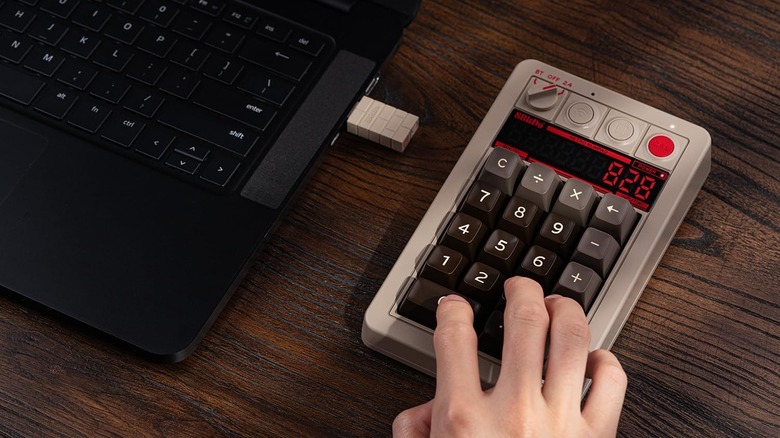
Mechanical keyboards are all the rage these days, as people have seemingly realized that the clicky models from the early days of home computers are better than the soft and squishy membrane units that almost completely replaced them for a while. You can even use one of those original IBM Model M keyboards with a modern computer if you use the right adapters, but most mechanical keyboards today look modern and, at worst, retro-futuristic.
8BitDo has gone a different way. The company is known for its cool retro keyboards, but the 8Bitdo 18 Keys Retro Mechanical Numpad is just a number pad (as the name indicates), styled in a similar fashion to the existing 8BitDo full boards. It works with both Windows and Android and comes in several styles. The one you see above is the C64 style, which of course refers to the Commodore 64 microcomputer. Other options include IBM Model M colors, Famicom, and Xbox, though, of course, the options are named in a trademark-friendly way.
You have the choice of Bluetooth or a dedicated 2.4-gigahertz wireless dongle, but perhaps the coolest thing about this mechanical numpad is that it also works as a standalone calculator. That makes it a two-in-one gift that can be used for spreadsheets and some quick calculations when your computer isn't even on. Professional reviews say it's a high-quality, well-made, and stylish device that does more than the average numpad and is perfect for a retro enthusiast.
UGREEN Uno RG 65W Robot Charger
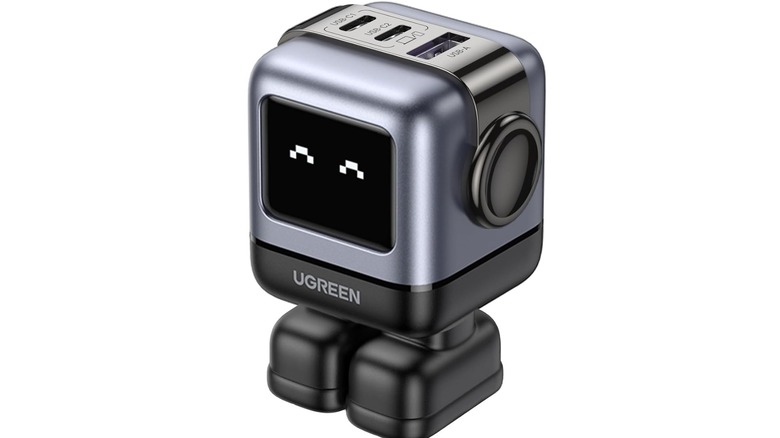
If we're being honest, a charger isn't the most exciting gift you can give someone. Sure, upgrading a charger to a modern high-wattage GaN model will transform the charging experience for the better, but it's still a little bland as a present. The UGREEN Uno 65W 3-Port USB-C Charger sheds the self-seriousness design of most charging gear by offering a cute little robot-style device with an expressive LED face. It also hits the tech-upgrade bits, as it does, indeed, use GaN technology.
But what does "GaN" mean? Well, it's short for Gallium Nitride, and chargers that use this technology are smaller, run cooler, and waste far less power than traditional silicon-based models. So this isn't just a cute novelty, but a modern cutting-edge charger. Professional reviews of the Uno praise its fast-charging performance and the ability to power three devices at once. The retail price ($52.99 on Amazon) is also fairly reasonable for what you get, though you'll have to provide your own USB-C cable. That's a fairly minor complaint, but you will need to ensure the USB-C cables you use are rated for the 65 watts of peak power the Uno can provide.
Keep in mind that the total power is divided across the three ports. So if you plug in a laptop that can use the whole 65 watts and then also plug in a phone or power bank, then the laptop might not have enough power to charge up. Luckily, there's also a 100-watt version of the Uno in case you need more juice.
GravaStar Mars Pro Bluetooth Speaker

Even the best Bluetooth speakers tend to be rather conservative in design. If you've seen one speaker, you've pretty much seen them all, right? The GravaStar Mars Pro Portable Bluetooth Speaker, however, can't be accused of being like every other speaker.
Instead, it looks like a tripedal robot from a science fiction movie, somewhat reminiscent of the turrets in the video game Portal. Is it a gimmick? Absolutely. Will it look awesome on a desk? Also yes. The Mars Pro comes in a couple of different colors and styles, with the War Damaged Yellow version being particularly cool. You know that person in your life who loves cyberpunk sci-fi is going to dig it.
But how is it as an actual speaker? Hands-on reviews rate the sound as good as you can expect from a 20-watt speaker. That's not a room-filling power level, but more than enough for a desk setup. If you want a stereo speaker system, you can connect two Mars Pro speakers to each other and have them act as your desktop PC speakers. They are, however, quite pricey (about $200 on Amazon), so buying a pair can be hard to justify. There's no denying the cool factor here, though, and RGB lighting adds even more character. The rated battery life of up to 15 hours means you can grab the Mars Pro from your desk and take it with you everywhere in your house.
Divoom Pixoo-Max Pixel-Art Display
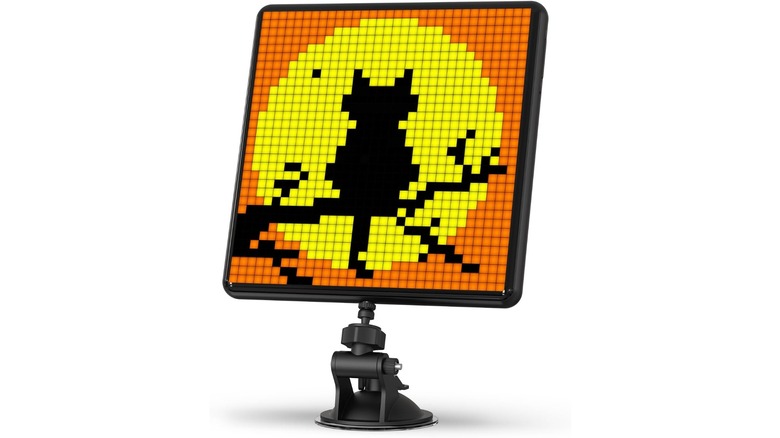
At one point, digital picture frames seemed like a popular gift suggestion, but now people need to figure out clever uses for old digital frames as they start piling up. It's a neat idea in theory, but you can just set a photo slideshow screensaver on your computer if you really want to see family photos when you take a breather.
The Divoom Pixoo-Max Pixel Display is something entirely different and far more interesting than a standard digital frame. Rather than being a typical LCD, this is a programmable LED screen with a 32-by-32-pixel display. In other words, it only displays pixel art at a low resolution, but that's what makes it a vibe ... and quirky. Using the companion app, you can create your own art and then display it using this fun device. It will look great next to any gaming setup, especially if you want to display gaming-related pixel art. You can use the included kickstand, wall-mount it, or use the suction cup mount, which makes it easy to install on the inside of a glass door as signage, for example.
The Pixoo-Max is not just a static piece of decoration, either, as it can display animated sequences or even the time. Hands-on reviews note that there's a large selection of community-made content to choose from, too. Use it for notifications, to count down time, or for any of several other cool app-driven features, with the potential that more will come as the app grows.
Dockcase Explorer Edition Smart USB-C Hub
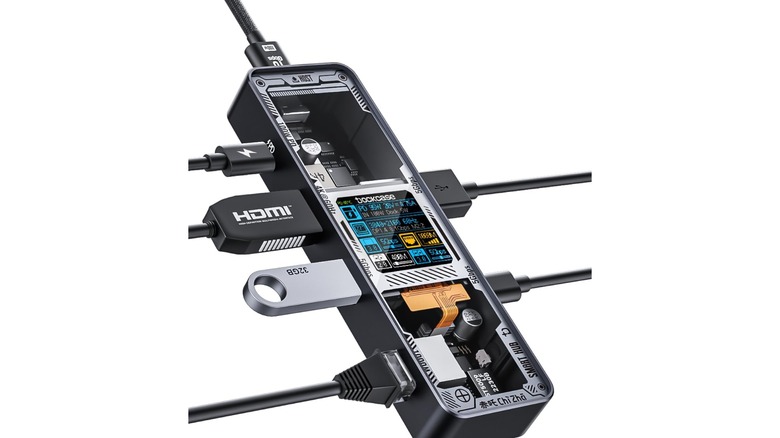
A chronic lack of USB ports on modern laptops is a completely valid problem, the solution to which is inevitably either a USB hub or docking station. Most examples of these products are just simple silver, gray, or black objects designed to stand out as little as possible. It's a gadget we all need to one degree or another, but never really think about.
The Dockcase Explorer Edition Visual Smart USB-C Hub does indeed come in either black or silver, but that's where the visual similarities to typical USB hubs end. The top panel of this hub is transparent, so you can see the cool electronic gadgetry inside. This gives it a cyberpunk vibe, further enhanced by the informative screen in the middle of that transparent panel. Hands-on reviews of the hub note how useful the information on the screen can be. You can instantly see, for example, what monitor is connected, what refresh rate is being output, and the resolution of the image.
Likewise, you can see details about the total power draw from the connected devices and how much is coming in from the (up to) 100 watts that the hub can pass through itself. The selection of six ports might not be enough for some people, but most users of thin and light laptops (think MacBook or Dell XPS) won't need more than the USB, HDMI, and Ethernet connections on offer.
Canon Ivy 2 Mini Photo Printer
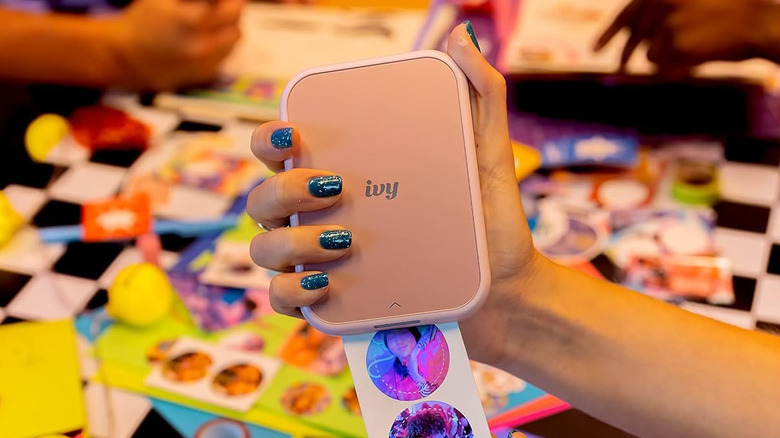
Printers aren't typically devices you keep on your desk these days, given that they're pretty large and work wirelessly. The Canon Ivy 2 Mini Photo Printer, though, is a palm-sized device that takes up hardly any space at all and uses an interesting ZINK (Zero Ink) paper system to create its prints.
This Bluetooth printer spits out two-by-three-inch images that you send to it from your smartphone, which is the only type of device it works with (both iOS and Android). The good news about that, of course, is that you probably have your phone with you — or at least near you — when you're sitting at your desk, anyway.
The stickable photos the Ivy 2 prints definitely lean towards the novelty side of things, but as professional reviewers have noted, you just might find yourself using the printer more often than you think. Part of this is because the photo paper doubles as a sticker, so you can use the device as a sticker printer or a fancy label maker. There are even sticker papers for the Ivy 2 that have circular cutouts. The accompanying app also lets you do some creative things, like printing out a single large image across several two-inch-by-three-inch prints. You can then reconstruct those for art projects, journals, or a scrapbook. It's certainly a niche and quirky gadget, but it is also a real printer.
OBSBOT Tiny 3 4K PTZ Webcam
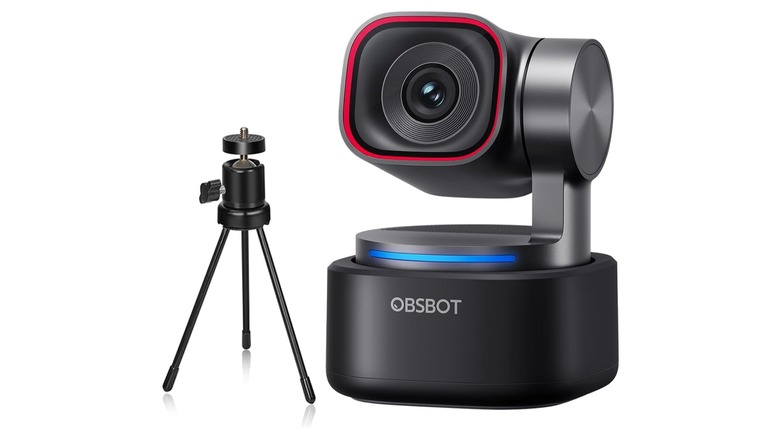
There are plenty of cheap webcams available that can beat a laptop camera, but if you're willing to spend a decent chunk of change, you can do much, much better than either of those options. As a case in point, and if you listen to the experts, the only real flaw of the OBSBOT Tiny 3 is its price tag ($349 on Amazon). In all other respects, this is one of the best webcams that money can buy, and it also manages to be a weird little thing at the same time.
As you might be able to tell just from its picture, the Tiny 3 has a motorized gimbal base, which allows the camera to move and track objects. It uses AI tracking technology to follow you around the room, which makes it great for doing presentations or for streaming in situations where you might get up and move around while you're talking. The microphones, too, are a common point of praise. You can record high-quality uncompressed audio if you like, and the three-mic system can pick up sound from all directions if you want.
Video quality matters a lot, of course, and you'll get either 4K at 30 frames per second (FPS) or 1080p at 120 FPS. That makes it suitable for high-quality talking-head type videos, but also for more action-oriented clips. The software for macOS and Windows includes expanded functions like intelligent background removal and can use features like NVIDIA Maxine that leverage the latest in GPU tech. Basically, this quirky cam is at the top of the pile from a technology standpoint.
TourBox Neo Creative Controller
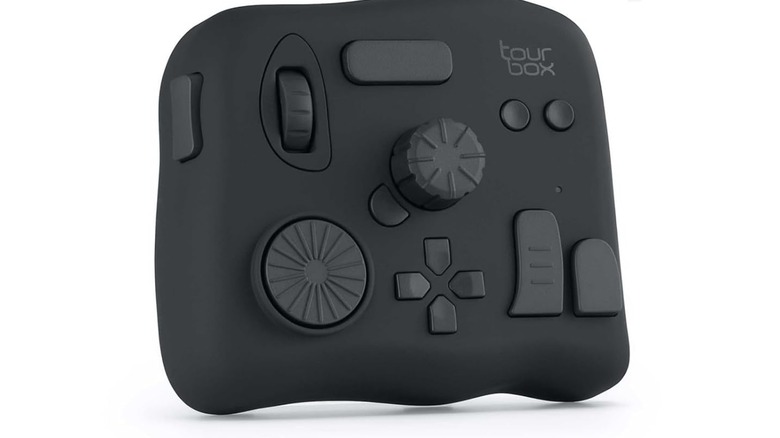
While the TourBox NEO might look like a game controller designed by Pablo Picasso, it's actually part of a long tradition among creative professionals to have the most bonkers control devices that help workflows like video editing, audio production, or any number of quirky on-computer jobs that no one outside of that niche even knows about. This is a wired device compatible with Windows or macOS (and only those two systems), which is designed to work with apps like Photoshop, Premiere Pro, Da Vinci Resolve, AutoCAD, Blender, and many others. For example, if you're drawing using something like a Wacom tablet, you can use the TourBox to adjust brush parameters or zoom. All of this is done with tactile buttons, which means you don't have to take your eyes off what you're doing.
Professional reviewers are impressed by the mix of value and functionality, since the TourBox is well-priced for an editing console ($169 on Amazon). That also makes it the perfect gift for an art or film student or someone who is just starting out in their freelance creative career. The device is cheap enough to be an affordable gift, but also good enough to serve a genuine practical purpose. The presets aren't perfect, but most people will likely want to program the console to their own preferences, anyway. The fact that the controls are unmarked could also be a sticking point for some, but, again, the tactile nature of the controls means you can likely use this device without having to look at it ... at least after some practice.
Teenage Engineering PO-12 Rhythm Pocket Operator
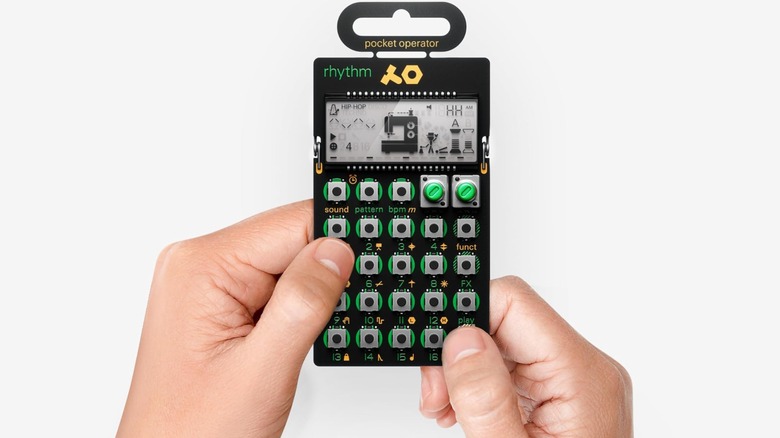
You'd think that, with the rise of AI music generators, people wouldn't be that interested in using traditional synthesizers to make their songs, but products like the Korg Volca series have shown the age of synths is far from over. If, however, you think the Volca synthesizers are still not quirky enough for you, then may we present Teenage Engineering Pocket Operator PO-12? Now, like the Volcas, the PO-12 is just one of a series. This one is mainly a drum machine in your pocket, but if you buy the other Pocket Operator models, like the PO-20 Arcade or the PO-16 Lead Synthesizer, you can combine them to create full songs.
So don't think of this as an endorsement of the PO-12 specifically, as each model in the series plays a different part. Which your gift recipient will like the most depends on what they like or are trying to create. That said, drum machines are maybe the most versatile of the lot, and since you can use a PO with other music gear, it's likely to find a spot in any musician's toolkit.
Professional reviews of the PO series are generally impressed with the quality of the sound and how cheap these are to acquire ($59 for the PO-12 on Amazon). It makes them the perfect starting point for someone getting into proper music production, and there's no reason a Pocket Operator can't form part of the next music mega hit.
How we picked these quirky desk gadgets

What's quirky to one person may be mundane to the next, so picking giftable gadgets for a list like this will always be rather subjective. That said, our first rule here was that anything that makes the cut needs to stand out from other typical examples of its product type. The more distinct, the better — these are not for people trying to dodge attention in their cubicles.
Second, these gadgets can't be purely decorative. They need to actually do something useful. Whether a device serves a clear job like functioning as a USB hub or is a creative tool like a photo printer or music synthesizer, it needs to allow whoever is on the receiving end to do something useful. Not only that, but each device should be something they'd want to use often enough to justify keeping it on their desk. Obviously, this also depends on the interests and disposition of the person in question.
Finally, all of the gadgets on this list have to be good at their intended jobs, high quality, and review well critically. In practice, this means a minimum average consumer review of four out of five stars on Amazon. Each product also needs to have at least one hands-on review by an expert, and that review also has to offer four stars or its equivalent. If the review is not scored numerically, then the reviewer has to give a clear recommendation with no major caveats. With those boxes ticked, you can give these gadgets with complete confidence.