

10 Cool Retro Keyboards That Can Work With Your PC

We may receive a commission on purchases made from links.
A keyboard will always be central to the design of your workstation, whether you're looking for upgrades for your home office that just work or you want to build a retro-modern gaming PC. That's because the keyboard is usually positioned at the center of your desk and will often be the first thing that you see under your monitor. However, there are a ton of options on the market, ranging from under $50 to more than $400, making it difficult to decide which one is actually worth your money.
You can customize most mechanical keyboards to give them a retro look, which is one of the reasons enthusiasts choose them. That means you can just pick any keyboard you like and start building that dream retro model yourself. However, this would take time, effort, and money, and you'll probably end up with a lot of mistakes before you finally get the throwback look and feel that you really want.
So, if you want a retro keyboard that will just work when you hook it up to your PC, it's often better to get one that brings the aesthetic right out of the box. To help you in that quest, we're listing ten options that you can pick from today. We sorted these options by price, ensuring that you can find the right model for your retro desk no matter what your budget is.
Aula F2088
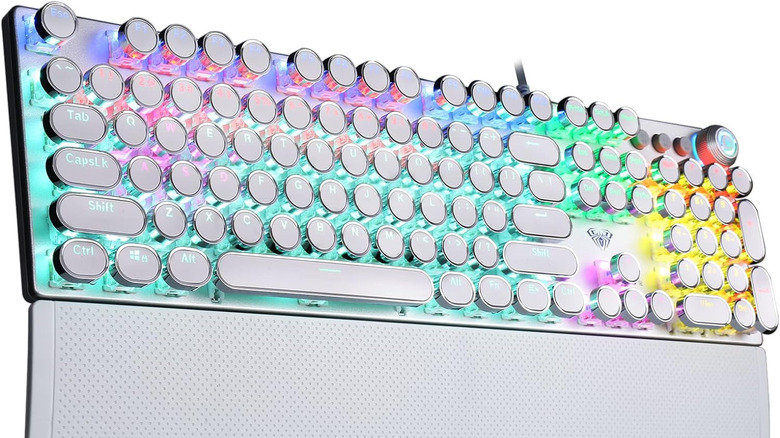
If you don't have much cash to spare but still want something retro and unique, consider looking at the Aula F2088. This wired mechanical keyboard comes with keycaps that resemble a classic typewriter and is equipped with clicky switches, meaning you will hear and feel each keypress. You can also customize the RGB (red, green, blue) lights on the keyboard, allowing you to build a color scheme that matches your mood and retro build. You have a choice between black, pink, or white colorways for the case and keys.
Despite being one of the least expensive options on our list at just $48.99, the Aula F2088 comes with features that you'd often only find on more expensive keyboards. This includes a magnetic wrist rest, making it easier to type on, and a top panel made from quality aluminum alloy, giving it a premium feel. You also get light, media, and volume controls on the upper right-hand corner of the keyboard, so adjusting the lighting mode and the media you're playing is a breeze.
There are some drawbacks to this keyboard, though. The biggest issue here is that the round typewriter keycaps can be quite confusing for those used to square or rectangular keys, especially if you prefer to type by feel. This can lead to a few mistypes, especially as you get used to the new shape, but that is the price you'll have to pay for aesthetics. Another issue here, raised in professional reviews, is that Aula uses its own switches, which feel less tactile and are noisier compared to high-quality Cherry MX switches. But at less than $50, these are some imperfections most people can easily overlook.
Keychron C2
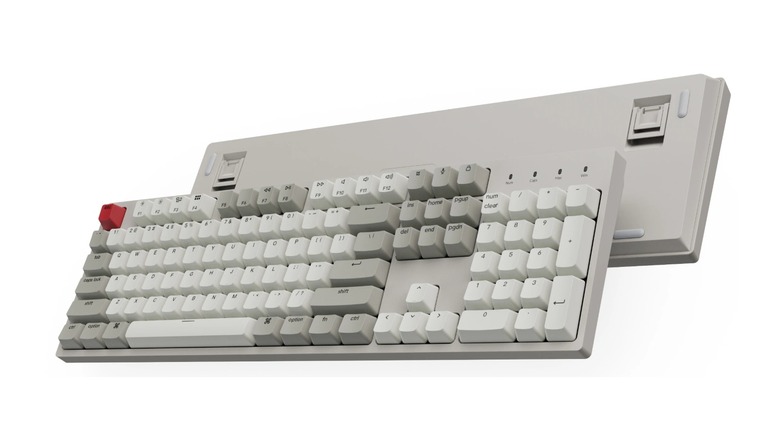
Keychron is known for making high-end mechanical keyboards that could cost up to $100 or more. However, it also makes affordable options that still retain that premium quality, which is what you'll get with the Keychron C2. This full-size 104-key keyboard doesn't have the unique typewriter look of the Aula F2088, but it recreates the beige aesthetic that was popular in the 1980s and 1990s. The only thing that betrays its modern roots is the red ESC keycap and Fn options printed on the F keys.
You have a choice between Red (Linear) and Brown (Tactile) Gateron G Pro mechanical switches, so you can pick the typing sound and feel that you like. This keyboard is compatible with both Windows and macOS and comes with the appropriate keycaps. It also has a voice assistant key that lets you activate Siri or Cortana with just a single press. One downside of this keyboard is that it doesn't have a backlight, so you won't be able to use it in the dark. That fits with the retro theme, though, since keyboards from back in the day didn't have LED backlights, either.
This keyboard costs $53.99, putting it within easy reach of even those sticking to a modest budget. If you catch it on sale, there's even a chance that you can get it at a lower price than the Aula F2088. Because of this feature set and the affordable price, the Keychron C2 made our list of the mechanical keyboards for Mac that you can get for much cheaper than the Magic Keyboard.
Royal Kludge RK X108
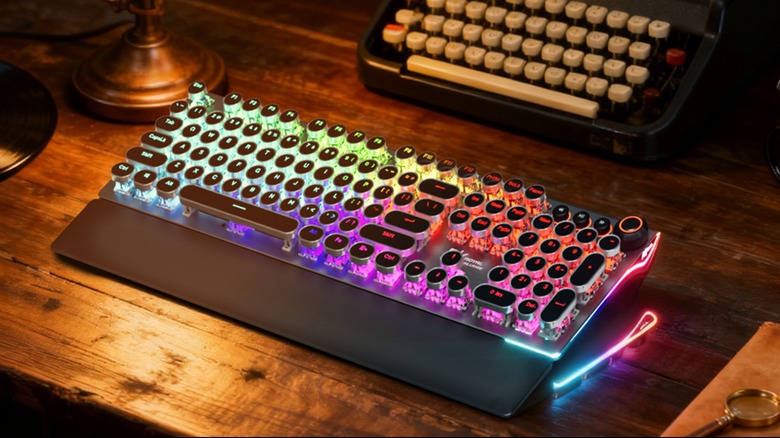
The Royal Kludge RK X108 looks so close to the Aula F2088 that you will be forgiven if you confuse the two. They're both wired mechanical keyboards with a full 104-key layout and come with typewriter keycaps. They also both have a rotary volume knob and media keys for controlling your music. However, this keyboard is a bit more expensive, coming in at $59.99 to $69.99, depending on the option that you get.
The higher price does give you customizable side lighting to bring more vibes to your gaming PC, along with more switch and color options. When it comes to switches, you can pick from either blue (clicky), red (linear), or brown (tactile). There are also five unique color options: shadow black, black, green, white, and white with blue backlights.
A major downside with this keyboard is that it does not offer hot-swappable switches. That means you cannot easily change the typing feel by replacing the switches using a switch puller. Some expert reviews also say that the feel of the keypresses isn't as good as what you get from more expensive brands, so you're going to be stuck with the switches that you picked when you ordered this keyboard.
Durgod K230 Fusion Steam
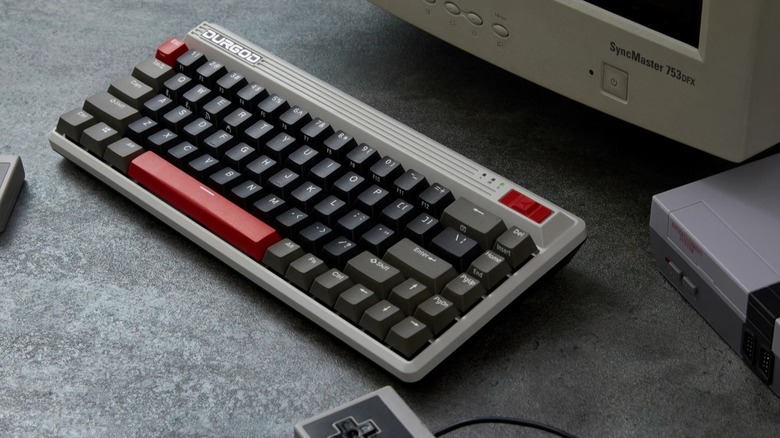
All the keyboards we've looked at so far are full-size 104-key models. If you rarely use the number pad and function keys and want something that frees up desk space, consider the Durgod K230 Fusion Steam. This 65% layout keyboard is one of the most compact options available and still leaves you with the crucial arrow and navigation keys. That compact size makes it a good option if you're looking for a great keyboard to pair with your Steam Deck.
This retro mechanical keyboard has aesthetics reminiscent of vintage gaming consoles while also offering modern features at a reasonable price. You can buy it for $92 directly from the Durgod website (it's also listed on Amazon, though it's out of stock at the time of this writing). Although this model is significantly more expensive than the other options we've listed so far, it also gives you benefits like 2.4-gigahertz, Bluetooth, and wired connectivity. If you choose to connect wirelessly, you can also seamlessly switch between three different devices. Many reviewers also love the typing experience brought about by the original Cherry MX switches used on the K230, where you can pick between Black (precise and linear), Brown (tactile and quiet), Red (linear), and Silver (fast and precise).
There are a couple of drawbacks when it comes to this keyboard, though. First is that it doesn't come with RGB or even just white backlights — again, this is in line with the retro theme, but many buyers expect these features, especially at this price point. It also doesn't have hot-swappable switches, so you cannot customize the feel after you've purchased the keyboard (unless you're willing to do some soldering).
8BitDo Retro
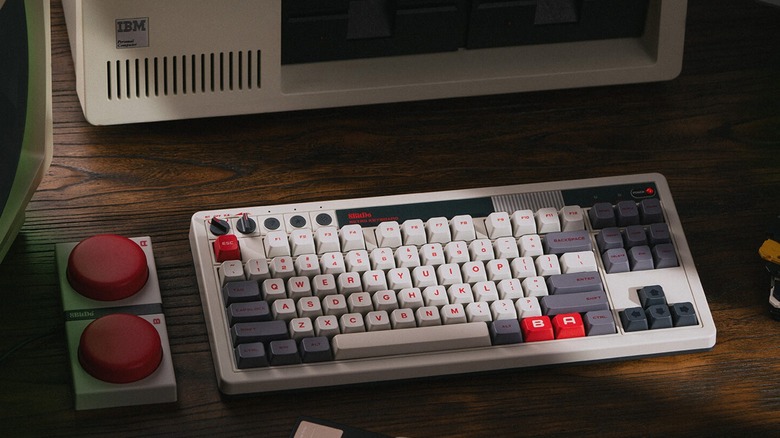
8BitDo is known for making retro-themed PC gaming gadgets inspired by iconic consoles, so it makes sense that the aptly named 8BitDo Retro Mechanical Keyboard shows up here. This keyboard is available in either the N Edition, which is inspired by the classic NES console, or the Fami Edition, which looks like the Family Computer counterpart of the NES in Japan, both of which are priced at $119.99. The 8BitDo website also offers a limited-edition N64 30th Collection–Clear Blue option, available for pre-order at $99.99, although this has a smaller TKL (tenkeyless) form factor.
Aside from its design, it also comes with several retro elements, like the rotary switch for changing modes between Bluetooth and 2.4-gigahertz wireless, and three dedicated settings buttons. But what makes this keyboard unique is that it comes with Dual Super Buttons — basically a macro pad that has two massive buttons that you can assign to whatever commands you want. You can attach up to four of these buttons, although only one comes straight out of the box. If you want other options, you'll have to get them directly from the 8BitDo shop.
There aren't a lot of major drawbacks with the 8BitDo Retro. One thing we noticed is that it lacked RGB backlights, but this won't likely be an issue for retro enthusiasts. You also only have one switch choice when you order it — Kailh Box White (clicky) — so you'll have to customize it yourself if you prefer linear or tactile switches instead. It's also not officially compatible with macOS, although some reviews say that it works just fine with the Apple operating system if you don't need to customize it.
Logitech G316 X 98
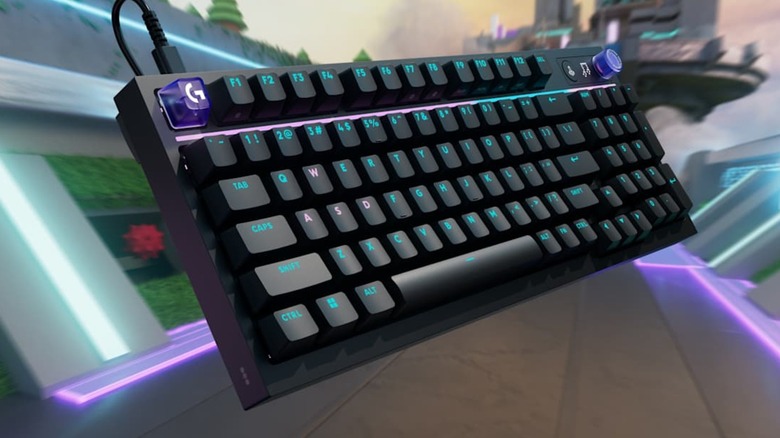
Logitech G, which is known for making gaming-focused peripherals and accessories, joined the retro craze with the Logitech G316 x 98. This retro-inspired keyboard features a dot-matrix LED display next to its translucent control dial. Another thing that some users will enjoy about the G316 X 98 is its 98% layout, which still provides you with a number pad but in a slightly smaller form factor than a full-size model for extra desk space.
The Logitech G316 x 98 comes with nice, "thocky" keys, making typing quite satisfying, and you also get to pick between linear or tactile switches to match your typing preferences. The biggest thing you'll notice with this keyboard is its RGB backlighting and the RGB strip that runs right across the keyboard underneath the F keys. This, alongside its black or white colorway, makes it feel more modern than retro, so you can say that it has a sort of retro-future design.
Although it has the same price as the 8BitDo Retro at $119.99, the G316 X 98 is a good option if you already have other Logitech G gear and prefer to stay within that ecosystem. It also has several features that make it great for gaming, like its 8-kilohertz report rate and advanced customization options through Logitech's G Hub software. If you're unsatisfied with the retro look of the keyboard, you can easily upgrade it by buying third-party retro keycap sets, like this highly rated set from Generic Store, or by picking out different colored key switches to modify it to your liking.
Epomaker Glyph
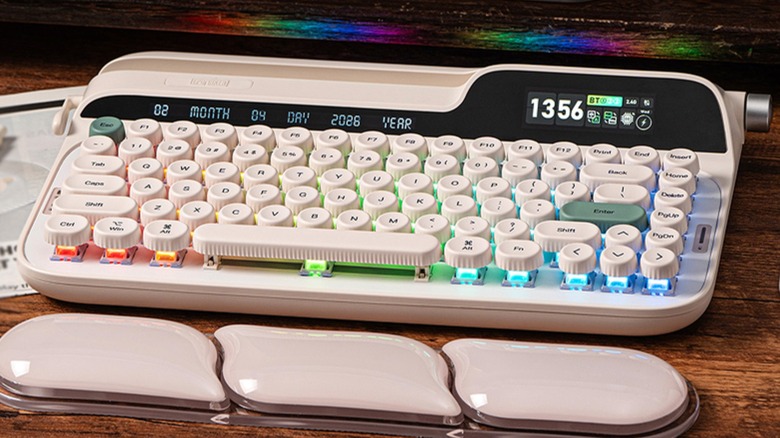
We've seen a couple of typewriter-style retro keyboards, but those are entry-level options that might not fit the bill for those looking for something more premium. So, if you're willing to spend cash on a retro-typewriter-style keyboard, the Epomaker Glyph is definitely one you should consider. This 75% keyboard costs $139.99, nearly twice as much as the Royal Kludge RK X108, but you're getting a lot of features, too.
The biggest advantage that you get with the Epomaker Glyph is tri-mode connectivity, allowing you to attach it to your PC via a USB-C cable, Bluetooth, or a 2.4-gigahertz wireless connection. It also features a knob for volume and media control, and a 2.79-inch LCD screen that tells you the time, keyboard status, and RGB control. The package also comes with a color-matched wrist rest to reduce typing fatigue and factory-lubed Wisteria V2 linear switches that deliver a creamy, buttery sound to make typing a satisfying experience. It even has a working typewriter return lever beside the built-in phone holder that works as a backspace key, making it feel more like an actual retro typewriter.
Users who still prefer a full-size 104-key keyboard will not like this keyboard's compact layout. Some buyer reviews also mentioned that the software can be a bit buggy, so that's another thing to watch out for. But other than that, this would be a great addition to most retro-themed PC builds.
Vortex Keyboard M0110
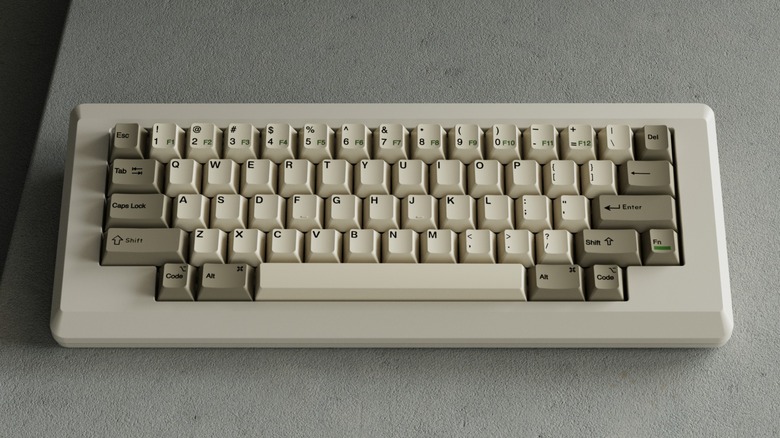
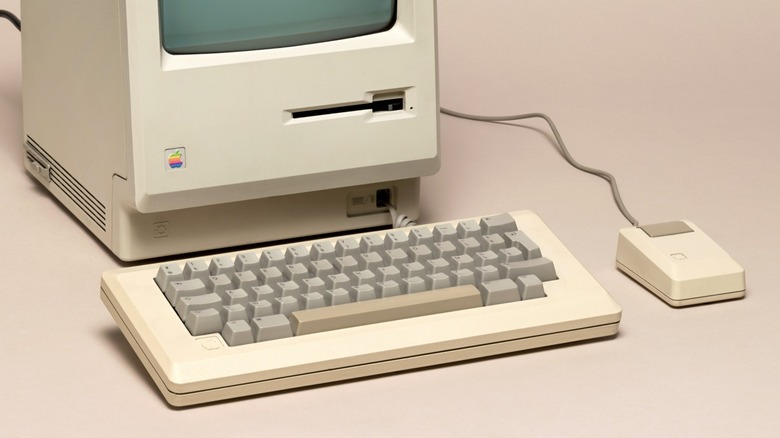
The original Apple Macintosh, which originally sold for $2,495, is one of the most iconic home computers ever made. While you can still get an original Apple M0110 Keyboard and Cable on eBay at around $170, you likely won't be able to use it with your modern computer. So, if you want something that has this feel as your daily driver, look no further than the Vortex Keyboard M0110. This model comes in two flavors — the original M0110 triple-mode version, which lacks the Ctrl keys, and the M0110 6.25 version, which has a modern 60% layout, including the much-needed Ctrl keys.
Hardcore retro enthusiasts will probably want the original version, but the missing Ctrl keys will likely make it difficult to incorporate in your everyday workflow. Even then, a 60% layout might be difficult for many users, especially as it lacks the arrow keys, navigation keys, and F keys that many productivity users have grown accustomed to. Nevertheless, these might be things you're willing to sacrifice if you really want to go for that retro look, primarily intend to use it with a phone or tablet, or just want it for aesthetics and use another keyboard for serious work.
The Vortex Keyboard M0110 offers tri-mode connectivity, meaning you can use it in wired mode via a USB-C cable, Bluetooth 5.0, or 2.4-gigahertz wireless, and you get various switch options from both Cherry MX and Gateron G Pro lines when ordering it. This keyboard also costs $150, making it even a bit cheaper than the artifacts you can buy on eBay.
Lofree Block
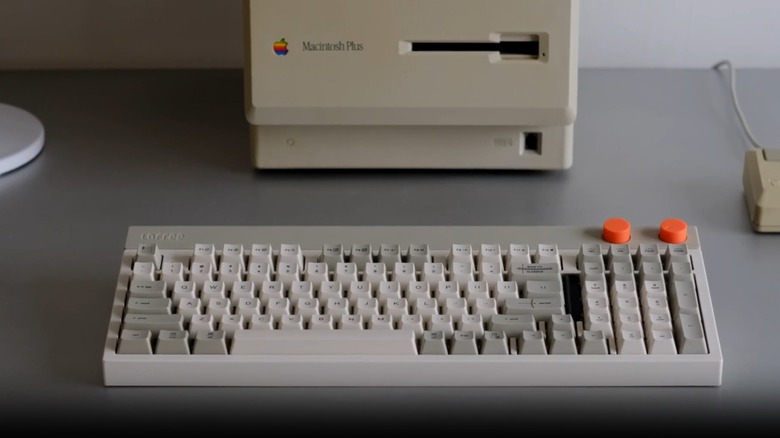
The Lofree Block keyboard offers the same '80s aesthetics as the Vortex M0110 but doesn't sacrifice functionality, instead maintaining the F and arrow keys. As the name suggests, the Lofree Block comes with sharp, square corners reminiscent of old keyboards. It also comes with two knobs — one for controlling volume and the other for changing modes between wired, 2.4-gigahertz, and Bluetooth connections. Even though it doesn't have the full-size 104-key layout that many of us are used to, it still has a relatively complete 98-key layout, which retains the number pad and some of the navigation keys while still reducing its overall footprint on your desk.
This keyboard is a bit pricey at $170, but it's a good investment for those who spend a lot of time on their keyboards. Professional reviewers praise it for its comfortable typing feel, especially as it delivers that coveted creamy sound as you get things done on your computer. It also comes with a white LED backlight, making it easy to use even if you prefer working in the dark, and it's compatible with Windows, macOS, and even Android devices, so you don't have to worry about running into issues when you switch gears.
You're not getting a perfect keyboard, though, as some users say that the Lofree Block has a less-than-stellar battery life. It also doesn't come with customization software, meaning you cannot remap its keys or add macro controls on the keyboard. Nevertheless, if you just want something that looks the vintage part and gets your typing done, you'd probably love having this peripheral on your desk.
Classic Style F104 Model F
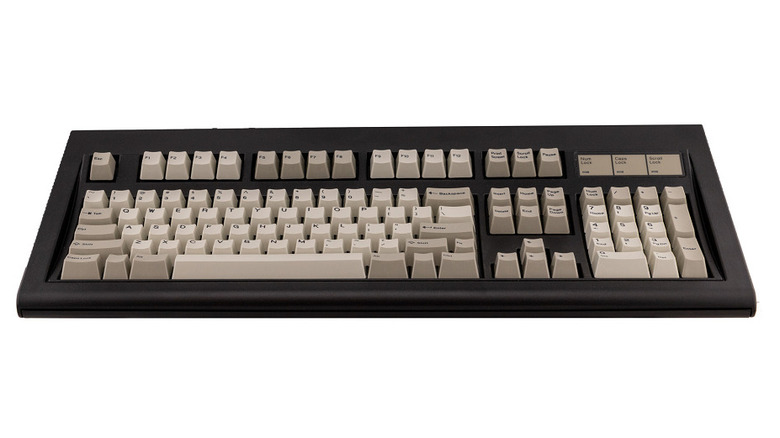
The IBM Model F is often considered the grandfather of mechanical keyboards, as it was the first ever keyboard to feature buckling spring switches over a capacitive printed circuit board (PCB). Although the Model M might be more popular, it uses a membrane instead of a PCB, even though actuating the keys still relies on mechanical movements. What makes the Classic Style F104 Model F keyboard different from all the other options here is that it doesn't just look like the classic IBM Model F and Model M keyboards from the '80s and '90s, but it also uses the same buckling spring mechanism to actuate the keys.
Because of this, the Classic Style F104 Model F is the closest thing that you can get to those legendary old keyboards without resorting to buying one off eBay and modifying it to make it work with your modern computer. This is a limited run, though, with each keyboard costing $399, and that's before the recommended add-ons. Still, this is worth the expense if you're a hardcore nostalgia buff, as it features the ergonomics and durability that the old IBM keyboards are known for.
Aside from the classic beige and off-white color, this keyboard is also available in the Industrial Gray colorway used in the IBM Industrial PC line. There are other options, too, like Black, True Red, Silver Gray, Light Blue, and Dark Blue, which, although they aren't part of the original color options from IBM, are usually more readily available and might be more suitable for people who want a color-themed retro build.
How we picked these retro-style keyboards
When building this list, we focused on retro-styled keyboards that bring unique features to the modern computing landscape and can work with your PC, backed up by expert and user reviews. We also ensured that there's an option for every price point to help you complete your retro build no matter how much you're budgeting. All the listed options are available on Amazon, except for the specialized Classic Style F104 Model F and the Durgod K230 Fusion Steam, which you'll have to purchase on their respective websites.
These are solid keyboards at their respective price points, and you won't go wrong with any of them if you temper your expectations based on your budget. But whether it's your first time upgrading to a mechanical keyboard or you already have quite a collection, it's still a good idea to check out these things that you need to know before buying one.