

10 Useful Apps And Gadgets That Can Replace Doomscrolling

We may receive a commission on purchases made from links.
Social media platforms like Facebook, Instagram, and TikTok are designed to keep you engaged as much as possible. The more you use these platforms, the more data they have to collect and sell to advertisers. Doomscrolling isn't a productive habit, and with excessive phone use having ramifications on your body, you're right to be concerned about your screen time. Fortunately, there are two great ways of combating doomscrolling: replacing it with a different habit or using tools that make the habit more difficult.
Both of these ideas can work well. There's a growing market of apps and gadgets that claim to fix the problem, but not all of them are worth your time and money. Anti-doomscrolling has become a viable business in its own right, so a bit of skepticism is warranted when evaluating anything marketed as a quick fix for screen time. In this roundup, we'll focus only on gadgets and apps that either create meaningful friction against phone use or offer a genuinely satisfying offline alternative, based on user feedback and expert testing.
Mudita Kompakt
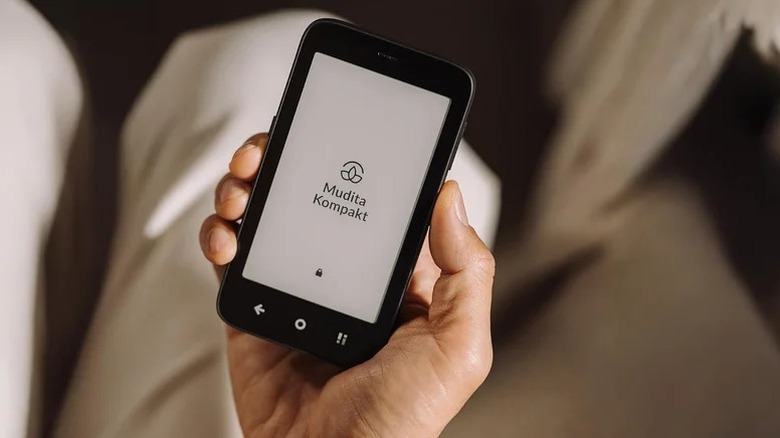
The Mudita Kompakt is one of the best minimalist phones around, with features that can help reduce screen time. Replacing your phone might be a hard sell, but a slightly dumber phone can work wonders. For starters, the Kompakt is a thick phone with a 4.3-inch screen that's easily reachable with one hand. Instead of a high-refresh-rate AMOLED screen, it features an E Ink display that's closer to paper than a traditional screen.
Because of this black-and-white E Ink screen, you're more likely to read e-books than scroll mindlessly. In fact, you can't even install social media apps directly on this phone, as it runs a custom version of Android called MuditaOS, which completely lacks the Google Play Store. However, it still features essential apps like calculator, weather, alarm, music player, and maps. The phone does support third-party apps, but you have to go through the process of sideloading them, which adds friction deliberately. Pocket-Lint praised the phone as an excellent tool for reducing digital distractions. It's certainly a drastic answer to doomscrolling, but it works perfectly.
Kobo Libra Colour
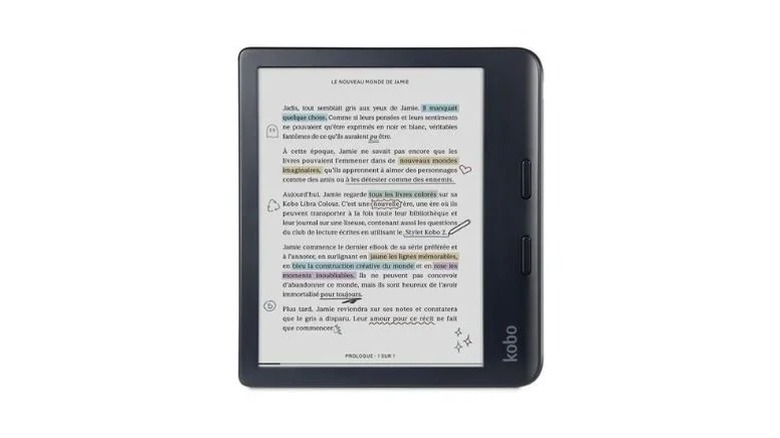
If the thought of replacing your phone entirely sounds a bit daunting, supplementing it with an e-reader will be much easier. The Kobo Libra Colour is a particularly appealing option because it features a color screen that enhances the reading experience for e-books, graphic novels, and comics. The large 7-inch screen means the Libra Colour is a more intentional experience than picking up your phone, but it still remains portable and easy to read. It also features physical page-turning buttons, something you won't find on any Kindle on the market at the time of writing.
Kobo's ecosystem is also considerably more open than the Kindle. You're not locked into one proprietary store, as Kobo lets you borrow e-books through services like Overdrive and Libby. The Libra Colour even lets you load your own e-books with EPUB or PDF file formats. At $260, it's one of the best E Ink tablets on the market. Wired applauded the Libra Colour, including for its color screen and repairability. The Kobo Clara Colour is also a great option, at a lower price tag of $180, but it only has a 6-inch screen, and no physical page-turn buttons.
Brick Phone Lock
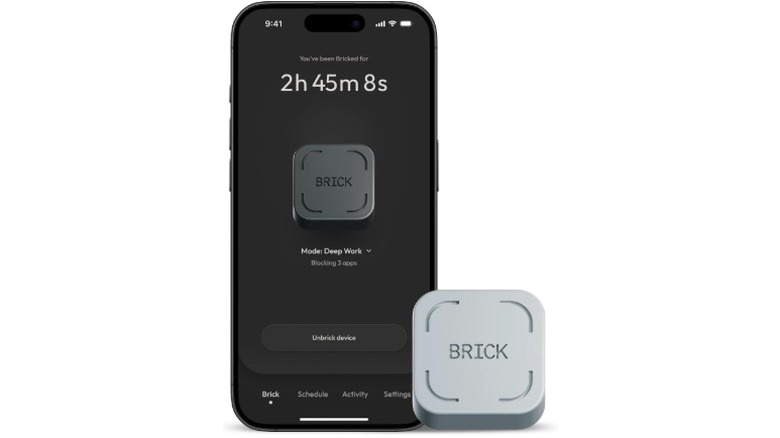
The Brick Phone Lock is a small physical device that features an NFC chip. Paired with an app, it can lock certain apps on your phone. You lock these selected apps by physically tapping your phone against the Brick, and unlocking requires the same action. This creates an obvious physical barrier, as you need to be close to the Brick to unlock apps. When you tap one of these blocked apps, you'll be greeted by a screen that tells you to tap the Brick to unlock the app. You can still use an "emergency Unbrick" feature to get to the app, but you only get five of these; once you're out, there's no way to regain emergency Unbricks.
Unlike other similar gadgets, the Brick is completely subscription-free. With the companion app, you can also configure custom modes that only block selected apps at certain times of the day. The New York Times had high praise for the Brick's easy setup process and its strict features, with the reviewer using it to avoid nearly eight days of social media temptation.
Boox Palma 2 Pro
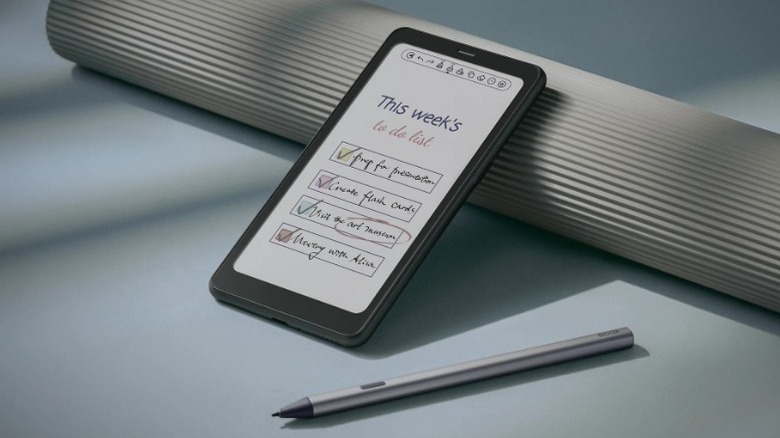
The Boox Palma 2 Pro is a phone-sized E Ink Android device that runs Google Play apps on a paper-like screen. Because of Android, it features wider support for apps than your average e-reader. However, the E Ink display is of a lower resolution and lower frame rate than almost every Android out there, which means it's bad for watching videos. It's very difficult to doomscroll on this device, but the portable design encourages more reading on the go. The Palma 2 Pro features 8GB of RAM, 128GB of storage, and a processor that's capable enough to run many Android apps.
With the E Ink display, you can expect weeks of battery life if you're reading only an hour or so a day. Unlike its predecessor, the Palma 2, the Pro iteration features a color display, which will suit you better if you want to read comics and graphic novels. It also features a physical SIM card slot, letting you access the internet on the go. This means you can either use it as a complete phone replacement, or just as an alternative to your phone. TechRadar vouched for its overall versatility, praising its unique phone-like form factor.
Switchly
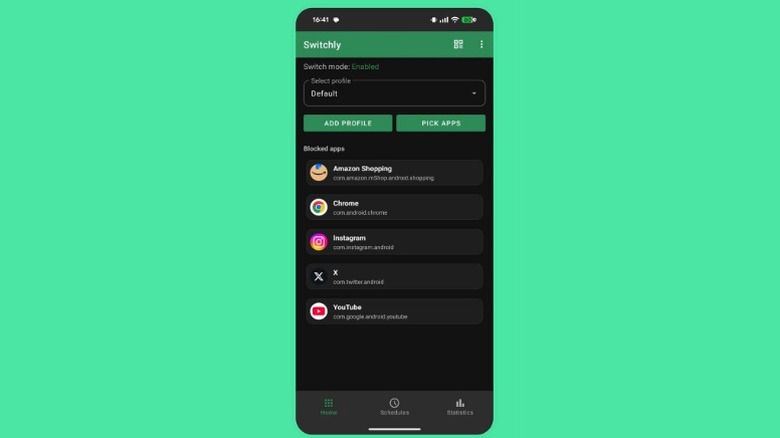
Switchly is a free, open-source Android app that can either work as a simple app blocker or as a much more comprehensive anti-doomscrolling tool. Like other similar apps, Switchly lets you block selected apps, but it also lets you block only selected sections in supported apps. For example, on Instagram, you can configure it to block reels, stories, and even the Explore page, leaving DMs open. While the app can set timers for social media apps, you can build schedules or even set it up so that opening an app requires tapping a physical NFC tag first. You can also set a requirement where you have to scan a QR code to unlock certain apps or app features.
The best thing about Switchly is that it doesn't require a subscription, and there are zero ads. Based on how much control you want, the setup process is a bit more involved than simply using a gadget like the Brick. For example, you'll need to buy your own NFC tags from Amazon if you want that physical barrier. Lifehacker found the app highly effective and praised the amount of features available for free.
Foqos
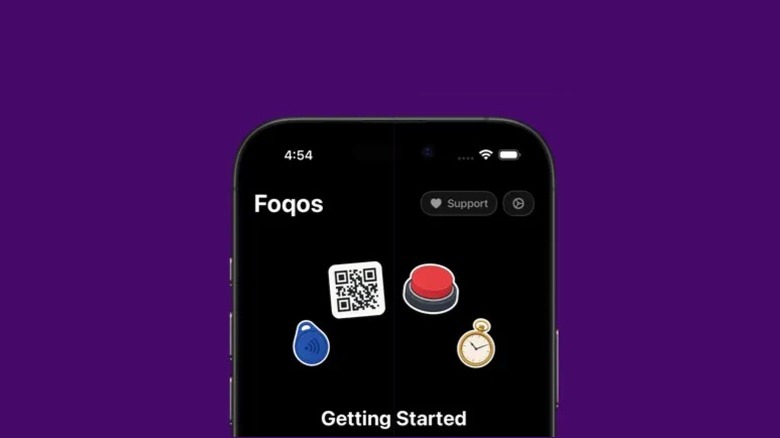
While Switchly is a great app blocker if you have an Android, it's not available on iOS. For iPhones, Foqos is the next best thing. This app is another great alternative to Brick; it's free, open-source, and doesn't feature any ads. Similar to other app blockers, you select a list of apps to block, but to unlock those apps, you need to either tap your phone against an NFC chip or scan a QR code. If you want to go the physical route, you'll need to buy your own NFC tags and tap your phone against it to set up the NFC feature.
The app allows you to use distinct tags or QR codes to block different groups of apps. Foqos also lets you block entire websites. You can create different profiles for work, home, or reading, for example, selecting different apps for each entry. Lifehacker found the setup process to be seamless and praised the app for easily introducing friction against doomscrolling.
Trimui Brick
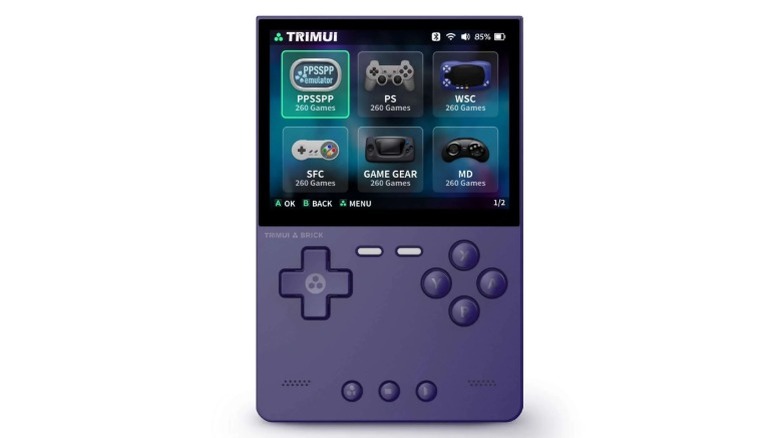
The Trimui Brick is not an app blocker, an e-reader, or a minimalist phone. Instead, it's a mini retro gaming gadget that gives you something else to do with your hands when you'd otherwise reach for your phone. Roughly the size of a large matchbox, the Trimui Brick is a retro handheld that runs emulators for older consoles. It comes with a 3.2-inch IPS screen, physical buttons, and around three hours of battery life. The Brick charges via USB-C, and you can use the SD card slot for transferring your games.
This retro handheld is more than capable of emulating classic consoles like the NES, Nintendo 64, Game Boy, and even the original PlayStation. It's not comparable in terms of power to something like a Nintendo Switch 2 or Steam Deck, but that limitation is partly the point here. This handheld console is best suited for shorter sessions. Instead of killing time on your phone out of boredom, it serves as a dedicated offline gadget that can be a more satisfying substitute when you're trying to recharge after work.
Bloom Card
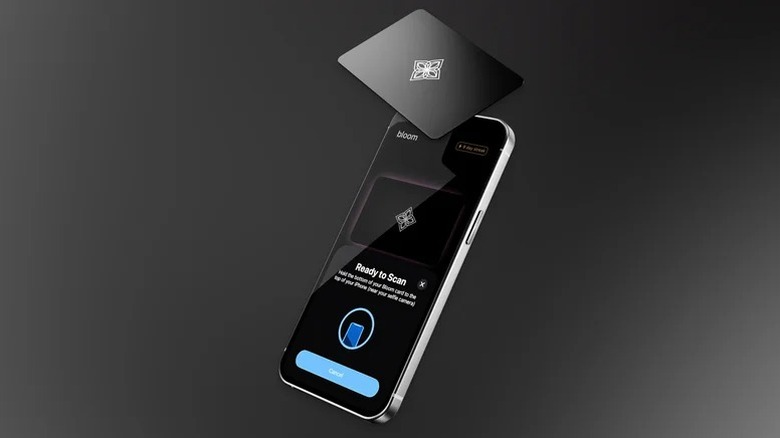
The Bloom Card is another strong, subscription-free app blocker, and it works well while looking sleek. This is a stainless steel card with an NFC chip inside, and when you block certain apps with the Bloom app, you can only unlock them by tapping the card against your phone. It's best to put the card in your wallet and take it anywhere with you, in case you need to access a certain blocked app in an emergency. The Bloom app also allows you to set custom schedules that block certain apps within that timeframe, and there are a decent number of default schedules ready to go. When using one of these schedules, you don't need the Bloom Card.
The app also features an interesting leaderboard and Friends tab, both of which are sections where you compare your focus time against others. At $39, it's cheaper than the Brick ($59), but there is one downside in comparison: for each focus session or schedule, Bloom allows three five-minute breaks. Ultimately, this makes Bloom a bit more lenient, but that also means that it's easier to get back to doomscrolling. ZDNet still recommends Bloom for its ease of use and low price.
ScreenZen
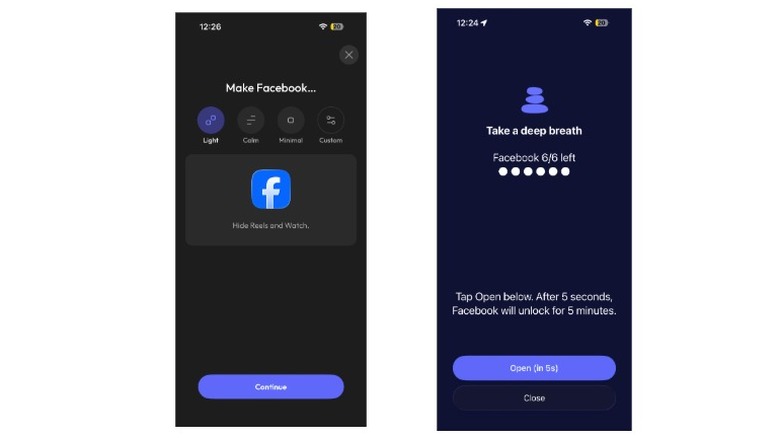
ScreenZen is an interesting app because instead of blocking certain apps outright, it offers a softer approach against doomscrolling. The default approach is to select certain apps, set a daily limit on openings or session time, and ScreenZen will show a message that adds a delay to the opening of the app. You can configure this message yourself and set a custom delay timer. With a custom message, this brief pause adds just enough friction to make you think before proceeding to the app.
On top of this simple barrier, you can also set up "interventions" for specific apps. For example, to access Facebook, you can configure ScreenZen to force you to complete a math puzzle before you open the app. On iPhone or Android, the app also features minimalistic web versions of apps like Instagram, Reddit, and TikTok. You can configure these versions and use them as simpler alternatives. For example, you can use Instagram without access to Reels or the Explore page. The app is subscription-free and features zero ads.
SmartGames Puzzle Kits
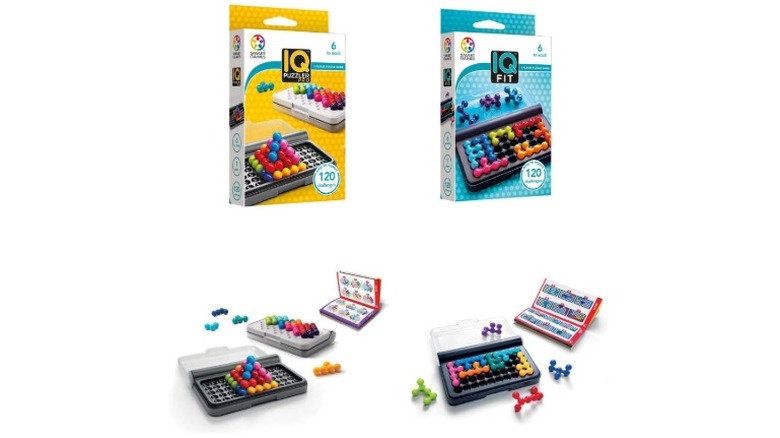
Studies show that puzzles are an excellent cognitive activity for kids and older adults. Puzzle kits from SmartGames are rated for ages six to adult, and they are great offline fun for the family. If you have kids, the next time you find yourself doomscrolling or see your kids glued to the screen, pick up one of these puzzles. The IQ Puzzler and IQ Fit bundle costs just $24, and they're self-contained, battery-free, and easy to carry. These puzzles are short, focused sessions that occupy your hands and brain without a screen.
The IQ Puzzler Pro set comes with 12 puzzle pieces and a challenge booklet with 120 different puzzles. It consists of tiny bead units that you have to arrange in 2D or 3D pyramids, depending on the challenge. The IQ Fit set is very similar, but instead of individual beads, several beads are joined together as 10 puzzle pieces. Again, there are 120 challenges, so you have a lot to go through before you exhaust all the puzzles.
Methodology
In this roundup of apps and gadgets that help replace or reduce doomscrolling, we focused on tools that either add real friction to phone use or offer a satisfying offline alternative. We prioritized products and apps with clear real-world effectiveness, positive feedback from reviewers, and designs that prevent distractions rather than rely on willpower.
For the apps, we focused mainly on free options with generous features, as too many apps in this category lock the most useful features behind a paywall. We evaluated these apps based on ease of use and how meaningful a barrier they can create. The physical gadgets, such as e-readers and NFC-based app blockers, were chosen for long-term practicality and low maintenance. For both categories, we cross-referenced our findings against expert reviews from outlets such as Wired, TechRadar, LifeHacker, and Pocket-Lint.