

5 Disadvantages Of Blu-Ray Discs

Blu-ray discs are making a comeback, and not just for their retro vibes. As a media format, Blu-ray is good for delivering Full HD resolution and quality audio, and there are even some additional perks to the format over DVDs. For those frustrated by the state of streaming services, they can seem like a perfect alternative. This can certainly be true for more than one reason, but those holding little experience with the format should know that Blu-ray discs can still have their own disadvantages.
Before you cancel your streaming subscriptions, be aware that Blu-ray discs can have their own set of issues. Along with the physical format being sensitive to smudges and scratches, there are instances of disc rot that can stem from issues with certain discs or a lack of care, which can cause read errors or even make the disc entirely non-functional. The format can also suffer from region exclusivity, and users should also remember the importance of keeping their Blu-ray player updated. Lastly, there's the fact that Blu-ray may not be as convenient as one would hope.
Make no mistake, building your own physical media library can be a rewarding experience — but that doesn't mean Blu-ray as a format is without its own set of issues. Similarly, with 4K Ultra High Definition (UHD) Blu-rays, you may find yourself entering a rabbit hole of wanting to continuously upgrade your media setup for a better viewing experience. If that's the case, just be sure to look for some non-negotiable features when choosing a Blu-ray player.
Discs can be sensitive

If you're familiar with audio CDs, then you may remember a time when you or someone you know would keep them stacked on top of one another and think nothing of it (such as piling a bunch of burned CD-Rs into your vehicle's center console). While this may have created its own set of issues, Blu-ray discs, especially 4K Blu-ray discs, can be far more sensitive and require a little more care. Proper care can be especially important if you're the type to worry about how long your Blu-ray collection will last.
Typical Blu-ray discs can be resistant to things like dust, smudges, and scratches, though it's still possible for these discs to get playback errors. Fortunately, taking care of a standard Blu-ray disc typically just involves some preventative care, such as ensuring you keep the discs in their protective case and not touching the surface of the disc with your fingers. Keep the discs away from heat, and avoid bending them. Properly seating a disc in the player tray also does wonders.
A standard Blu-ray disc does require some care, but a 4K disc may require a bit more protection due to the amount of data compacted onto the disc. They can be extremely sensitive, and even a small smudge or speck of dust can cause playback issues. In this instance, a clean microfiber cloth and some 70% isopropyl alcohol can be your friend. Wipe from the center to the edge, and avoid circular motions.
Disc rot is real
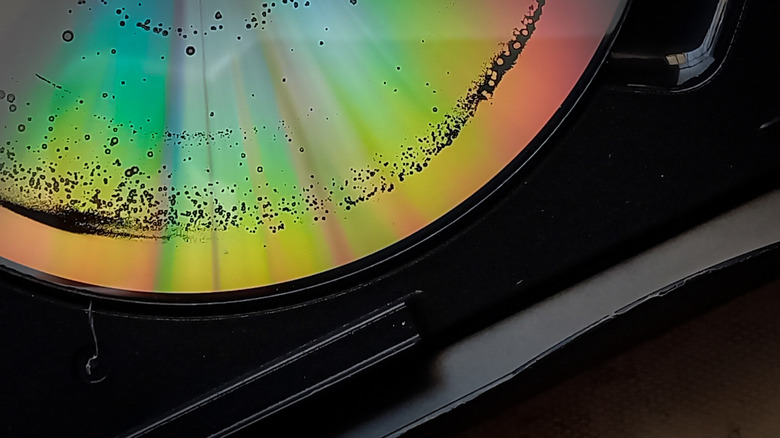
A quality Blu-ray disc should offer several protections that can ensure longevity, but it is possible for these protections to fail (or never be there in the first place). If the disc was well-crafted, then it should have a silicone and silicone dioxide resin coating to help protect against scratches and moisture. Blu-ray discs also rely on a metal reflective layer, which can corrode if moisture gets in. Not all Blu-ray discs are created equal, of course, and poorly made or damaged discs may suffer from what's known as disc rot.
Even if protections are in place, disc rot can still happen if proper care isn't taken. Scratches can impact protective layers, whereas certain chemical reactions or oxidation can also affect the quality of a disc. If a disc starts to become discolored or looks "milky," it may be a sign of disc rot. If the disc also looks like it's been stabbed with a pin, it may also be a sign of trouble. Blu-rays with disc rot are likely to not play properly, but you may also notice pixelation or skips.
Not all is lost, of course, as BGR has covered numerous ways to preserve DVDs and Blu-rays. If properly taken care of, a Blu-ray should last you years, if not decades. Do your best to keep your collection in a dry, clean area, ideally away from direct sunlight. Keeping media in its original packaging and stored vertically can help mitigate disc rot as well as any potential cracking or bending. Preventative measures can go a long way, though cheap discs may still suffer.
Blu-rays can be region-locked

This may ring a bell if you're used to this issue with streaming services, but it's still possible for certain Blu-ray discs to be locked to a specific region. Just like how a Netflix show or movie may only be available in certain countries, the same can hold true for physical media, as well. Fortunately, the practice has become less common over the years (with 4K UHD discs rarely being region-locked), yet there are still some signs to be on the lookout for — especially if you like foreign or retro media.
With Blu-ray discs, regions are broken down into A (the Americas, Japan, South Korea, Taiwan, and much of Southeast Asia), B (Middle East, Europe, Africa), C (the rest of Asia, China, India, and Russia), and ABC, with region ABC being universal. So if a disc says that it's Region A, it will only work with a Region A or region-free player. DVDs can especially suffer from region-lock, for whatever it's worth, though there is an explanation for why there are region codes in the first place.
Again, this is less of a worry with 4K discs, but standard Blu-rays can still be region-locked, and your player may be, too, so it doesn't hurt to double-check. Your Blu-ray player may even have an option to switch regions, if necessary (but you may be limited to the number of times you can switch). You may not have to worry about regions all that often, but it can still pay to double-check before making a purchase.
Lack of updates can cause incompatibility issues

Like virtually any electronic device these days, Blu-ray players may also need software or firmware updates. If you let a smartphone go without a software update, as an example, you may find that not every feature functions as it should. The same can also be said for Blu-ray players and their media. Certain discs may have some additional features that your player doesn't have the firmware to support. This may cause playback issues, but fortunately, updating your Blu-ray player can usually do the trick.
You'll need to check the manual for your specific hardware, but if it can receive firmware updates, you can usually download the update directly from the player or use a computer to get the file. Firmware updates can also bring about some additional perks, as they may help if you're experiencing performance issues. As an example, some 4K Blu-ray players needed an update to receive access to certain Dolby features. However, be aware that some updates may cause their fair share of headaches, as well.
Back in 2025, a Windows 11 update caused Blu-ray applications to freeze or display black screens. Microsoft released a quick update that "partially resolved" problems for users, but it's a good lesson why doing a bit of research before performing a firmware update helps. If you find that you're experiencing playback issues even when your discs look pristine, checking for a firmware update may be one solution to try.
Blu-ray discs may not be that advantageous over streaming

Streaming can be a frustrating experience, to say the least. Between the severe fragmentation among services and the ever-increasing costs, going with physical media can seem like a suitable solution. Media giant Sony has already proven why moving to DVDs and Blu-rays can be a good idea, but starting a solid physical library may take a little more effort than buying a disc player and calling it a day.
For starters, one needs to consider the cost when it comes to building a solid Blu-ray library. Second-hand shops can be your friend, but new releases can start to get pricey, and fast. You may look into finding some bundles or collections, but it's pretty likely you'll be purchasing one disc that contains one movie, and that's where the trouble can start. Once you start building a collection, finding a place to store it may become a challenge as well, especially if your residence already has limited space.
There's also the issue that Blu-rays may not skip the inconveniences of streaming in the first place. Movies can still have ads before a title begins (which can also be unskippable), and physical discs also mean you have to get up and switch them anytime you want to start something new. Blu-ray discs can also have their own navigation menus, which may be slow or uncooperative. This isn't to say that building a collection can't be a fun and rewarding experience, but those thinking physical media is the ultimate solution to streaming problems may be in for a rude awakening.