

7 Perks Of Switching To Apple Music, According To Former Spotify Users
Spotify and Apple Music are widely considered among the top music streaming services, with each offering distinct advantages over the other. Amid controversy over the investments of Daniel Ek, Spotify's former CEO and current executive chairman, and alleged lower payments to artists, though, some subscribers are choosing to move over to Apple Music.
In terms of the number of paying subscribers, Spotify still reigns supreme, so there might be some hesitation as you'll be shifting away from the most popular option. That being said, we've identified seven perks of switching to Apple Music, according to former Spotify users, including a cleaner user interface, better sound quality, and a more affordable membership cost. This list shows that signing up with Apple Music isn't a bad decision at all, and for some people, it could be a change that they regret not doing earlier. However, it won't be all positive, as there are also a couple of downsides to swapping subscriptions.
Apple Music's interface is simpler and cleaner
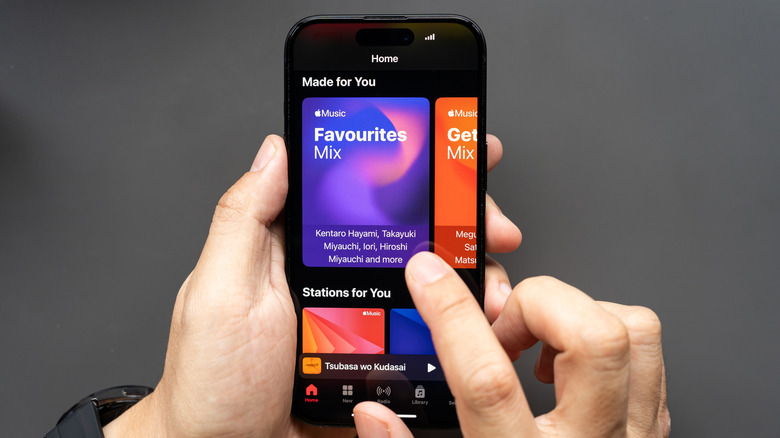
Spotify users moving to Apple Music will instantly notice the latter's simpler and cleaner interface. Spotify is a fast-growing platform, but some of the additional features end up cluttering the home screen and also make it feel more like a social media app than a music app, according to former users.
The bloated app and the increasing number of AI artists on the platform are among the reasons why people ditch Spotify. Alongside the platform's social features, the app's user interface becomes very busy and confusing. While some people love the depth of Spotify's capabilities, it's starting to require more of an effort to actually get to your favorite songs and playlists on the streaming service.
Since Apple Music's sole focus is on the music itself, the home screen is equally focused. It shows your playlists, new songs in your favorite genres, and the app's recommended songs for you. Some former Spotify users said that they love that Apple Music is just a music app, which is part of the next perk for moving to this service.
There are no podcasts or audiobooks on Apple Music
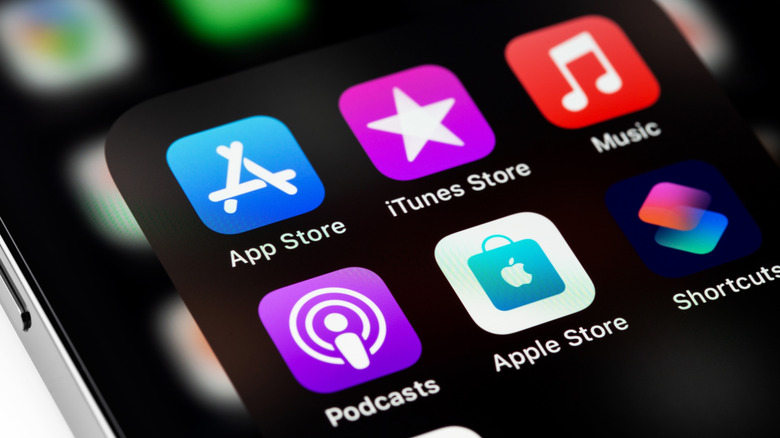
Spotify has added new audiobook features as well as more perks for podcast listeners, but for users who just want to enjoy their music, all of this added content could be a bad thing. If you only want to see only music when you launch your streaming service, then you should go for Apple Music. Apple Music is able to stay focused on music because Apple has separate Podcasts and Books apps for these forms of audio content. This helps streamline the user interface for all of these apps, eliminating distractions if you just want to play your favorite album on Apple Music.
Former Spotify users said that the lists of podcasts and audiobooks can jam up the app's home page, but you'll only see songs, albums, and playlists on Apple Music. If you like listening to other types of audio content then you wouldn't mind them, but users who made the switch to Apple Music said that they became tired of all the stuff on Spotify that they didn't care about.
Apple Music has better sound quality
Even though Spotify added lossless streaming for Premium members, songs on Apple Music still sound better. That's because Spotify only offers up to 24-bit/44.1 kHz FLAC, while Apple Music supports up to 24-bit/192kHz. This probably won't matter for most people who just want to listen to their favorite tunes, but for audiophiles who have the equipment to take advantage of the higher-quality audio, the upgrade is very noticeable. Some people claim that you can hear the difference even when you're using regular headphones though.
Former Spotify users said that when they transferred to Apple Music, they started hearing sounds in songs that they didn't realize were there. That's because the songs on Apple Music are so much richer. They checked again on Spotify, and they found out that the sounds are actually there, but you can just barely hear them.
You'll also be able to listen to certain songs in Apple Music in spatial audio with Dolby Atmos, which creates a surround sound experience while you're listening through headphones or earbuds. The technology works best with high-fidelity tracks, so with the lower quality of Spotify music, you won't find this feature there.
Apple Music's playlists offer more thoughtful curation

Going back to Spotify's social media feel, it's easier to find playlists that are created by other users or generated by algorithms. Apple Music, on the other hand, has a different approach to playlists, according to former Spotify users. While there are still some that are made by other subscribers, the Apple Music team handpicks the songs for the major playlists that are featured on the service. Many people prefer this, because it's better curation for genres that you want to explore and songs that may match your taste.
You'll see Apple Music-made playlists that have been freshly updated in the platform's "New" section. You can also access songs or albums of your favorite artists, then scroll down to see the playlists that have included them. If you've become so used to the playlists on Spotify, you can search for them on the platform, then rebuild them on Apple Music, although there's no assurance that all of the songs will be available on Apple's service.
It's easy to transfer saved playlists to Apple Music
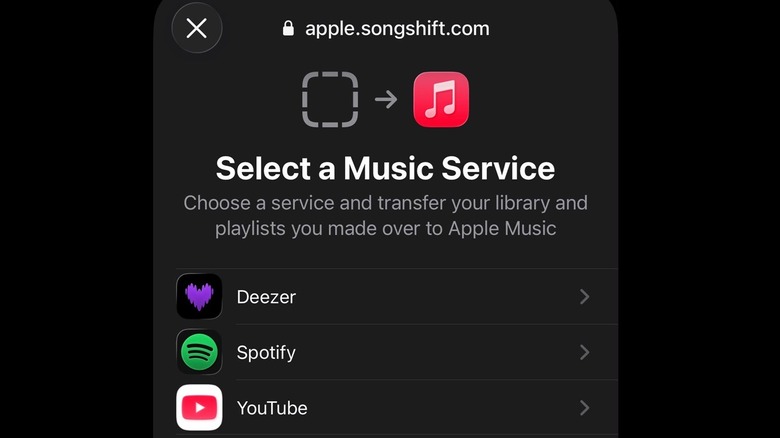
One of the things holding back Spotify users from switching to Apple Music is that they don't want to go through the trouble of rebuilding their playlists on a new streaming service. If you've been on Spotify for a while, you may have dozens of playlists saved there, and it's not unheard of to have more than 100.
If you're seriously considering making the switch to Apple Music, the platform already has a built-in tool to transfer your playlists from Spotify. It's called SongShift, and you can access it by tapping on your profile icon at the upper right of the app, and scrolling down to "Transfer Music from Other Services." Once you've loaded your Spotify profile, you can choose not just the playlists, but also the albums and songs that you want to move to Apple Music. The tool will then let you review and fix if there are any mismatches among the songs before you initiate the transfer.
SongShift will move your playlists one by one, but you can set up batch transfers by signing up for SongShift Pro at $6.99 per month. Users who transferred from Spotify said that they just paid for one month to move everything quickly, then canceled their subscription. They also said that the tool worked very well, as it did a great job with matching songs between the services.
Apple Music costs less than Spotify
Unlike Apple Music, Spotify offers a free tier that's supported by ads and doesn't allow downloads for offline listening, among other limitations. However, when comparing paid subscriptions, Spotify is more expensive, even with the Apple Music price hike. Among the disadvantages of using Spotify instead of Apple Music is that its individual Premium plan costs $12.99 per month, while the latter costs $11.99 per month.
The difference in the individual plans might not look much, but the gap slightly widens when you consider the family plan, which former Spotify users said attracted them to Apple Music. Both are for six people, but Spotify's family plan costs $21.99 per month compared to Apple Music's family plan costs $19.99 per month. Switching to Apple Music grants even more value with an Apple One subscription, according to users who made the move. For $21.95 per month for an individual plan or $27.95 per month for a family plan of up to six people, not only do you get access to Apple Music, but you're also signed up for Apple TV, Apple Arcade, and iCloud storage. Spotify doesn't offer a bundle that can match the contents of Apple One.
You can upload your own music to Apple Music
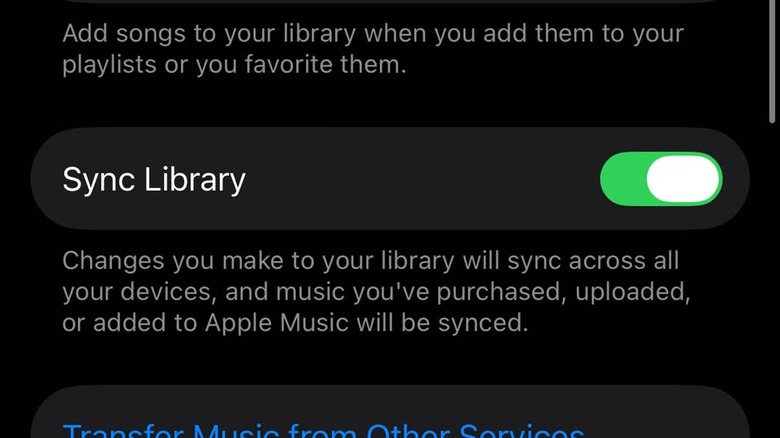
The music that you can add to your Spotify playlists are limited to what's on the service. That's not the case with Apple Music, which allows you to upload your own tracks and add them to your library. You'll then be able to stream those songs on any device where you log on with your Apple Music account.
To do this, you need to activate the Sync Library feature on the devices where you're using the streaming service. On Windows or Mac computers, you can find it in the Settings of the Apple Music app, and on the iPhone, it's in the Apple Music menu when you go to Settings then Apps. You'll be able to drag audio files on your computer to the Apple Music window, or choose Import after clicking on the three-dot icon on the sidebar.
According to users who moved away from Spotify partly because of this feature, it's for those who have music collections on their computers with songs that aren't available on Apple Music or any other streaming service. This preserves them further, and allows you to listen to them at any time through the app.
Downsides of switching to Apple Music from Spotify
Switching to Apple Music isn't going to be completely painless, though. If you've been on Spotify for years, the service already understands your preferences very well, but you'll obviously be starting from scratch when you move over to Apple Music. Some former Spotify users said that you're going to have to spend some time liking songs and artists, adding tracks to your library, and listening to playlists in order to train the algorithm to get to the level to where Spotify's was when you left.
The feature that former users miss the most, however, appears to be Spotify Connect. One of the disadvantages of Apple Music is that it doesn't have a continuity feature that lets you keep listening to the song that's playing as you switch devices. With Spotify Connect, the track continues when you move from your phone to your computer with a simple tap or click, as long as they're logged in to the same account on the streaming service.